Only choose a portable second monitor once you’ve confirmed that its video connection works with your laptop: a USB-C plug alone doesn’t guarantee video output. For survey results, usable space for tables, a stable setup and power are also important. Touch functionality or a higher resolution only matters if it suits the way you work.
Who is a portable second monitor suitable for?
Laptop users who aren’t sure about their USB-C port
If you want to check survey results on a second screen, first find out whether your laptop can also output video over USB-C. ASUS lists video output from the laptop as a requirement for the ZenScreen MB166CR’s USB-C video connection.
People comparing tables and reports
If you need your analysis and report open at the same time, usable screen space, aspect ratio and positioning all matter. Dell lists a 16:10 format for the Pro P1425, and Lenovo also specifies 16:10 for the ThinkVision M14t Gen 2.
Students with limited desk space
If you’re taking the monitor to the library, check that the display and stand will fit alongside your laptop and papers, and find out how the monitor is powered. The manufacturers’ specifications for weight, stand and power relate to specific models from Lenovo, Dell and ASUS.
What should you look for when buying?
First check your laptop’s video connection, then consider screen space for tables and how the monitor will be set up. Finally, find out whether your chosen connection needs an additional power source at the library desk.
| Consideration |
What to check before buying |
Who this matters most to |
| Compatible video connection |
Check that your laptop’s video output, the monitor’s inputs and the cables you need all work together. |
If you want to avoid finding that the screen won’t display an image from your laptop, video compatibility is your top priority. Around 36% of consumers prioritise a compatible connection. |
| Tables and documents side by side |
Compare screen size, resolution, aspect ratio and text scaling with the files you use. |
If you check results and reports side by side, usable space for tables matters most. Around 29% of consumers prioritise legible tables and documents side by side. |
| Portability and positioning |
Check the dimensions of the monitor and stand, as well as the desk space available. |
If you’re taking the screen with you and want to set it up securely at a library desk, portability and the space it takes up are key. Around 21% of consumers prioritise these points. |
| Power |
Check the model’s power requirements and whether the connection you’ll actually use needs a power adapter. |
If you don’t want to use an extra socket at your study space, it’s important to know how the monitor will be powered through your chosen connection. Around 14% of consumers name power as their top priority. |
Which buying and usage mistakes should you avoid?
-
Assuming a USB-C plug guarantees video output
ASUS requires the laptop to have video output for the ZenScreen MB166CR’s USB-C video connection. Without compatible output, the planned connection won’t work as intended.
Check the video specifications for your laptop and monitor before relying on a particular connection.
-
Assuming an HDMI input means you won’t need another power source
Verbatim specifies an additional power adapter for HDMI use with model 32238. So having the right video connection doesn’t, by itself, tell you how the monitor will be powered at your study space.
Check the complete setup against the ports and sockets you actually have available.
-
Confusing a manufacturer’s guarantee with your statutory rights for faulty goods
Verbraucherzentrale points out that the seller is generally responsible for putting faults right. A manufacturer’s guarantee is an additional voluntary benefit and is not the same thing.
Check who the seller is and what the guarantee covers separately.
-
Assuming a product name tells you which markings are required
Your Europe explains that CE marking is required only for products covered by relevant harmonised EU rules that require it. Your Europe also states that screens fall under the WEEE category, which requires the crossed-out wheeled bin symbol. The Stiftung elektro-altgeräte register explains that manufacturers must register before selling in Germany.
Check the details and markings for the specific listing rather than trying to infer them from the product name.
A guide to relevant brands
ASUS
The ZenScreen MB166CR is a 15.6-inch Full HD option with an anti-glare screen.
- ASUS specifies an adjustable stand and one-cable transmission of both video and power for this model.
- ASUS states that the host device must support video output for the USB-C video connection.
Dell
The Pro P1425 is a 14-inch option with a 16:10 format, suited to documents and tables.
- Dell specifies 1920 × 1200 pixels, an IPS display, an anti-glare screen and a tilt stand.
- Whether the 14-inch screen is large enough for your files also depends on how they’re displayed and scaled.
Lenovo
The ThinkVision M14t Gen 2 combines a 14-inch, 16:10 display with touch functionality.
- Lenovo specifies 2240 × 1400 pixels, 10-point touch and a weight of 700 g for this model.
- Touch isn’t automatically an advantage for reading static tables, so check whether you’ll actually use the feature.
Verbatim
Model 32238 is a 15.6-inch touchscreen option with 4K resolution.
- Verbatim specifies 3840 × 2160 pixels, along with USB-C with DisplayPort Alt Mode and HDMI.
- Verbatim states that HDMI use requires an additional power adapter. The manufacturer’s specifications aren’t an independent readability test.
Joybuy products for a portable second screen
This selection features portable second screens for laptops, designed for viewing and comparing survey results. The models vary in size and design, among other things.
 Image unavailable
Blackview DCM6 PRO, 14-inch Full HD laptop extender
Listed as a second screen for comparing results on a laptop. Check whether the stated compatibility range of 13 to 17.3 inches suits your laptop.
Product name: 14 inches, Full HD; compatibility range: 13 to 17.3 inches.
View at Joybuy
 Image unavailable
Portable wireless 16-inch monitor, 2.5K, IPS
The product listing specifies wireless transmission and a built-in battery. Check in advance that the listed transmission methods are compatible with your laptop.
Product name: 16 inches, 2.5K, IPS, built-in 8000-mAh battery, AirPlay and Miracast.
View at Joybuy
 Image unavailable
Blackview SCM5, 14-inch Full HD IPS monitor
The adjustable stand is useful when setting up the monitor on a desk. Check that your laptop falls within the stated compatibility range.
Product name: 14 inches, Full HD, IPS, 18.2 mm slim; compatibility range: 13 to 17.3 inches.
View at Joybuy
 Image unavailable
Blackview TABLE 9, 16-inch monitor in 16:10 format
The 16:10 format may be useful when choosing a monitor for tables and reports. Also check that the stand will fit on your library desk.
Product name: 16 inches, 16:10; supports 100 W reverse charging.
View at Joybuy
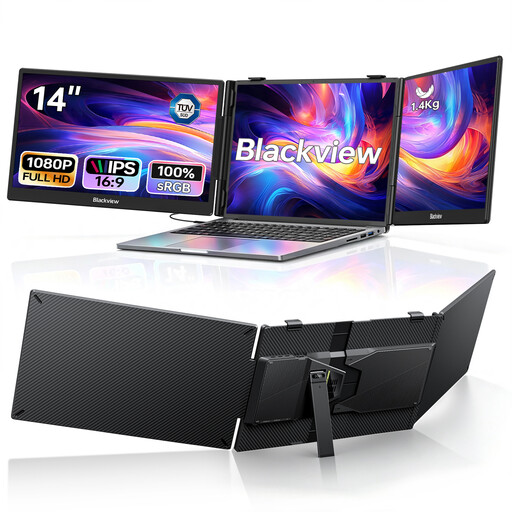 Image unavailable
Blackview DCM5, foldable dual monitor with two 14-inch screens
The foldable design gives you two extra screens alongside your laptop. Check that your device falls within the stated compatibility range and supports the required connection.
Product name: two 14-inch Full HD IPS screens, 100 W PD; compatibility range: 13 to 17.3 inches.
View at Joybuy
Frequently asked questions
Will any USB-C port on a laptop work with a portable monitor?
No. ASUS requires the laptop to have video output for the ZenScreen MB166CR’s USB-C video connection. Check the connection specifications for your particular laptop and monitor.
Will I need a socket to use a portable monitor in the library?
It depends on the model and connection. ASUS describes the ZenScreen MB166CR as transmitting video and power over a suitable USB-C connection. Verbatim specifies an additional power adapter for HDMI use with model 32238. You can’t use this information to determine a specific battery life for your laptop.
Is a 16:10 monitor automatically easier to read for tables?
Not necessarily. Dell and Lenovo specify a 16:10 format for their respective 14-inch models. The actual workspace you can see and the text size also depend on resolution and scaling. It’s best to compare how your own tables and reports look.
Which markings are relevant for a portable monitor?
Your Europe (European Union) explains that CE marking is required only for products covered by relevant harmonised EU rules that require it; it isn’t an independent quality mark. Your Europe lists screens under the WEEE category, which requires the crossed-out wheeled bin symbol. The Stiftung elektro-altgeräte register explains that manufacturers must be registered before selling in Germany. Check the details for the specific product and listing.


