What should you look for when buying?
First check the connection to your laptop, then compare how documents look with the space you have available, and finally decide whether you really need touch.
| What matters when buying |
What to check |
Who is this particularly important to? |
| Connection and power |
Check your laptop port’s video mode and power output, along with the monitor’s and cable’s requirements. |
If I want to open sources on my laptop and second screen, the connection needs to provide both video and power. Around 26% of consumers prioritise connection and power supply. |
| Readability |
Try a typical PDF alongside your notes using your preferred text size and scaling. |
If I want to read longer texts alongside my notes, how they look with my preferred scaling matters most to me. Around 26% of consumers put document readability first. |
| Space and portability |
Measure the usable desk space and check how much room the monitor takes up when set up, including its stand and accessories. |
If I regularly take the screen with me and set it up at a library desk, it needs to fit in my bag and on my work surface. Around 21% of consumers prioritise space and portability. |
| Complete setup |
Check which cables and power supply you’ll need, and what’s included with the specific model. |
If I want to set up the screen for taking notes, I want to avoid unnecessary features and missing accessories. Around 16% of consumers focus above all on the cost of a complete setup. |
| Touch input |
Check how touch data is transmitted and whether your operating system and note-taking app support touch input. |
If I want to navigate or enter information directly on the extra display, I need a compatible touch connection. Around 11% of consumers prioritise direct touch control. |
Key brands to consider
The details below apply to the product lines or models mentioned and aren’t a general assessment of each brand as a whole.
ASUS
The ZenScreen range includes USB-C second screens; the MB16ACV is a 15.6-inch Full HD model.
- ASUS lists a matte finish, USB-C with DP Alt Mode and a net weight of 0.9 kg for the MB16ACV.
- No HDMI input is listed for this model; these details don’t automatically apply to other ZenScreen models.
Lenovo
The ThinkVision M14t Gen 2 is aimed at users looking for a compact 14-inch display with touch and stylus support; the L15 is a larger Full HD alternative.
- Lenovo lists a resolution of 2240 × 1400 pixels, 10-point touch and support for an active stylus for the M14t Gen 2. The manufacturer lists a 15.6-inch screen and 1920 × 1080 pixels for the L15.
- The M14t Gen 2 comes with a passive stylus, not an active one. Features of the two models aren’t interchangeable.
LG
The gram +view 16MR70 is a 16-inch model designed for a larger document view.
- LG lists a resolution of 2560 × 1600 pixels, a cover that can be used as a stand and two USB-C ports.
- According to LG, the connected device must support DisplayPort Alt Mode and USB output power of more than 7.5 W. How long it runs on your laptop battery depends on the device.
Dell
The P1425 is a 14-inch option if desk space is limited.
- Dell lists a resolution of 1920 × 1200 pixels and a tilting stand for the P1425.
- A 14-inch screen has less physical display area than a 16-inch one.
ViewSonic
The TD1655 combines a portable Full HD screen with 10-point touch.
- ViewSonic describes video, power and touch being transmitted over compatible USB-C.
- For the connection described, the manufacturer says the source device must support DisplayPort 1.2 Alt Mode and power supply. Its recommendation to use a power bank or mains power for longer sessions isn’t a measured battery life for your laptop setup.
Joybuy products for study notes
This Joybuy selection includes portable second screens for a larger document view, as well as a model for direct touch input.
 No image available
ARZOPA Z1RC 2.5K Portable Monitor, 16 inches
The 16-inch display is a good option if you’d like more screen space for viewing documents.
16 inches; 2560 × 1600 pixels; IPS; USB-C and HDMI; stated weight: 810 g.
View at Joybuy
 No image available
ARZOPA A1 Portable Monitor, 15.6 inches
The 15.6-inch display is a good option if you want to view sources on a second screen alongside your notes.
15.6 inches; 1920 × 1080 pixels; IPS; USB-C and HDMI; stated weight: 780 g; 4 mm thick; stand listed in the product title.
View at Joybuy
 No image available
Blackview SCM6 Laptop Screen Extension, 14 inches
This 14-inch extra display could suit you if you’re looking for a more compact screen and use a laptop between 13 and 17 inches.
14 inches; FHD; IPS; stated weight: 600 g; 4.5 mm thick; integrated stand. Listed as an extension for laptops from 13 to 17 inches.
View at Joybuy
 No image available
UPERFECT Portable Monitor, 15.6 inches
This 15.6-inch model is a good option if you want a separate display for documents and notes.
15.6 inches; 1920 × 1080 pixels; IPS; 100% sRGB; USB-C and Mini-HDMI; integrated adjustable stand.
View at Joybuy
 No image available
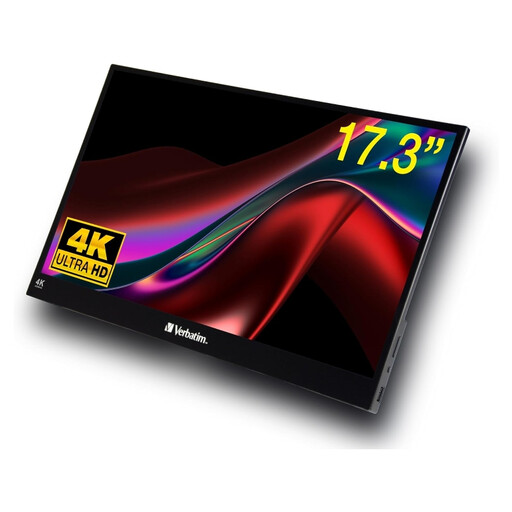
Verbatim PMT-17 Portable Touchscreen Monitor, 17.3 inches
Touch could be useful if you want to navigate or enter information directly on the extra display. The larger screen needs more space and is heavier to carry.
17.3 inches; Full HD; IPS; touchscreen; USB-A, USB-C and HDMI; stated weight: 1.63 kg. The product description lists Windows as a supported operating system; functionality with other systems may vary.
View at Joybuy
Frequently asked questions
Is a USB-C port on my laptop enough?
No, the connector shape alone isn’t enough. Check your specific port’s video mode and power output against the monitor’s requirements. For example, LG says the 16MR70 needs DisplayPort Alt Mode and an output of more than 7.5 W.
How do I set up longer PDFs on a second screen?
Set the screen up securely and try a typical PDF at your preferred text size and scaling. According to the manufacturer, the cover of the LG 16MR70 also works as a stand for portrait or landscape orientation; automatic rotation requires LG’s OnScreen Control software.
Do I need a separate power supply for HDMI?
It depends on the model. Verbatim says the PM-14 needs a power supply when used with HDMI; the manufacturer states that a power adaptor is included.
What happens if a product is faulty or I cancel an order in Germany?
For a consumer purchase, the seller’s statutory liability for defects is separate from any voluntary guarantee. Online purchase contracts generally come with a 14-day right to cancel; exceptions and the terms of the specific contract should be taken into account.
Can I put an old monitor in general waste?
No, old electrical equipment is collected separately. The German Environment Agency lists municipal collection points among the ways to return it; whether you can return it to a retailer depends on the applicable requirements.


