
Lieferung heute & morgen

Qualitätsgarantie

Willkommens-Angebote freischalten: KOSTENLOSE Lieferung | Bis zu 80 % RABATT | Kostenlose 30-Tage-JoyPlus-Testphase
App herunterladen
A portable Phomemo thermal printer can be useful for studying, family life, crafting or travelling: your smartphone provides the template, while the printer produces notes, labels or stickers straight away. To avoid your device ending up unused in a cupboard after a short time, however, you should pay close attention to the print format, app compatibility and consumables.
A mobile printer without ink does not require ink cartridges or toner cartridges. Instead, it uses special thermal paper, label paper or sticker paper. Depending on the format and specification, these media can vary considerably in price. Before buying, it is therefore worth checking:
A mini printer may be sufficient for occasional notes. If you regularly create address labels or stock markings, you should factor ongoing material costs into your choice.
A small Bluetooth mini printer is easy to transport, but often does not print on standard A4 paper. Many sticker and label printers are designed for narrow media. This is sufficient for shopping lists, revision cards or short notes. Contracts, invoices and boarding passes, on the other hand, require a suitable document format.
The key consideration is therefore not just the size of the device, but the question: What do you want to print regularly? A portable label printer is designed for labelling, while a mobile document printer uses a different paper format and belongs to a different class of device.
A wireless smartphone printer usually requires a suitable manufacturer app. Before buying, users should check whether the app works with their smartphone or tablet and which permissions are needed. The user interface, templates and connection process may differ between Android and iOS devices.
The following features can also be helpful:
A sticker printer such as the Phomemo T02 or Q02E is aimed at small stickers, creative projects and short text notes. A label maker such as the Phomemo D30, by contrast, is designed for narrow labels for drawers, cables, folders or storage containers. The D30 is specified as having a label width of 0.59 inches.
The Phomemo A282U is intended for documents such as invoices, contracts and boarding passes. According to the product information, it supports contracts, invoices, boarding passes and bills of lading, among other documents. The term “inkless” refers to the printing technology and does not replace the need to check the specific paper format.
The devices in this selection connect wirelessly via Bluetooth. According to the product description, the A282U connects to iOS and Android devices via the Phomemo app. The D30 app offers features including text, tables, symbols, logos, barcodes, QR codes, images, time stamps, Excel import, scanning and OCR functions, as well as voice input.
If you only want to print revision notes or simple stickers, you do not necessarily need the most extensive range of features. For a small business, workshop or well-organised home, however, templates and barcodes may be important.
For use on the go, an integrated battery is more practical than mains-only operation. The Phomemo A282U is specified as having a rechargeable battery with a capacity of up to 150 sheets per charge. The actual figure may vary depending on the print content, paper and conditions of use.
When transporting the devices, protect them from moisture, extreme temperatures and heavy impacts. The manufacturer’s instructions also state that the battery should be charged in accordance with the specified guidance and that the devices should be kept out of the reach of young children.
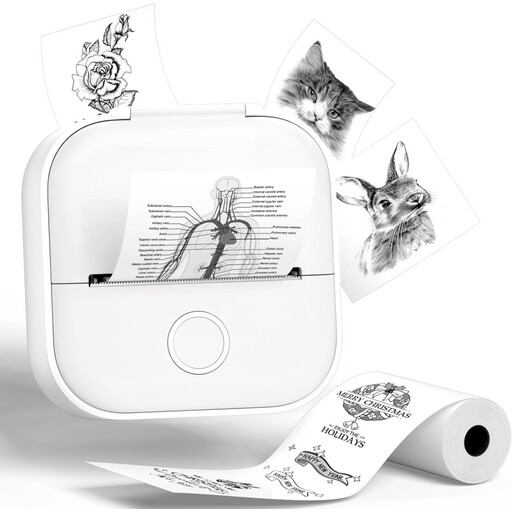
Why this product suits the profile: This compact mini printer is designed for revision notes and stickers, making it suitable for students, families and simple creative projects.
Its clear focus on notes and stickers helps prevent it from being mistaken for an A4 document printer.
Compact format and use as a portable Phomemo thermal printer for short mobile printouts.
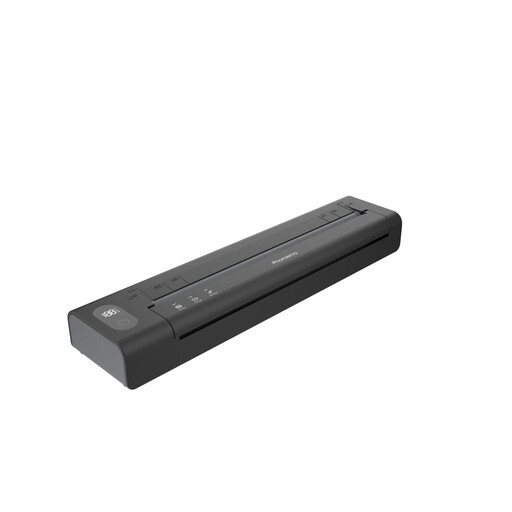
Why this product suits the profile: The A282U is an appealing option for users looking for a mobile document printer with Bluetooth connectivity for iOS and Android devices.
Its document-focused design makes it clearer before purchase that it is intended not only for narrow stickers, but also for invoices and boarding passes.
600 g weight, Bluetooth printing via the Phomemo app and, according to the product information, up to 150 sheets per battery charge.
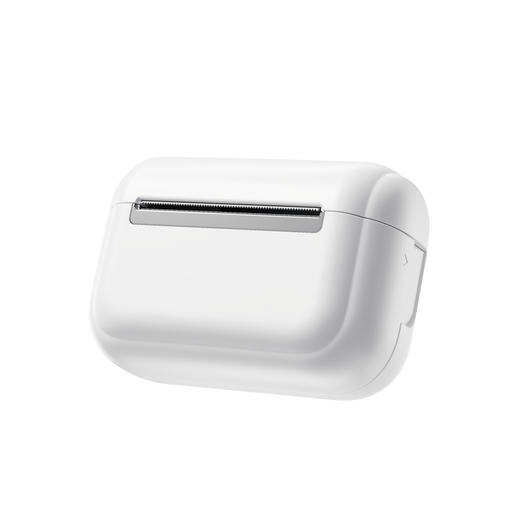
Why this product suits the profile: The Q02E is designed for mobile sticker projects, gift decoration and creative applications.
Calling it a sticker printer clearly indicates its intended purpose and reduces the risk of buying a device for the wrong paper formats.
Pocket format and inkless thermal printing for DIY projects without ink cartridges.
We have put together a complete, regularly updated list of products that fully meet these strict selection criteria and the safety regulations applicable in the EU.
First, install the Phomemo app from the relevant app store. Then enable Bluetooth and the permissions required by the app. Switch on the printer and select it within the app. If you experience connection problems, restart both the app and the device, and check whether another smartphone is already connected.
Its durability depends on the quality of the paper, storage conditions and environmental influences. Direct sunlight, high temperatures, moisture and friction can affect thermal printouts. For important documents, it is advisable to keep the original digital file as well. Store refill paper in a dry, protected place and follow the manufacturer’s storage instructions.
There are no ink or toner costs, but you will need to pay for compatible thermal paper, labels or sticker rolls. The price per printout should therefore be taken into account when choosing a printer. A small paper format may be sufficient for occasional notes; with frequent use, pack size and material cost are particularly important.