Start by choosing the image size you need. For individual postcard-sized prints, a compact dye-sublimation printer is a good choice; for portrait prints up to A4, consider a photo inkjet printer. Also check the space needed for the paper feed, how other users will access the printer, and the cost of the compatible paper and ink or ribbon. A smartphone instant printer is best suited to small images.
Which option suits you?
Limited space, occasional prints
If you print portraits at a shared desk now and then, the printer’s footprint and the space needed for the paper feed both matter. The Canon SELPHY CP1500 uses 100 × 148 mm paper; Canon UK lists Wi-Fi as one of the model’s features.
Larger, more detailed prints
If you need portrait prints up to A4 and have room for a larger device, consider photo inkjet printers such as the Canon PIXMA G650 or Epson EcoTank ET-8500. Canon UK and Epson UK describe both models as offering photo printing up to A4.
Regular photo printing
If you’ll be printing several portraits regularly, consider the consumables alongside your expected print volume. Canon UK and Epson UK list refillable tanks for these models; their stated yields are based on the manufacturers’ respective testing conditions.
What to consider when buying
Compact dye-sublimation printer
A good choice if: you mainly want to print individual postcard-sized portraits.
Things to bear in mind: it can’t print A4, and you may need extra space behind the printer for the paper feed.
A4 photo inkjet printer with refillable tanks
A good choice if: larger portrait prints or regular photo printing are important, and you have room for a bigger device.
Things to bear in mind: make sure the space required and the cost of the printer, ink and photo paper suit your planned print volume.
Smartphone instant printer
A good choice if: you want to print small pictures straight from your smartphone in an instant-photo format.
Things to bear in mind: its small image area is no substitute for A4 printing, and the Fujifilm instax SQUARE Link requires film, sold separately.
| Priority |
What to look for |
Who is it important to? |
| Limited space and a small format |
Check the image size and clearance in front of and behind the printer. The SELPHY CP1500 prints postcard-sized images measuring 100 × 148 mm. |
If there’s little room at the shared desk, I’d prioritise a handy image size and measure the paper feed area too. Around 36% of consumers put a small footprint and compact format first. |
| Print size |
Check that the model supports the paper size you need and borderless printing in that exact format. |
If I need to see facial details on a larger print, I’d consider printing up to A4. Around 29% of consumers prioritise fine portrait details. |
| Regular printing |
Work out the cost of the printer, compatible photo paper and ribbon or ink together, based on your planned print volume. |
If several portraits are printed regularly, I’d factor in the ongoing cost of compatible consumables. Around 21% of consumers prioritise the cost of repeat prints. |
| Printing straight from a smartphone |
Check the app, connection options, image area and whether film is required separately. |
If I want to print individual small pictures straight from my smartphone, the app needs to work with my devices. Around 14% of consumers prioritise printing from a smartphone on the spot. |
Common buying mistakes
-
Comparing only the printer’s dimensions at a shared desk
When printing with the Canon SELPHY CP1500, the paper also moves out behind the printer. PC-WELT describes this paper feed in its review of the model.
Before choosing a permanent spot, measure the available space, including the area behind the printer.
-
Assuming a small instant print is the same as a large portrait print
The Fujifilm instax SQUARE Link has an image area of 62 × 62 mm. The SELPHY CP1500 prints postcard-sized images, while the photo inkjet printers mentioned above can print up to A4.
Decide on your preferred print size before choosing a printing technology or model.
-
Comparing only the printer price or the manufacturer’s stated yield
Dye-sublimation printers, refillable ink tanks and instant film all use different consumables. Manufacturers’ stated yields are based on their own testing conditions, so they can’t be directly compared as a cost per portrait.
Compare the paper and ink or ribbon costs for the same image size and your expected print volume.
Key brands at a glance
Canon
The models covered here offer two different ways to print: the SELPHY CP1500 for postcard-sized prints and the PIXMA G650 for photo printing up to A4.
- Canon UK lists Wi-Fi and 100 × 148 mm printing for the SELPHY CP1500. The PIXMA G650 is listed with six inks and borderless printing up to A4.
- The SELPHY CP1500 can’t print up to A4. In PC-WELT’s review of 29 January 2023, paper and ribbon were not included with the basic model tested. Canon’s stated yield for the G650 is based on 10 × 15-cm photos and is not an independent cost comparison.
Epson
According to the manufacturer, the EcoTank ET-8500 combines photo printing up to A4 with refillable six-colour ink tanks, as well as scanning and copying.
- These details apply to the ET-8500 and shouldn’t be taken to apply to every EcoTank printer.
- On 3 November 2026, Epson UK marked the ET-8500 as unavailable in its own online shop. This doesn’t necessarily apply to other retailers.
Fujifilm
The instax SQUARE Link is an app-controlled smartphone printer for small square instant photos.
- Fujifilm lists Bluetooth, a built-in battery and an image area of 62 × 62 mm.
- SQUARE film is required separately. The printer is no substitute for an A4 printer or a general-purpose printing option for computers.
HP
The Sprocket Select is an example of a portable, app-controlled ZINK photo printer.
- HP Support UK lists Bluetooth and ZINK media for this model.
- HP says this model isn’t compatible with macOS; this doesn’t apply to other HP photo printers.
Related products at Joybuy
The following Joybuy products are portable thermal printers. Check in particular that the image size, print quality and connection method suit your portrait prints and the devices you share.
 No image available
Bluetooth thermal printer for photos, notes and labels
This could be a good option for printing from your smartphone if Bluetooth printing and its compact size suit your shared workspace.
The title mentions 10 rolls of thermal paper. The description lists Bluetooth printing from iOS and Android smartphones and a weight of 200 g. It also says that printed images may turn black if rubbed.
Joybuy
 No image available
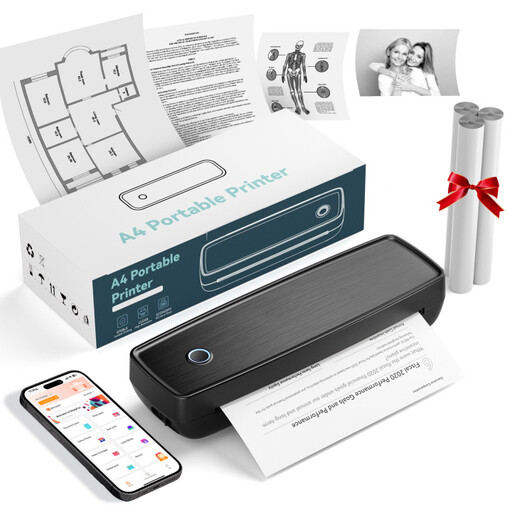
Portable thermal printer with Bluetooth and USB-C
This may suit basic printing at a mobile workspace, as long as the paper types and connection method meet your needs.
The description lists thermal paper rolls, folded paper, and Bluetooth and USB-C connections.
Joybuy
 No image available
RONGTA F11B A4 thermal printer
If you want to print larger images on thermal paper, check that the printing method and stated formats will give you the level of portrait detail you need.
The title lists A4, A5 and B5, 203 DPI and 16 mm/s. The description lists image and document printing via app and USB, as well as Bluetooth for mobile devices.
Joybuy
 No image available
Portable Bluetooth thermal printer for smartphones
This is an option for printing on the go if black-and-white thermal printing suits your needs.
The description lists a 1200-mAh battery, black-and-white printing and Bluetooth connections to smartphones.
Joybuy
 No image available
Phomemo A282U portable wireless printer
The description focuses mainly on documents such as contracts and invoices. Before using it for portrait prints, check that the image size and print quality will meet your needs.
The description lists Bluetooth printing via the Phomemo app on iOS and Android devices, and a weight of 600 g.
Joybuy
Frequently asked questions
Can several people use the same small photo printer?
Canon UK lists Wi-Fi printing from mobile devices and computers, as well as USB connectivity for computers, for the Canon SELPHY CP1500. Before buying, check which devices and connections can actually be used at your shared desk. The unit tested by PC-WELT didn’t include a USB cable.
Do I need extra consumables for the SELPHY CP1500?
Yes. Canon sells compatible paper and ink ribbon sets for the SELPHY CP1500. Check what’s included with the specific offer: the set wasn’t included with the basic model tested by PC-WELT.
How should I budget for an A4 photo printer?
Include the printer, compatible photo paper and ink in your calculations. Manufacturers’ stated yields are based on specific printing conditions, so they aren’t enough on their own to give you a reliable cost comparison for your portrait prints.
Is a smartphone instant printer suitable for portrait prints?
The Fujifilm instax SQUARE Link could work for small pictures printed straight from your smartphone; Fujifilm lists an image area of 62 × 62 mm and a Bluetooth connection. As SQUARE film is sold separately and the image format is small, it’s no substitute for A4 prints.


