What should you look for when buying?
Windows mini PC
A good fit if: your software or devices require Windows, and you want a computer that takes up little space on your height-adjustable desk.
Things to consider: Expandability and specifications vary by model. Check the RAM, SSD, graphics and monitor ports on the exact version you’re considering.
Mac mini
A good fit if: your image-editing software and peripherals work with macOS, and your chosen configuration has the ports you need.
Things to consider: Apple offers different combinations of unified memory and SSD storage; a monitor isn’t included.
Larger desktop or compact workstation
A good fit if: you’re looking for a purpose-configured Windows workstation for large files or multitasking, and have a suitable place to put it.
Things to consider: The workstation label alone doesn’t guarantee better retouching performance or reliable colour reproduction on the monitor.
When choosing a desktop for portrait retouching at a sit-stand desk, start with what matters most to you.
| Priority |
What to check before buying |
Who is this important to? |
| Desk space and placement |
Check the case, power supply, space for the computer and cable routing against the movement of your desk. |
If my monitor and input devices already take up space, I want to position the computer so I can still adjust the desk height. Around 30% of consumers prioritise clear desk space and suitable placement. |
| Performance for retouching software |
Check the software version, operating system, RAM, graphics and available SSD space together. |
If I’m working with lots of images or layers, I want to know whether the exact configuration suits my software and workflow. Around 30% of consumers prioritise compatibility with their retouching software and files. |
| Assessing skin tones |
Choose a monitor to suit your output needs and plan for profiling; calibration can’t compensate for unsuitable panel characteristics. |
If I need to assess skin tones reliably, choosing a suitable monitor is part of the decision – not just the computer. Around 20% of consumers prioritise colour assessment and suitable output. |
| Ports and future upgrades |
Check the ports against your monitor and accessories; look into documented upgrade options for the specific model. |
If I want to keep using my existing devices or upgrade the computer later, I want to check its ports and upgrade options in advance. Around 20% of consumers mainly prioritise ports or future hardware upgrades. |
Joybuy products for your sit-stand desk
This selection features Windows mini PCs for workspaces with limited room. Matching RAM and SSD specifications don’t replace checking compatibility with your specific software.
 No image available
Ninkear M8 Mini PC
Its compact design may suit a workspace with limited room. Check that the configuration works with your retouching software.
16 GB DDR5, 1 TB SSD, AMD Ryzen 7 8745HS, Windows 10/11; dimensions: 130 × 127.5 × 52 mm.
Joybuy
 No image available
Ninkear L12 Pro Mini PC
This mini PC is designed for compact setups. Before buying, check that the listed specifications suit your software and devices.
16 GB DDR4, 1 TB SSD, Intel i9-12900HK, Windows 10/11; USB 4.0 and dual-band Wi-Fi 6.
Joybuy
 No image available
Ninkear L20 Mini PC
Its stated case volume of 0.66 litres may be useful when space is limited. Check the storage option you’re choosing and your software’s requirements.
Intel Core Ultra 5 226V, 16 GB RAM, 512 GB/1 TB SSD, Windows 11; supports three 4K displays.
Joybuy
 No image available
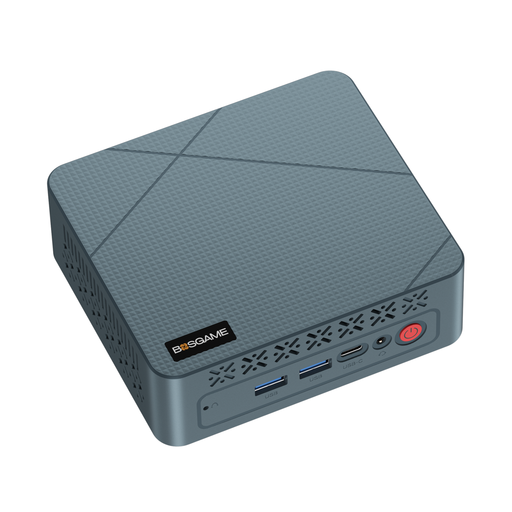
BOSGAME E2 neo Mini PC
Its compact mini PC design may suit a workspace with limited room. Check the storage against your actual needs.
AMD Ryzen 5 3500U up to 3.7 GHz, 16 GB RAM and 256 GB SSD.
Joybuy
 No image available
SOYO S4PLUS Mini PC
This mini PC’s compact design makes it worth considering if space is tight. Check that its specifications suit your files and software.
Ryzen 7 H 255 (8C/16T, up to 4.9 GHz), 24 GB LPDDR5, 512 GB PCIe 3.0 SSD, Windows 11 and Radeon 780M.
Joybuy
Frequently asked questions
Is 8 GB of RAM enough for Photoshop?
For Photoshop 27.x, Adobe lists 8 GB of RAM as the minimum requirement and 16 GB or more as the recommended amount. Choose based on your software version and workflow; meeting the minimum doesn’t guarantee smooth performance with large files.
How should I set up my computer at a sit-stand desk?
Plan the computer’s position and cable routing so you can still adjust the desk. The German Federal Institute for Occupational Safety and Health recommends alternating between sitting and standing; standing all the time isn’t automatically better, particularly for tasks requiring fine motor skills.
Who is responsible if something goes wrong after purchase?
For a consumer purchase in Germany, the seller is generally responsible for the statutory guarantee, not the manufacturer. The consumer advice centre states that the period is two years from delivery; this is separate from any additional manufacturer’s guarantee that may be offered.
What should I check to make sure a desktop PC complies with requirements for the German market?
For market surveillance of electrical and electronic products, the German Federal Network Agency lists requirements including CE marking, product identification, manufacturer details, instructions in German and a declaration of conformity. A German-language shop page alone doesn’t prove that a particular version complies.
Can I simply return a desktop bought online?
According to the consumer advice centre, goods ordered online can generally be returned within 14 days of receipt under the right to cancel; exceptions and the specific contract terms apply. The right to cancel is separate from the statutory guarantee.


