What should you look for when buying?
Start by assessing the window’s position and how you’ll control the light, then consider the colour workflow for your intended output. Resolution and connections should suit your workspace, but they’re no substitute for reflection control or colour management.
| Concern |
What to check before buying |
Who is it especially relevant to? |
| Reflections and light from windows |
Check the surface and whether a hood is included with the exact model; consider the monitor’s position and sun protection in your workspace. |
If I’m retouching by a bright window, I want to limit reflections first, as they can make it harder to judge dark areas of an image and fine adjustments. Around 33% of consumers rank reflection control as their top buying concern. |
| Preparing portrait prints |
Match the required output colour space, colour modes, hardware calibration and any necessary measuring equipment. |
For prints, I want to match the colour space and calibration to my output, rather than relying on vivid screen colours alone. Around 27% of consumers put their print workflow first. |
| Assessing skin tones on screen |
Check that the specific model has a suitable colour mode and profiling method; assess colours in consistent lighting wherever possible. |
If my portraits are intended for screens, I need to assess skin tones consistently and use a suitable colour mode. Around 27% of consumers prioritise colour assessment for screen output. |
| Viewing detail and connecting a laptop |
Check that the native resolution and screen size, as well as the video and charging capabilities of your laptop, cable and monitor, are compatible. |
If I want to see my tools alongside the image and work with a laptop, I check the resolution and connections together. Around 13% of consumers put detail viewing and laptop connectivity first. |
Joybuy monitors for portrait retouching
The following Joybuy models have been selected for shoppers looking for 4K detail and documented anti-glare surfaces. Depending on the model, they also offer stated colour gamut coverage and USB-C; an anti-glare surface doesn’t guarantee that reflections from a window will disappear in your workspace.
 No image available
INNOCN CB27U1, 27-inch, 4K UHD
The listed 4K and NON-GLARE features suit shoppers looking for fine detail and an anti-glare surface; they don’t guarantee a reflection-free view by a window.
3840 × 2160 pixels; 120 Hz; 99% Adobe RGB; USB-C with 90 W Power Delivery.
Joybuy
 No image available
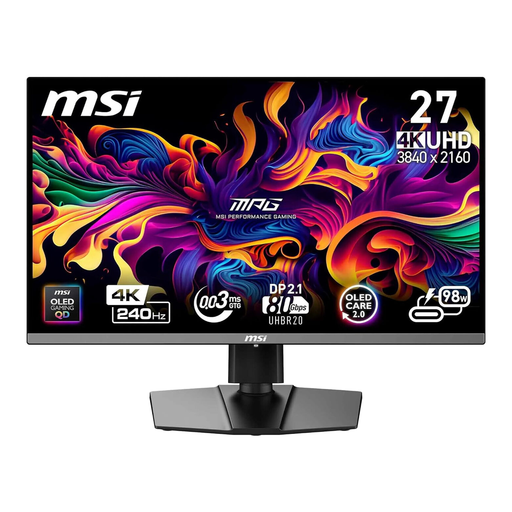
MSI MPG 272URXDE, 26.5-inch, 4K QD-OLED
The product details list an anti-glare surface and colour gamut figures; compare them with your intended output and check for reflections in your own workspace.
4K; 240 Hz; 98% Adobe RGB and 99% DCI-P3; USB-C Power Delivery with 98 W.
Joybuy
 No image available
MSI MPG 322URXDE, 32-inch, 4K QD-OLED
The listed 4K and anti-glare features are relevant when choosing a monitor for detailed work in a bright workspace, but they’re no substitute for checking how it handles reflections in practice.
3840 × 2160 pixels; 240 Hz; 98% Adobe RGB and 99% DCI-P3; USB-C with 98 W Power Delivery.
Joybuy
 No image available
ASUS ROG Swift OLED PG32UCDMR, 32-inch, 4K
The product details list an anti-glare panel. Still, check whether its surface is suitable for the position of your window and the light control in your retouching space.
3840 × 2160 pixels; 240 Hz; 99% DCI-P3; USB-C with 90 W Power Delivery.
Joybuy
Frequently asked questions about portrait retouching by a bright window
Is a particularly bright monitor enough if it’s right next to a window?
No, not on its own. First, see whether you can reduce direct reflections by changing the monitor’s position or using sun protection; then consider the surface and whether the specific model includes a hood. A typical brightness rating doesn’t measure reflections in your workspace.
How do I set up my monitor for consistent skin tones?
Choose a colour mode that suits your intended output and set up a profiling or calibration workflow with your workspace lighting as controlled as possible. Calibration can’t correct a colour space that’s too small or panel uniformity issues.
Do I need Adobe RGB for every portrait job?
No. What matters is your output and colour workflow. Wider coverage may be relevant for a print workflow that requires it; for a defined sRGB screen workflow, you should also check that the monitor has a suitable sRGB mode. A colour gamut percentage alone doesn’t guarantee a good print match.
What additional equipment should I check for calibration?
Check whether a measuring device, software, hood and required cables are included or need to be bought separately. LG states that Calibration Studio software isn’t included with the 27UP850K-W.
Can I return a monitor bought online in Germany if the reflections are a problem?
If you’re a consumer buying at a distance from a trader, you generally have a 14-day right to cancel from the date of delivery, subject to legal exceptions. According to Your Europe, the European Union’s information portal, you may have to pay the direct cost of returning the item if the trader informed you of this correctly before purchase and doesn’t cover the cost. This cancellation right doesn’t apply to purchases from private individuals.


