Portrait retouching for web and social media
If you mainly share images online, look for a suitable sRGB and monitor profile workflow. Adobe recommends sRGB and appropriate conversion settings for consistent online display.


For portraits that are mainly published online, a suitable sRGB mode and a profiled display matter more than having the widest possible colour gamut. For colour-critical prints, a wide gamut, calibration and a suitable print workflow become more important. Also check the resolution, desk space and connections: no single monitor specification can guarantee the colours of the finished image.
If you mainly share images online, look for a suitable sRGB and monitor profile workflow. Adobe recommends sRGB and appropriate conversion settings for consistent online display.
If you regularly compare your edits with paper prints, you’ll need a colour management workflow that suits the print process, as well as a suitable monitor. Adobe recommends using a profile for the specific printer, ink and paper combination.
If you edit details on an external display, check the space available, the video connection and the charging power you need. The requirements will depend on your laptop and its connections.
| Consideration | What to check when buying | Who is it particularly important to? |
|---|---|---|
| Assessing skin tones | Check the sRGB mode, as well as the options for calibrating and profiling the specific model. | If I want to assess skin tones in portraits published online, I need a suitable sRGB and monitor profile workflow. Around 36% of consumers prioritise assessing skin tones. |
| Matching portrait prints | Compare Adobe RGB coverage and calibration options; check which measuring device and print profile suit your process. | If I regularly prepare portraits for a specific print process, the profile must also match the printer, ink and paper combination. Around 21% of consumers put print matching first. |
| Seeing fine details | Compare the native resolution with the screen size and check that images and the interface remain easy to use at your chosen scaling. | If I need to assess fine adjustments while keeping my tools in view, resolution and a practical working area are essential. Around 29% of consumers prioritise detail. |
| Fitting a monitor into your workspace | Measure the width and depth, including the stand, and check the video output, cables and laptop charging requirements against the model specifications. | If I need to make room for a desk, computer connection and possible laptop charging, the specific combination of dimensions and connections matters. Around 14% of consumers put workspace integration first. |
A wide colour gamut or factory setting doesn’t tell you how the monitor will reproduce colours once set up. Calibration also can’t make up for a limited colour gamut or an uneven panel.
Check colour gamut, calibration method and screen uniformity separately, and allow for profiling as part of your workflow.
Allow time for calibration and profile maintenance. Depending on your workflow, you may also need a measuring device.
A soft proof reflects the intended output conditions. The monitor’s colour gamut alone doesn’t determine how a print will look.
Work out your print workflow before choosing a photo monitor based solely on its colour gamut coverage. Soft proofing requires the right profile for your printer, ink and paper.
Matching colours may require test prints and profiles for your specific printer, ink and paper combination.
A USB-C port doesn’t automatically support the video signal you need, and it may not provide enough power to charge a laptop. Specifications vary by model for charging power and dimensions.
Check the video output, charging power required and dimensions of the monitor when set up against your workspace and laptop.
Depending on the connection and setup, you may need a suitable cable, a separate power supply or a different desk mount.
The ColorEdge CS2740 and CG2700X are designed for photo and print workflows. EIZO states that the CS2740 offers typical Adobe RGB coverage of over 99%; the CG2700X is a 27-inch 4K model.
BenQ offers the PhotoVue SW272U, a 4K model with 99% Adobe RGB for photography, and the DesignVue PD2705U, a differently oriented 4K option with 99% sRGB.
The German specifications for the ProArt PA279CRV list a 27-inch screen, 3840 × 2160 pixels and colour modes for sRGB and Adobe RGB.
The UltraSharp U2725QE is a 27-inch 4K option with a Thunderbolt hub for a connected laptop workstation.
The LG 27U631A-B is a QHD IPS option; LG states that the model typically offers 99% sRGB.
This selection of monitors includes models for online portraits, colour-critical print workflows and detailed retouching at a laptop workstation.
 No image available
For a wide-gamut workflow, the product description lists 100% Adobe RGB.
The product name and description list a 27-inch screen, 3840 × 2160 pixels and Mini-LED Rapid IPS.
The product name also lists 160 Hz at UHD and 320 Hz at FHD.
Connections include USB-C, DisplayPort and HDMI; the stand is height-adjustable.
 No image available
For portraits intended mainly for online use, the product description lists 99% sRGB.
The model is listed as a 27-inch 4K UHD IPS monitor with 3840 × 2160 pixels.
HDMI 2.0, DisplayPort 1.2 and VESA mounting are listed; the stand can be tilted.
 No image available
For a wide-gamut workflow, the product description lists 99% Adobe RGB and 100% sRGB.
The model is listed as a 27-inch IPS monitor with 3840 × 2160 pixels and a 120 Hz refresh rate.
USB-C with 90 W Power Delivery, HDMI and DisplayPort are listed. The stand is height-adjustable.
 No image available
For detailed retouching at a laptop workstation, USB-C with video output and 65 W Power Delivery is listed.
The model is described as a 27-inch 4K monitor with 3840 × 2160 pixels and a Fast IPS panel.
A height-adjustable stand and integrated KVM switch are also listed.
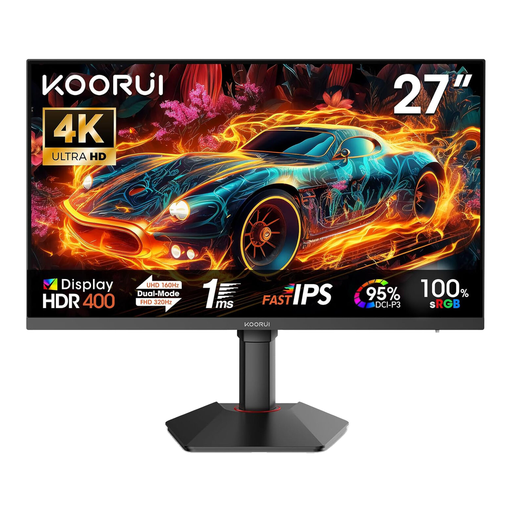 No image available
For portraits intended for online use, the product description lists 100% sRGB.
The model is listed as a 27-inch 4K UHD monitor with 3840 × 2160 pixels and a Fast IPS panel.
It also lists 95% DCI-P3 and a height-adjustable stand with tilt and pivot functions.
Connections include two HDMI 2.1 inputs and DisplayPort 1.4.
No, not for online use alone. Adobe recommends sRGB and suitable profile conversion settings for consistent online display. Whether you also need a wide gamut depends on other output formats, such as print or different colour spaces.
Set up the display for your intended workflow, then calibrate and profile it using suitable software or measuring equipment. Adobe distinguishes calibration, which adjusts the monitor, from the profile, which describes its current colour reproduction.
The monitor’s colour gamut alone doesn’t determine the print result. For a colour-managed print workflow, Adobe recommends using not only a calibrated monitor with an accurate profile, but also an ICC profile for the specific printer, ink and paper combination.
Compare the EU energy label and product information sheet for the specific model. The European Commission explains that displays are rated from A to G, with separate information provided for HDR. Electricity costs also depend on how long you use the monitor and your tariff.