Retouchers with just one free mains socket
If you’re setting up a computer and screen from scratch, the number of mains sockets you need matters. Hesse Consumer Window warns against plugging one multi-socket extension lead into another.


If you don’t already have a suitable monitor and want to use as few mains sockets as possible for your computer and screen, consider an all-in-one. If you already have a monitor or plan to choose one separately, a mini PC gives you more flexibility, but generally needs its own mains socket in addition to the screen. Also check that the specific configuration meets the requirements of your retouching software, and make sure the total electrical load of all your devices is safe.
If you’re setting up a computer and screen from scratch, the number of mains sockets you need matters. Hesse Consumer Window warns against plugging one multi-socket extension lead into another.
If you want to keep using your existing monitor or choose your screen and computer separately, check that the video connections are compatible and that you can use a suitable monitor profile. Adobe explains that an incorrect profile can lead to unnecessary colour adjustments.
For large files or image catalogues, RAM, SSD capacity and connections for your existing devices are important things to check. Adobe describes using an SSD for Lightroom Classic catalogues and image files as one way to support your workflow.
A good fit if: An integrated screen suits your colour workflow and you want to run your computer and display using as few mains sockets as possible.
The trade-off: You’re choosing the screen at the same time as the computer; external drives and other devices may need additional connections and power.
A good fit if: You already have a suitable monitor, or want to choose the screen size and colour performance independently of the computer.
The trade-off: The computer and separately powered screen generally need their own mains sockets, unless one-cable power delivery is confirmed for that specific device combination.
| Criteria | What to check before buying | Who is this important to? |
|---|---|---|
| Mains sockets and safe set-up | The plugs for all your devices and the load limit of the extension lead you’ll be using; don’t plug one multi-socket extension lead into another (Hesse Consumer Window). | When setting up a computer and screen, I want to use as few mains sockets as possible without overloading an extension lead. Around 29% of consumers prioritise having fewer mains sockets to use. |
| RAM and software | The version and operating system requirements of your retouching software, as well as the RAM in the specific configuration. Adobe lists 8 GB as the minimum for Photoshop 27.x and recommends 16 GB or more. | For extensive retouching projects, I want to check that the specific configuration suits my software and way of working. Around 29% of consumers put suitability for retouching first. |
| Colour assessment | How well the integrated or separate monitor suits your workflow, and the options for calibration and profiling. Adobe points out that an incorrect monitor profile can lead to unnecessary adjustments. | When editing portraits where colour accuracy matters, I want to assess skin tones and other image colours reliably on screen. Around 24% of consumers prioritise colour assessment. |
| Storage and connections | SSD capacity for images and catalogues, plus connections for your monitor, card reader and drives; also factor in the cables and power required for external drives. | When managing image archives and catalogues locally, I need enough storage and the right connections for my devices. Around 18% of consumers prioritise image archives and connections. |
A mini PC doesn’t include a screen. A separately powered monitor will therefore generally need its own mains socket.
Before you buy, make a list of the plugs for all the devices you plan to use at the same time.
Adobe warns that an incorrect monitor profile can lead to unnecessary colour adjustments. A high resolution is no substitute for a suitable profile.
Plan to profile your monitor, and take the lighting conditions in your workspace into account.
Profiling may require measuring hardware and compatible software; Adobe recommends this for colour-critical work.
Overloading can cause overheating. Adding more sockets doesn’t increase the permitted load.
Check the load rating of the extension lead you’re using, and don’t plug one multi-socket extension lead into another.
RAM, SSD capacity and other specifications can vary between versions. The model name alone won’t tell you whether a particular configuration suits your retouching work.
Before buying, check the full specifications of the version on offer and what’s included in the box.
Apple offers the iMac as an all-in-one option and the Mac mini as a computer for use with a separately chosen monitor.
The HP ProDesk 4 Mini G1i is a Windows mini PC option for use with a separately chosen monitor.
The ThinkCentre Neo 50q Gen 5 Tiny is another Windows option with a separately chosen monitor.
The Dell Pro Micro Plus QBM1250 is a compact, configurable Windows desktop.
The compact desktop computers below are designed to be used with a separately chosen monitor. Remember to allow for its own mains socket, as well as the connections needed for your other devices.
 No image available
For use with a separately chosen monitor; HDMI and DisplayPort are listed as connections.
Intel Core Ultra 7, 16 GB DDR5, 512 GB M.2 PCIe SSD, Intel Graphics and Windows 11 Pro.
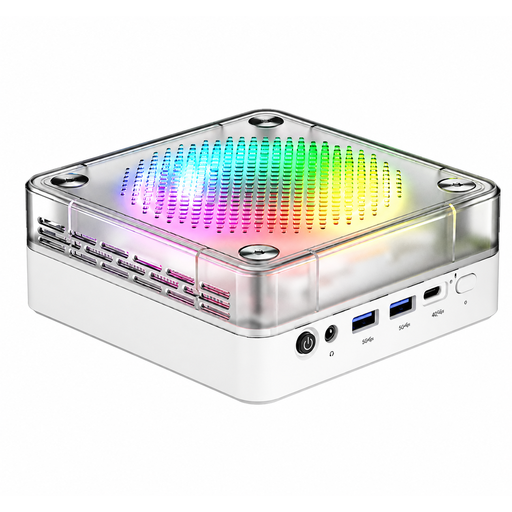 No image available
For use with a separately chosen monitor; the product title lists HDMI, Type-C and USB.
AMD R7-8745HS, 16 GB DDR5, 512 GB SSD, Windows 11, BT 5.2 and Wi-Fi 6.
 No image available
For use with a separately chosen monitor; HDMI and Thunderbolt 4 are listed as video connections.
12-core CPU, 12-core GPU, 16 GB Unified Memory, 256 GB SSD, 2.5GbE, Wi-Fi 7, Bluetooth 6 and macOS.
No image available
For use with a separately chosen monitor; HDMI and Thunderbolt 4 are listed as video connections.
12-core CPU, 12-core GPU, 24 GB Unified Memory, 512 GB SSD, 2.5GbE, Wi-Fi 7, Bluetooth 6 and macOS.
 No image available
For use with a separately chosen monitor; the description lists HDMI and Thunderbolt 4 as connections.
M6 12-core CPU, 12-core GPU, 24 GB Unified Memory, 1 TB SSD and silver finish.
Adobe lists 8 GB as the minimum for Photoshop 27.x and recommends 16 GB or more. Before buying, check the requirements for the version you actually use; the minimum requirement doesn’t tell you how well it will perform with large retouching projects.
Calibrate and profile your monitor, ideally in stable lighting conditions. Adobe recommends measuring hardware and compatible software for colour-critical work; a high-resolution display alone is no substitute for an accurate profile.
Check the load limit of the specific extension lead and the total load of everything plugged in at the same time. Hesse Consumer Window warns against overloading and plugging extension leads into one another; its stated usual guideline of no more than 3,500 W doesn’t apply universally to every extension lead.
Your statutory rights for faulty goods are against the seller; any additional guarantee is voluntary and subject to its own terms. Consumer contracts made online usually come with a 14-day right to cancel. Check the conditions that apply to your specific purchase.
Products covered by relevant EU rules requiring CE marking must carry the mark. It is a declaration made by the manufacturer, not an approval from a central EU certification body. Also check the product identity and manufacturer’s information for the specific offer.