Retouchers with limited desk space
You need room for your monitor and input devices, as well as a practical viewing distance. That’s why the monitor’s full dimensions, including the stand, matter more than screen size alone.


Start by measuring the usable desk space and comparing it with the monitor’s dimensions, including the stand; screen size alone tells you little about how much room it will actually take up. For portraits viewed mainly on screen, a compact sRGB monitor may be a good fit. If you regularly prepare images for print, a wide-gamut monitor with calibration options is a better choice. Resolution, aspect ratio and connections also affect how well the image, tools and laptop fit into your workflow.
You need room for your monitor and input devices, as well as a practical viewing distance. That’s why the monitor’s full dimensions, including the stand, matter more than screen size alone.
If you want to assess skin tones and other colours for print, you’ll need a suitable colour gamut and a carefully managed colour workflow.
For images viewed mainly on screens, weigh up sRGB coverage against extra resolution, connections and print-proofing features.
| Consideration | What to check before buying | Who does it matter to most? |
|---|---|---|
| Desk space and viewing distance | Compare your desk’s width and depth with the monitor’s dimensions, including the stand; check separately if you’re planning to use an arm mount. | If your monitor and input devices need to fit into a small space, every centimetre of desk space counts. Around 33% of consumers put space requirements first. |
| Colour control for print | Check the Adobe RGB figures for the exact model, and confirm which measuring sensor and software are compatible with your calibration workflow. | If you regularly proof portraits for print, you need a suitable colour gamut and a coordinated colour-management workflow. Around 27% of consumers prioritise print colour control. |
| Digital workspace | Compare the resolution and aspect ratio, and consider how your software arranges the image and toolbars. | If you want to keep the image and tools visible at the same time, the pixel count and vertical workspace can make all the difference. Around 20% of consumers put this digital workspace first. |
| Laptop connection | Check your laptop’s USB-C video output and power requirements against the ports and power delivery of the specific monitor. | For a tidy laptop setup, it’s important to know whether the connection can carry a video signal and supply enough power. Around 20% of consumers prioritise laptop connectivity. |
The stand and the way the monitor is positioned both affect whether there’s room for input devices alongside it.
Compare the full dimensions with your usable desk space. Only consider an arm mount if both your desk and monitor are suitable for one.
Colour gamut coverage is just one part of colour management, which brings together the file, what you see on screen and the final output.
Decide whether you regularly proof prints, then plan profiling and calibration to suit your workflow.
Monitors can vary in how much power they deliver over USB-C. Your laptop also needs the right port for video output.
Check DisplayPort Alt Mode and your laptop’s power requirements against the specifications for the exact model.
The SW range includes the compact SW242Q photography monitor, for buyers looking to combine high resolution with a wide colour gamut.
The ColorEdge CS2400S is a compact option if colour management and hardware calibration are your priorities.
The ProArt PA248QFV is a compact 16:10 option for buyers looking for stated sRGB coverage.
The UltraSharp U2424HE is a compact USB-C hub option for buyers who prioritise connectivity over stated photography-monitor features.
This Joybuy selection features compact monitors for digital portrait retouching. If you prepare prints, also check the colour gamut and calibration workflow for the specific model.
 No image available
Its compact screen size may suit digital photo editing when desk space is limited.
23.8 inches, IPS and 1920 × 1080 pixels. Full HD offers less vertical pixel workspace than 1920 × 1200, which can limit how much of your image and toolbars you can see at once.
 No image available
The stated sRGB coverage is a useful factor to consider for digital portrait output.
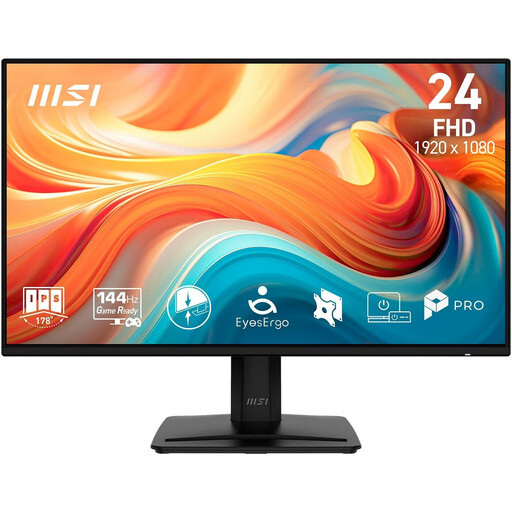
24 inches, IPS, Full HD and 99% sRGB. The stated VESA mount measures 100 × 100 mm; check the mounting requirements if you plan to use a monitor arm. Full HD offers less vertical pixel workspace than 1920 × 1200.
 No image available
A 24-inch IPS monitor may be worth considering for digital photo editing on a smaller desk.
Full HD and IPS are listed in the product title. It also states 116% sRGB; this figure alone does not demonstrate suitability for accurate print colour proofing. Full HD offers less vertical pixel workspace than 1920 × 1200.
 No image available
Its 24-inch screen places this model in the compact size range for desks with limited space.
IPS, 16:9 and 1920 × 1080 pixels. Full HD offers less vertical pixel workspace than 1920 × 1200; check that there’s enough room for your image and tools in your software.
 No image available
USB-C may be useful for a laptop setup; check that your laptop and monitor support the video and power features you need.
The product title lists 24 inches, Full HD, IPS and USB-C. Full HD offers less vertical pixel workspace than 1920 × 1200.
A 24-inch monitor may be a good fit if desk space is limited. Also compare the pixel count, aspect ratio and dimensions including the stand: the models covered here range from 1920 × 1080 to 2560 × 1600 pixels.
Use a colour-management workflow and follow the calibration instructions for the specific model. EIZO describes customisable calibration targets for ColorNavigator; a large stated colour gamut alone won’t do this work for you.
Before buying, check whether your planned calibration workflow requires a measuring sensor or any other equipment. EIZO describes ColorNavigator as software for hardware calibration of ColorEdge monitors; check the instructions for the specific model.
Yes. The European Commission lists computer monitors as being within the scope of EU energy labelling for electronic displays. The label ranks efficiency from class A to G; this does not mean that any particular model mentioned here belongs to a specific efficiency class.