If you can assess the portrait on your existing monitor, a compact graphics tablet is an obvious place to start. Compare the overall dimensions and active area separately. A pen display may suit you better if you want to work directly on the image and can make room for it, as well as provide the right video, data and power connections. Wacom, XPPen, Huion and ugee list dimensions for their respective models; Huion also sets out the connection requirements for the Kamvas 13 (Gen 3).
Which type is right for you?
Retouchers with limited desk space
If you edit a scanned portrait on your existing computer and want to keep space free around your keyboard and monitor, compare the overall dimensions and active pen area separately. Wacom, XPPen and Huion list dimensions for their respective models.
Retouchers working on fine details
When dealing with scratches, blemishes or precise mask edges, the right pen controls and settings in your image-editing software matter. Adobe explains, among other things, how pen pressure can control painting tools in Photoshop.
Those who prefer to work directly on the image
If you want to draw on the portrait as it appears on screen, you could consider a pen display, but remember to allow for extra desk space and the right connections. Huion describes this type of device with the Kamvas 13 (Gen 3).
What should you look for when buying?
Graphics tablet without a display
A good fit if: you assess the portrait on your existing monitor and want to use as little desk space as possible.
The trade-off: you draw on the tablet and view the result on a separate screen; it may take time to get used to looking in a different direction.
Pen display
A good fit if: you prefer to make corrections directly on the image on screen and have enough space and the right connections.
The trade-off: with the Huion Kamvas 13 (Gen 3), you need to consider how it connects to your computer and which cables are included. Huion says the USB-C-to-USB-C cable described is not included.
| Buying priority |
What to look for |
Who is it important to? |
| Space required |
Measure the available desk space and compare the overall dimensions and active area of the specific model. |
If I need to keep space free around my keyboard and monitor, the footprint of the whole device matters; around 36 % of consumers put space requirements first. |
| Fine retouching |
Check software support and adjustable brush settings; assess buttons or a scroll wheel according to how you work. |
For fine corrections, I want to be able to control the pen and brush to suit my needs; around 29 % of consumers prioritise control when retouching details. |
| Direct input |
Consider the extra desk space required and the video, data and power connections you plan to use. |
If I want to work directly on the portrait on screen, this matters more to me than minimising the space used; around 21 % of consumers put it first. |
| Computer and software |
Check the operating system and application requirements for the exact model; for the USB-C connection described by Huion, also check DisplayPort mode and USB requirements. |
If I want to keep using my existing device and image-editing software, the connection needs to be compatible; around 14 % of consumers prioritise this compatibility. |
Avoiding common buying mistakes
-
Measuring only the active area
The device takes up more space than the area the pen works on. The overall dimensions listed by XPPen for the Deco mini7 V2 are larger than its active area.
Measure the available space, allowing for a practical cable route, and compare it with the overall dimensions of the exact model variant.
-
Assuming USB-C automatically carries video
For the USB-C connection Huion describes for the Kamvas 13 (Gen 3), the computer port must support the required data and DisplayPort functions.
Before buying, check your computer port, the planned cable route and what is included, using the instructions for that exact display model.
Huion says the USB-C-to-USB-C cable described is not included with the Kamvas 13 (Gen 3). Depending on how you connect it, you may also need cables and a power supply.
-
Judging a tablet by pen pressure levels alone
The number of pressure levels alone does not tell you whether you can control a tool in the way you need for your retouching. That also depends on your image-editing software and brush settings.
Check that your application is supported and set up the brush parameter you want, rather than comparing models solely by their number of pressure levels.
Key brands at a glance
Wacom
Wacom also recommends the Intuos Small to beginners in photo editing. The Intuos Pro Small is a separate compact model.
- For the Intuos Pro Small, Wacom lists overall dimensions of 215 × 163 mm and an active area of 187 × 105 mm.
- These dimensions and the USB or Bluetooth details do not automatically apply to the Intuos Small. Check the specifications for the full model variant.
XPPen
According to XPPen, the Deco mini7 V2 is a graphics tablet without a display.
- XPPen lists an active area of 177,8 × 111,1 mm, eight shortcut keys and support for Photoshop, GIMP and Krita, among other applications.
- The compatibility details apply to the model named and are not an independent test of how it works with every software version.
Huion
The Inspiroy 2 S is a small model without a display; the Kamvas 13 (Gen 3) is a pen display.
- Huion lists overall dimensions of 246 × 152 mm for the Inspiroy 2 S. The Kamvas 13 (Gen 3) has a 13,3-inch display, according to Huion.
- You need to plan for video and power connections with the Kamvas 13 (Gen 3). The USB-C-to-USB-C cable described by Huion is not included.
ugee
According to ugee, the S640 is a compact graphics tablet without an integrated display.
- The official specifications list overall dimensions of 215,3 × 162,53 mm, an active area of 6,3 × 4 inches and ten shortcut keys.
- These manufacturer specifications alone do not prove that it is independently better for portrait retouching.
Related products at Joybuy
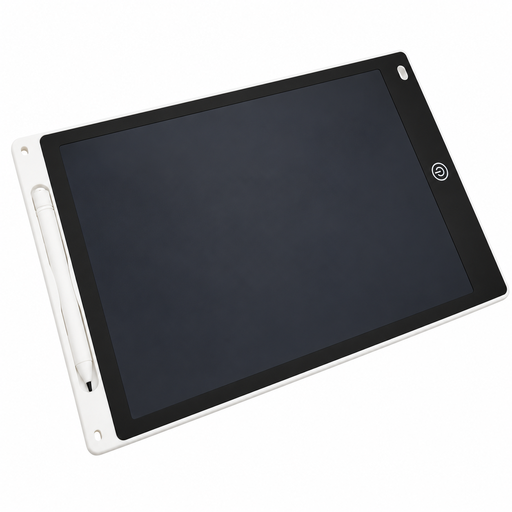
A Joybuy product with a pen for drawing and writing, which may be suitable for computer-based retouching once you have checked software and device compatibility.
 No image available
12-inch LCD drawing tablet with pen and erase function
The title describes an LCD drawing tablet with a pen. Before buying, check whether it can be used as an input device with your computer and image-editing software.
The product description lists a pressure-sensitive surface and an erase button.
According to the description, use by children aged 5 and over is only recommended under supervision; the battery compartment must only be opened by adults. Keep button batteries out of the reach of young children.
View at Joybuy
Frequently asked questions
Does a graphics tablet replace retouching software or a monitor?
No. A graphics tablet without a screen is an input device for use with your existing screen; you still need suitable software to edit images. Adobe, for example, provides documentation for the healing brush in Photoshop.
Is USB-C alone enough to connect a pen display?
Not for the USB-C connection Huion describes for the Kamvas 13 (Gen 3): Huion requires a port with DisplayPort mode and at least USB 3.1 Gen 1, and also explains the power requirements. As an alternative, Huion lists a connection via the 3-in-1 cable with HDMI.
What should I set up first for fine corrections?
Set up the pen and, if needed, the buttons in the device software. Then check which brush settings in your image-editing application respond to pen pressure. Adobe describes pressure-sensitive tool control in Photoshop; the exact settings depend on the application and tool.
What rights do I have if an online purchase in Germany is faulty?
According to Your Europe's guidance, purchases from a trader are covered by a legal guarantee of at least two years from the date you receive the goods; this is different from a voluntary manufacturer's warranty. Your Europe also explains that distance purchases generally come with a 14-day cancellation period.


