For a mainly fixed overhead view of your table, a USB document camera that you can position to suit your setup is an obvious option, provided its capture area, footprint and computer connection are right for you. A webcam may be enough if you mostly want to show yourself and only occasionally bring the painting area into view. For recording independently with a flexible frame, consider a mirrorless camera; if you want to capture moving viewpoints, a stabilised compact camera may be a better fit. Before deciding, test the framing, colours, audio and planned recording time in the conditions you’ll actually be using.
Which camera might suit you?
Tutors with a small desk
You want to show painting techniques live on your computer and need a camera that captures your piece and hands clearly. IPEVO describes the V4K PRO as a USB document camera, while Logitech says the MX Brio has a downward-tilting Show Mode.
Tutorial creators who care about colour
You record lessons yourself and want to assess brushstrokes and glaze colours under the lighting in your room. Sony and Canon offer mirrorless cameras with interchangeable lens options; Canon also lists custom colour profiles for the EOS R50 V.
Creators who want to switch viewpoints
You want to film around the pot as well as show the view from above, so you need a camera you can move or a setup that lets you plan for different angles. Canon describes the EOS R50 V as having a vari-angle screen, while DJI lists a rotating screen and a mechanical three-axis gimbal for the Osmo Pocket 3.
What to look for when choosing
USB document camera
A good fit if: You mainly want to show your hands, brushes and pottery live on your computer.
Keep in mind: You’ll need a compatible computer, and the capture area and camera position must work for your pot and desk.
Webcam with desk mode
A good fit if: You usually show yourself while teaching and only bring the painting area into view from time to time.
Keep in mind: A downward-tilting view doesn’t automatically give you a straight-down shot.
Mirrorless camera with interchangeable lens
A good fit if: You record independently and want to plan your lens, framing and colour settings carefully.
Keep in mind: Include a lens or kit, mounting, storage and power in your planned setup.
Stabilised compact camera
A good fit if: You also want to film freely by hand as you move around your piece.
Keep in mind: Stabilisation is no substitute for a secure position for a continuous desk view; check the close-focus capability and what’s included in the set too.
| What you need |
What to check before buying |
Who this matters most to |
| Show the piece and your hand movements |
With your pot, palette and hands in their actual positions, check the capture area, focus distance and mounting. IPEVO lists a maximum capture area of 34,2 × 25,5 cm and a focus range starting at 10 cm for the V4K PRO. |
If I want to show the pot and the hand working on it together, the view also needs to capture the key brushstrokes. Around 33 % of consumers would make a full view of the desk their main buying consideration. |
| Assess the paint colours |
Test the camera under the room lighting you plan to use and check whether you can adjust the white balance. Canon Deutschland explains that ambient light can affect the colours in a recording. |
If I want to show glaze colours clearly, I want to judge them in a test clip under the lighting I actually use. About 27 % of consumers would make colour control their most important buying consideration. |
| Record spoken instructions |
Test the sound from where you plan to speak and listen out for background noise in the room. IPEVO recommends a speaking distance of 30–70 cm for the V4K PRO’s microphone. |
If I explain the steps while painting, I want my voice to be clear from the position I’ll be speaking in. Around 20 % of consumers would put speech clarity first. |
| Plan a longer recording |
Test the memory card, available capacity and power supply with a recording at your planned length and settings. Sony Deutschland lists full storage and a low battery as possible reasons for a recording to stop. |
If I want to record a whole lesson, I want to avoid interruptions caused by storage or power issues. About 20 % of consumers would prioritise recording for as long as possible without interruption. |
Common camera-buying misconceptions
-
Assuming “4K” guarantees a useful overhead view
The resolution alone doesn’t tell you whether the pot and your hand will fit in the frame, or whether the camera will focus from the height you have available. A webcam mode that tilts down doesn’t guarantee a straight-down view either.
Place your piece and hands where you’ll actually work, then check the framing from the position your desk allows.
Depending on your setup, you may need a suitable mount or a different camera position.
-
Assuming a camera body is a complete recording kit
Mirrorless camera bodies and kits can differ. Sony also offers the ZV-E10 II with an E PZ 16–50 mm F3.5–5.6 OSS II; Canon explicitly lists the lens and accessories included with the Content Creator Kit.
Compare the specific listing and test framing and focus with the exact lens included.
Depending on the body and recording setup, you may need to buy a lens, mount or other accessories separately.
-
Starting a long lesson without a test recording
When recording video independently, a full memory card, low battery or rising camera temperature can limit how long you can record. Sony Deutschland also notes that higher video data rates place greater demands on the memory card.
Test the card, power supply and a recording at your planned length and video settings.
If a recording is interrupted, it can take extra time to reshoot and edit the missing section.
Brands to consider
IPEVO
The V4K PRO is a USB document camera designed to show your desk on a computer.
- IPEVO lists autofocus from 10 cm and a maximum capture area of 34,2 × 25,5 cm for this model.
- Check that your pot, hands and available space fit within the capture area, and that your computer is compatible.
Logitech
The MX Brio is a webcam for presenting on camera, with occasional views of your desk.
- Logitech describes this model as having a downward-tilting Show Mode and adjustable image controls.
- Show Mode doesn’t guarantee a straight-down view, so check the actual framing with your own setup.
Sony
The ZV-E10 II is a mirrorless camera with interchangeable lenses for recording video independently.
- Alongside the body, Sony offers a kit with the E PZ 16–50 mm F3.5–5.6 OSS II.
- The kit lens won’t guarantee the close-up framing you want from every possible desk height.
Canon
The EOS R50 V is a video-focused mirrorless camera with interchangeable lenses and custom colour profiles.
- Canon lists a vari-angle screen and video controls for the EOS R50 V.
- Check whether you’re buying the body or a kit: the Content Creator Kit explicitly includes an RF-S 14–30mm F4–6.3 IS STM PZ lens and other accessories.
DJI
The Osmo Pocket 3 is a compact gimbal camera you can move around your piece.
- DJI lists a mechanical three-axis gimbal and a rotating screen.
- These features don’t replace secure mounting for a continuous desk view; what’s included depends on the specific set.
Joybuy products for video recording
The Joybuy products below include webcams and standalone video cameras that could be suitable for recording a pottery painting tutorial. For each one, check whether the product and its mount let you set up a stable view of your pot and hands.
 No image available
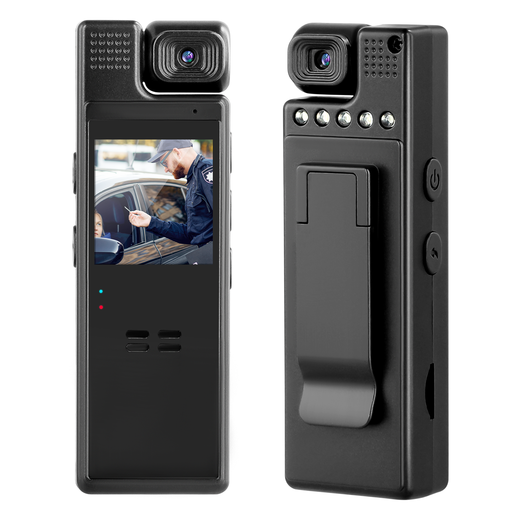
Compact camera with 1080P and a lens that rotates through 180°
The rotating lens may be useful if you want to change the camera’s orientation. Check with a test shot that it captures your pot and hands from the position you plan to use.
Listed in the product title: 1080P and a lens that rotates through 180°.
Joybuy
 No image available
AOC webcam with microphone, 4K and a 99° field of view
If you’re considering this webcam for a desk view, first check that it can show your pot and hands together with enough detail to see what you’re doing.
Listed in the product title: 4K, 99° field of view, privacy cover and noise reduction.
Joybuy
 No image available
Philips 2K QHD webcam SPL6308S/00
If you want to use a webcam on your laptop or desktop screen, check whether the clip-on mount suits your workspace.
Listed in the product title: 2K QHD, microphone with noise reduction and clip-on mount.
Joybuy
 No image available
KOMERY X9 digital camera with 4K and 18x zoom
If you’re planning to use different framings, test the focus and how clearly it shows small brushstrokes with your exact setup.
Listed in the product title: 4K video, autofocus, 18x zoom and 64 MP photos.
Joybuy
 No image available
DJI Osmo Pocket 3
If you want to switch viewpoints and film around your pot, also check how to position the camera securely for a longer desk view.
Listed in the product title: 1-inch CMOS, 4K/120fps, three-axis stabilisation and a rotating 2-inch touchscreen.
Joybuy
Frequently asked questions
Is 4K enough to show brushstrokes on a pot?
Not on its own. It also matters how large the piece appears in the frame from the camera height available, and whether the camera can focus from that distance. IPEVO lists a focus range starting at 10 cm and a maximum capture area of 34,2 × 25,5 cm for the V4K PRO; test other models with your own setup.
How do I set up a recording on a small desk?
Arrange your pot, palette and hands as you would when working, then test the view with the camera in a stable position. Canon explains that a tripod helps keep the composition consistent. If you’re using a USB document camera, also check the connection and computer compatibility; IPEVO lists USB-A for the V4K PRO.
How can I make sure the colours in my tutorial are clear?
Record a test clip under the lighting you plan to use for the lesson and check the white balance. Canon Deutschland explains that different ambient lighting can affect the colours in a recording.
What should I check before making longer video recordings?
Test the memory card, power supply and planned recording length with the camera settings you intend to use. Sony Deutschland lists full storage and a low battery as possible reasons for a recording to stop early.
Can I film flatmates or course participants and publish the video?
In Germany, images of people may generally only be distributed or shown publicly with their consent under § 22 KunstUrhG. Section 23 sets out exceptions, but these cannot automatically be applied to a filmed teaching session. If personal data is processed, you also need an appropriate legal basis under the General Data Protection Regulation. The Federal Ministry of Justice and the Federal Office of Justice set out the legal requirements, while the Federal Commissioner for Data Protection and Freedom of Information explains the legal bases for data processing. What applies in a particular case depends on who can be recognised or heard, and how the recording is used.


