
Lieferung heute & morgen

Qualitätsgarantie

Willkommens-Angebote freischalten: KOSTENLOSE Lieferung | Bis zu 80 % RABATT | Kostenlose 30-Tage-JoyPlus-Testphase
App herunterladen
A dead smartphone or laptop battery always comes at the worst possible time—whether you're travelling, commuting, or in the middle of an important meeting. A power bank, also known as an external battery or portable charger, is the obvious solution. But the market is overwhelming, filled with technical promises that don't always deliver. Many buyers invest in a device that quickly proves to be impractical or underpowered.
As your Joybuy Product Recommendation Officer, I'll help you recognise the typical pitfalls and make an informed decision. We'll focus on the facts that truly matter.
Marketing claims can be misleading. Pay close attention to these three points to avoid a bad purchase:
To find the right power bank for your needs, you should check three core aspects. These will help you objectively evaluate a model's performance and suitability.
The most important metric for a power bank's energy is Watt-hours (Wh). This value is calculated from the capacity (in Amp-hours, Ah) and the voltage (in Volts, V). The Wh value is universally comparable and is especially relevant for air travel.
Charging speed is measured in Watts (W) and managed by charging protocols.
The available ports determine a power bank's versatility. A modern external battery should have at least one USB-C port that functions as both an input and an output (bidirectional). Additional USB-A ports increase compatibility with older devices. A power bank with a built-in cable can be practical, as you don't need to carry a separate one. However, pay attention to the quality and length of the integrated cable.
Based on these objective criteria, we have identified several models for typical use cases.
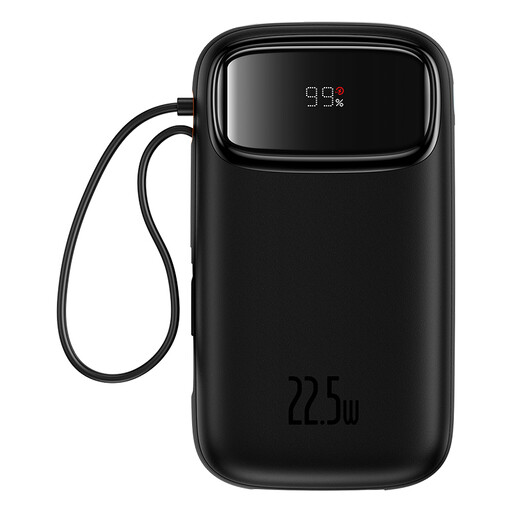
Why This Fits Their Persona: Ideal for the daily commute or short trips. Its compact design and integrated cables (USB-C and Lightning) make it extremely practical, as no extra cables are needed. The 10,000mAh capacity is enough for 1-2 full smartphone charges.
The digital display shows the exact battery level as a percentage, avoiding the inaccuracy of simple LED dots. The charging power is clearly specified at 22.5W, bypassing the vague "fast charging" trap.
Two integrated charging cables for maximum compatibility without cable clutter. The compact design with a carrying strap makes it an effortless companion.
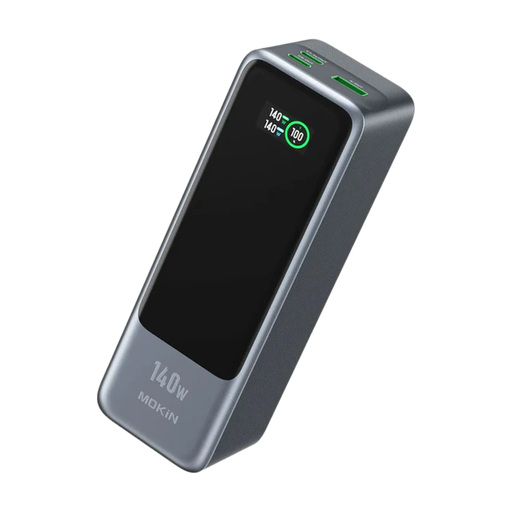
Why This Fits Their Persona: Designed for users who need maximum power for demanding devices like a MacBook Pro or other high-performance laptops. With 24,000mAh capacity and 140W output, it's a powerhouse for business trips and mobile workstations.
This model clearly specifies support for PD 3.1 with up to 140W. The LCD display shows charging power and battery status in real-time, providing full transparency. The 86.4 Wh capacity is explicitly stated and flight-safe.
Extremely high charging power of 140W that rapidly charges even demanding laptops. The ability to charge three devices simultaneously makes it highly versatile.
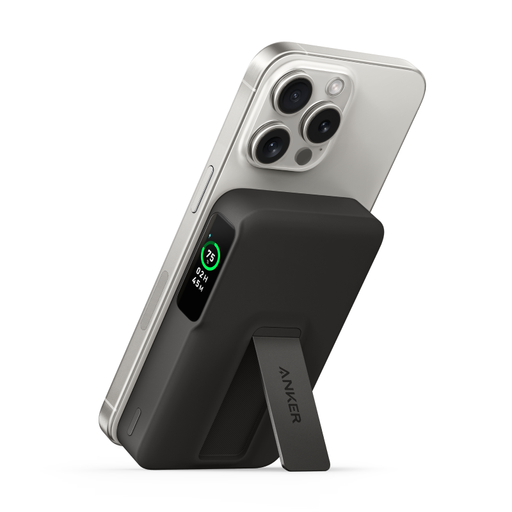
Why This Fits Their Persona: Perfect for owners of a newer iPhone who want a seamless, wireless charging experience. The magnetic attachment (MagSafe compatible) and integrated stand are ideal for watching videos or taking video calls on the go while the device charges.
The Qi2 certification is an official standard that guarantees reliable 15W wireless charging performance—unlike many non-certified magnetic chargers. The smart display provides clear information about the charging status and remaining time.
Certified 15W wireless charging for iPhones and a practical, foldable stand. The informative display offers better control than simpler models.
We have compiled a complete, real-time list of products that fully satisfy these strict selection criteria and UK safety regulations.
1. How many times can a 20,000mAh power bank charge my smartphone? This depends on the rated capacity of the power bank and the battery size of your smartphone. As a rule of thumb: a 20,000mAh power bank (approx. 74 Wh) has a real output capacity (rated capacity) of about 12,000 to 13,000mAh. It can fully charge a modern smartphone with a 4,500mAh battery about 2.5 to 3 times.
2. Can I take a 20,000mAh power bank on a plane? Yes, a 20,000mAh power bank (approx. 74 Wh) is well below the common international limit of 100 Wh and is allowed in carry-on luggage. For safety reasons, it is prohibited in checked baggage. When in doubt, check your airline's specific regulations beforehand.
3. What's the difference between a power bank with and without a built-in cable? A power bank with a built-in cable offers great convenience, as you don't need to carry a separate cable. The downside is that the cable is a potential point of failure and cannot be easily replaced if it breaks. Models without integrated cables are more flexible, as you can use the appropriate cable for your device (e.g., USB-C to USB-C, USB-C to Lightning). Many modern devices offer a combination of both.