
Lieferung heute & morgen

Qualitätsgarantie

Willkommens-Angebote freischalten: KOSTENLOSE Lieferung | Bis zu 80 % RABATT | Kostenlose 30-Tage-JoyPlus-Testphase
App herunterladen
At first glance, finding a new power strip seems simple. But as the number of devices in our homes and offices grows—from laptops and smartphones to tablets—so do our power needs. A modern power strip with USB-C promises to end the charging chaos. However, many products hide pitfalls that lead to frustration and wasted money. Before you make a decision, you should know the most common flaws that only become apparent after the purchase.
The 3 Most Common Pitfalls When Buying a Power Strip:
To avoid a bad purchase, focus on objective technical specifications instead of marketing promises. Three features are crucial.
The key to fast charging isn't the USB-C port itself, but the protocol it supports. Look for the USB-C Power Delivery (PD) specification. This protocol enables significantly higher power output.
A power strip without a clear wattage rating for its PD port will likely fail to meet your fast-charging expectations.
Safety is non-negotiable. A high-quality power strip with surge protection is a small investment that can protect thousands of dollars worth of equipment. It diverts dangerous voltage spikes, preventing damage to sensitive electronics.
Additionally, a power strip with a switch offers two advantages:
The number of outlets is important, but their usability is crucial.
Instead of making a blanket recommendation, we've identified a product that suits different types of users thanks to its well-thought-out features.
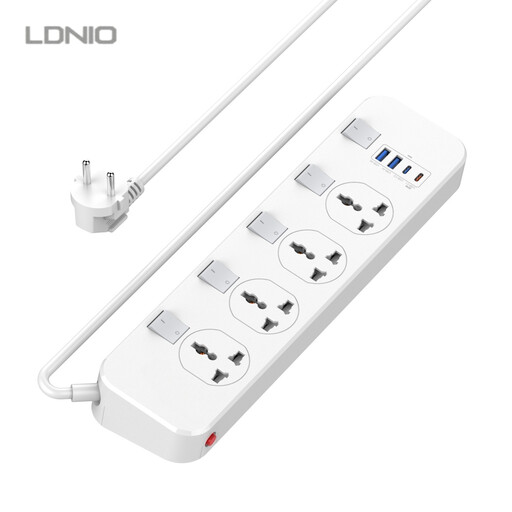
Why This Fits Their Persona: Ideal for a tidy and functional workspace. With four outlets, multiple USB ports, and individual switches, it allows you to power your monitor, PC, charging dock, and other peripherals from a central, controlled hub.
The individual switches prevent unnecessary standby power consumption and give you full control over each connected device, counteracting the impractical design of many power strips.
The 20W USB-C PD port fast-charges smartphones. The combination of universal sockets and USB ports eliminates the need for separate chargers.
Why This Fits Their Persona: Frequent travelers know the problem of incompatible socket standards. This power strip replaces multiple travel adapters and chargers. Your laptop, camera, smartphone, and power bank can all be charged from a single device.
The universal sockets accept EU, US, and other plug types, solving the problem of incompatible outlets abroad or with imported devices.
A compact, all-in-one solution for your luggage. The integrated surge protection provides safety on unfamiliar power grids, such as in hotels or vacation rentals.
Why This Fits Their Persona: In a family household, expensive devices like TVs, game consoles, and computers are all plugged into one strip. Safety and control are the top priorities here. This power strip protects those investments and allows for easy management of the power supply.
The built-in surge protection counteracts the risk of hardware damage from power fluctuations—an often overlooked but critical safety feature.
The individual switches allow you to selectively cut power to the game console or TV to reduce energy consumption or limit screen time.
We have compiled a complete, up-to-date list of products that fully meet these strict selection criteria and relevant safety standards.
This depends on the device you want to charge. For most smartphones and tablets, a USB-C PD port with 20W is sufficient for fast charging. However, if you want to charge a laptop (like a MacBook or a Windows Ultrabook), you should look for a model with at least 65W to ensure a stable power supply, even while the device is in use.
Yes, absolutely. Surge protection is an essential safety feature that shields your electronic devices from damage caused by sudden voltage spikes on the power grid. These spikes can be caused by lightning strikes or even by switching operations in the power network. The cost of repairing damaged electronics far exceeds the small additional cost of a power strip with this protective feature.
Individual switches offer maximum control and efficiency. They allow you to selectively disconnect only the devices that are not in use, while others continue to run. This reduces standby power consumption (so-called "vampire power") and increases safety, as you can completely de-energize unneeded devices without having to unplug them.