
Lieferung heute & morgen

Qualitätsgarantie

Willkommens-Angebote freischalten: KOSTENLOSE Lieferung | Bis zu 80 % RABATT | Kostenlose 30-Tage-JoyPlus-Testphase
App herunterladen
By Joybuy Product Recommendation Officer, July 14, 2026
A modern workspace or living area is home to a growing number of electronic devices. This often leads to cable clutter and a shortage of available outlets. Furthermore, many devices needlessly consume power in standby mode. A power strip with individual switches and USB offers a structured and energy-efficient solution. It allows you to power multiple devices from a central point, completely disconnect individual devices from the grid when not in use, and charge mobile devices directly without an extra power adapter.
This article introduces various models and explains the key features to consider when choosing a suitable power strip.
The choice of the right model depends on your individual needs for safety, functionality, and installation. Here are some crucial criteria.
Safety is a non-negotiable criterion. Integrated surge protection is essential to protect connected devices like computers, TVs, or audio systems from damage caused by voltage spikes, such as those from nearby lightning strikes or fluctuations in the power grid. For households with children, an integrated child safety feature (usually in the form of plastic shutters covering the socket contacts) is an important protective measure.
Consider how many devices you need to connect. A 6-outlet power strip is sufficient for many office and home applications. In addition to the number of standard AC outlets, pay attention to the integrated USB ports. A modern power strip with USB-C and Power Delivery (PD) enables fast charging for compatible laptops, tablets, and smartphones without needing their original power adapters. USB-A ports remain relevant for older devices. Individual switches for each socket offer maximum control over power consumption.
The form factor determines how well the power strip fits into your environment. Models designed for wall mounting have corresponding holes on the back and help keep the floor free of cables. A flat desktop power strip, on the other hand, can be placed directly on your desk, offering easy access to all ports. Angled sockets are advantageous for accommodating even bulky power adapters next to each other without issues.
Here is a selection of products that meet different requirements for functionality and design.
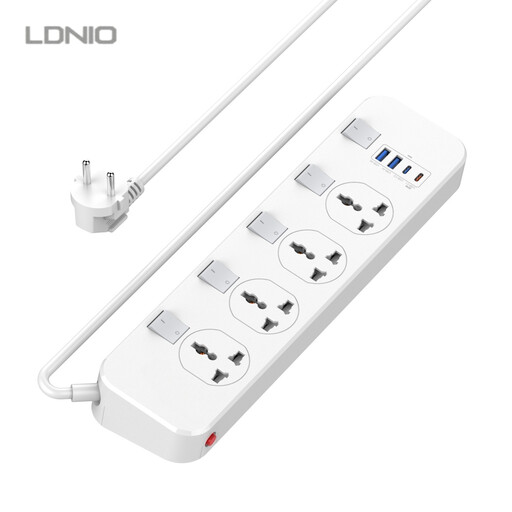
Why It Stands Out This model combines a wide range of ports with modern charging features. The four universal sockets, complemented by two USB-A ports and a powerful 20W USB-C PD port, make it a versatile hub for international devices and current tech. Each of the four AC outlets and the entire USB block can be controlled by its own switch.
Pros
Who Is It For? Home office users or tech-savvy individuals who need a central charging station for various devices, including those that benefit from USB-C PD.
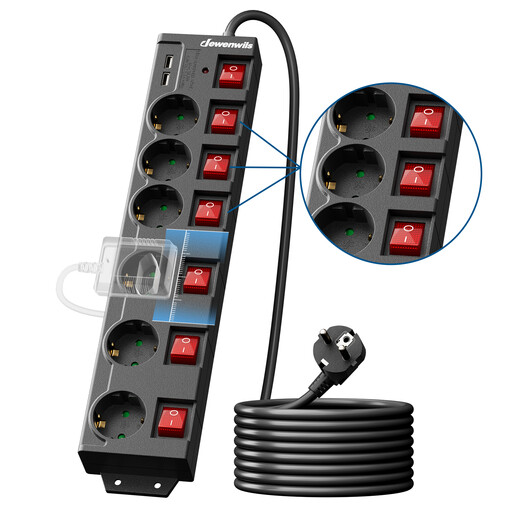
Why It Stands Out This switched power strip focuses on classic functionality and durability. It offers six individually switched outlets plus a master switch. The 90-degree rotated sockets are particularly practical, as they allow the use of bulky power adapters without blocking adjacent slots.
Pros
Who Is It For? Users who need reliable and safe power distribution for a larger number of devices with conventional plugs, such as in workshops, offices, or for extensive home theatre systems.
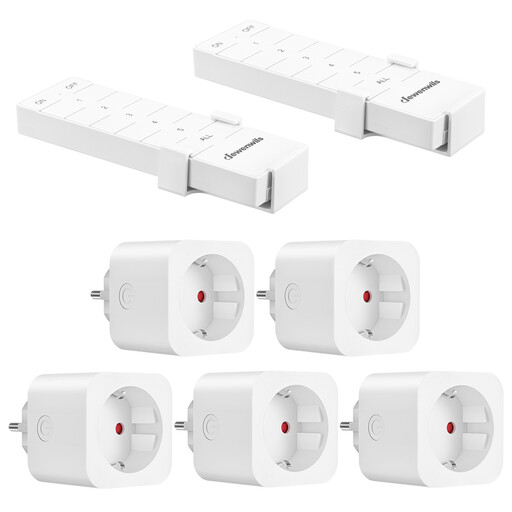
Why It Stands Out This kit is not a traditional power strip but a flexible alternative for remotely controlling appliances. It consists of five individual outlet adapters and two remote controls. Installation requires no wiring—just plug and play. The strong RF signal penetrates walls and furniture.
Pros
Who Is It For? Users who appreciate the convenience of remote control and want to switch individual devices scattered around a room without using a central strip.
If the models presented here don't exactly match your requirements, there is a wide range of other solutions available. From compact strips for travel to professional 19-inch strips for server racks, the selection is vast.
? Discover more models in our Power Strips with Cord category
An individual switch allows you to selectively cut power to a specific device without affecting other connected appliances. This is ideal for eliminating standby power consumption and saving energy without having to unplug the device every time.
A surge protector defends connected electronic devices against short-term, high voltage spikes in the power grid. Such spikes can be caused by nearby lightning strikes or by switching operations in the power grid, and can damage sensitive electronics like computers, TVs, or hi-fi systems.
Yes, if the power strip has a USB-C port with Power Delivery (PD) and its power output is sufficient for your laptop model. Many modern ultrabooks and MacBooks can be charged via USB-C PD. Check your laptop's power requirement (in watts) and compare it with the specification of the power strip's USB-C port. For high-performance gaming laptops, the power output is often insufficient.