Teams with fixed workstations on multiple floors
If you need to connect PCs or existing network storage, the main thing to check is whether the connection works at the actual workstations.


For desktop PCs or network storage across floors, a wired Powerline kit is a sensible place to start. You’ll only need Wi-Fi on the destination floor if you also want to connect mobile devices. The key is to test the connection at the wall sockets you plan to use: your building’s electrical wiring and potential sources of interference can affect performance, and the stated Powerline rate is not a guaranteed file transfer speed. Powerline provides the network connection, not file storage or access permissions.
If you need to connect PCs or existing network storage, the main thing to check is whether the connection works at the actual workstations.
For large files, the transfer speed you can achieve between devices and having the right LAN ports matter more than the advertised Powerline rate alone.
If you also want to connect laptops or other mobile devices on another floor, check how many LAN ports you need as well as whether you’ll need Wi-Fi.
Suitable if: you need to connect desktop PCs or network storage via Ethernet, and don’t need additional Wi-Fi on the destination floor.
Consider: A two-adapter kit initially connects two locations; check whether you’ll need additional adapters and ports for more workstations.
Suitable if: you need to connect mobile devices as well as fixed equipment on another floor.
Consider: The Wi-Fi feature doesn’t remove the need to test the Powerline connection. Also compare the number of LAN ports on the destination adapter.
Suitable if: you want to add another workstation or room to a network that’s already set up.
Consider: The additional adapter must be compatible with your existing technology range and specific model.
Suitable if: you already have a suitable network cable, or can run one to a particularly important workstation.
Consider: Installing a new cable may involve building work. You’ll need to check which connection can deliver the transfer speed you need for your particular setup.
| Buying priority | What to check before buying | Who is this important to? |
|---|---|---|
| Connection between floors | Test the kit at the wall sockets you plan to use, and check the connection while nearby electrical appliances are running as usual. | If I need reliable network access on several floors, I want to test the connection at the actual workstations. Around 36% of consumers put connecting floors first. |
| Transferring large files | Check the LAN port and local transfer speed using representative files; consider Powerline and Wi-Fi rates separately. | When I regularly work with large project files, the transfer speed I can actually achieve matters more than the rate printed on the box. Around 29% of consumers prioritise file transfers. |
| LAN and Wi-Fi connections | Count the rooms and devices, work out how many LAN ports you need, and check whether you’ll need Wi-Fi on the destination floor. | If several devices are used on another floor, I want to plan for the right LAN connections and Wi-Fi if needed. Around 21% of consumers check these connection options first. |
| Compatibility with existing adapters | Check the full model names and technology ranges of your existing adapters. | If you want to keep using your existing adapters, check compatibility before buying an additional one. Around 14% of consumers prioritise extending their existing network with a compatible adapter. |
The manufacturer’s stated rate isn’t a measure of file transfer speeds at the sockets in your building. Performance can be affected by the electrical wiring and how the adapters are positioned.
Test the connection between the floors you plan to use with representative files. Check the LAN port speed separately from the Powerline and Wi-Fi rates.
A kit with two adapters initially connects two locations. You’ll need to account for any additional rooms and devices when planning your setup.
Count your workstations and the connections you’ll need before choosing a starter, network or expansion kit.
devolo explicitly states that Magic and dLAN products cannot be used together as compatible Powerline adapters.
Before buying an additional adapter, check the full model names of your existing ones and make sure they belong to the same technology range.
The devolo Magic 2 LAN DINrail is designed for installation in a distribution board. devolo requires this to be done by a suitably qualified electrician.
Check the installation requirements and costs separately if you’re planning a solution for a distribution board.
This device may need to be installed by a qualified electrician.
Worth considering if you’re choosing between Magic LAN kits, Magic Wi-Fi kits and adapters to extend your setup to other rooms.
Worth considering if you’re looking for a LAN kit with a pass-through socket, or a Wi-Fi Powerline kit with several LAN ports.
Worth considering if you want Wi-Fi as well as a connection between floors, along with the mesh features designed for the FRITZ!Powerline 1240 AX Set.
Joybuy’s selection of network connections for workstations on multiple floors includes wired options and models with Wi-Fi.
 No image available
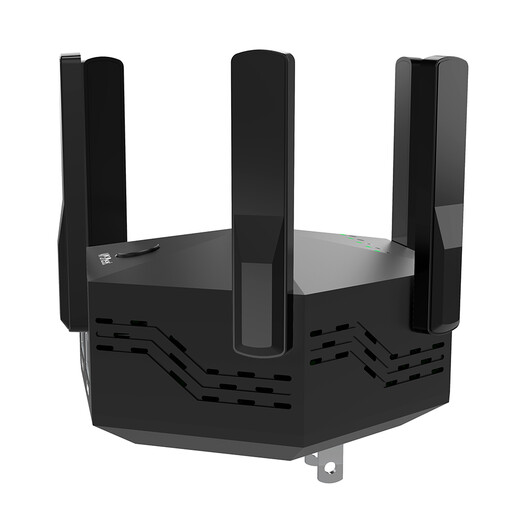
The product name describes a signal booster. If you need a Powerline connection between floors, check before buying that this device actually provides the type of connection you need.
The product name lists dual-band, 1200 Mbps, 6 adjustable antennas and an EU plug.
 No image available
For a fixed Ethernet workstation, this model is described as a wired Powerline kit. You’ll need to test the connection at the wall sockets you plan to use.
The product details list HomePlug AV2, 1000 Mbps, one Gigabit port and no Wi-Fi. For best performance, the description recommends plugging the adapters directly into wall sockets.
 No image available
If you need Wi-Fi as well as a wired connection for devices on the destination floor, the product name lists this option. Check that the features suit your devices.
The details list AV600, Wi-Fi 600 Mbps and one Gigabit port. For best performance, plug the adapters directly into wall sockets rather than extension leads.
 No image available
For a fixed Ethernet workstation, the product name describes a Powerline kit with a pass-through socket. Test the connection at the wall sockets you plan to use.
The details list AV1000, 1000 Mbps, one Gigabit port and no Wi-Fi. The description recommends plugging the adapters directly into wall sockets.
 No image available
The product description lists a two-adapter kit for a wired connection between two locations. You’ll need additional compatible adapters for any other locations.
The product details list AV600 and a pass-through socket. For best performance, plug the adapters directly into wall sockets.
No. A Powerline adapter provides a network connection for connected devices. You’ll need to set up file storage and access permissions on the PC, server or network storage you use.
Test the adapters at the wall sockets you plan to use. devolo recommends plugging them directly into the sockets rather than using an extension lead or multi-socket adaptor. If the connection is weak, check for possible sources of interference, such as power supplies or dimmer switches.
No, not as part of the same Magic Powerline network. devolo describes Magic adapters as compatible with one another and explicitly excludes dLAN adapters from use with Magic 2 LAN.
Devices supplied in Germany must meet the relevant electromagnetic compatibility requirements. CE marking is required where applicable harmonised EU legislation calls for it; it does not guarantee any particular transfer speed.
The statutory consumer rights generally apply against the seller; a manufacturer’s guarantee is separate and voluntary. The Verbraucherzentrale explicitly distinguishes between these rights. Check the guarantee terms for your purchase. If you’re buying as a business, don’t assume that consumer rights apply.