What should you look for?
First, test the connection at the sockets you’ll actually use and check your internet upload speed. Then choose LAN or Wi-Fi to suit the device you’ll use to upload your album.
| Consideration |
What to check before buying |
Who is it important for? |
| Connection between floors |
A new Powerline network needs at least two compatible adapters. Test the connection at the wall sockets you intend to use. |
If I’m transferring photos from another floor, the connection needs to work reliably all the way there. Around 36% of consumers would prioritise the connection between floors. |
| Actual cloud upload speed |
Measure your internet connection’s upload speed and compare it with the connection at your destination. The Bundesnetzagentur broadband measurement tool measures, among other things, the upload speed of your internet connection. |
If I want to upload my album to the cloud, I want to know whether the bottleneck is my internet connection or my home network. Around 29% of consumers would focus primarily on this upload bottleneck. |
| LAN or Wi-Fi at your destination |
Check whether you’ll connect a computer via Ethernet or need Wi-Fi for a smartphone or tablet. |
I need Wi-Fi at the other end for a wireless device; Ethernet may be suitable for a desktop computer. Around 21% of consumers would prioritise having Wi-Fi at their destination. |
| Extending coverage to more floors |
Count the locations you need to cover and check the exact adapter family. According to devolo, Magic and dLAN adapters can’t be combined in the same Powerline network. |
If I want to cover several floors or add to an existing network, any additional adapters need to be compatible. Around 14% of consumers would prioritise the need to extend their network. |
Products at Joybuy
The products below include Powerline kits for wired or wireless connections, as well as a multi-socket extension lead. Check the product type and choose the connection that suits your upload workspace.
 No image available
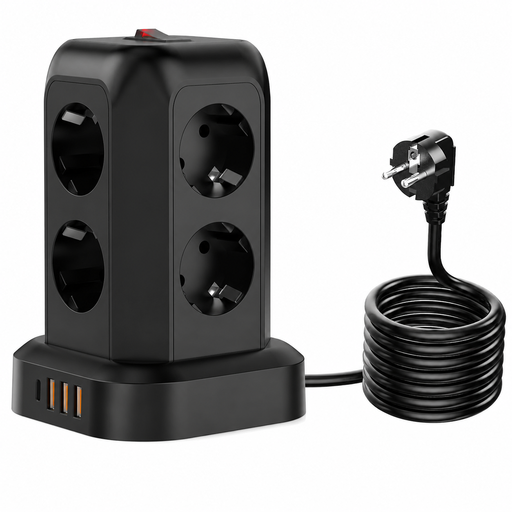
Power Strip Tower 12-in-1, 8 sockets and 4 USB ports
This product isn’t suitable for a Powerline connection between floors: the title describes a multi-socket extension lead, not a Powerline kit.
The title lists 8 sockets, 4 USB ports and surge protection.
View at Joybuy
 No image available
MERCUSYS MP300 KIT AV600 Powerline adapter kit
This option may suit you if you’re uploading photos from a smartphone or tablet and need Wi-Fi at your destination.
The product title lists WiFi 600 Mbps, a Gigabit port and compatibility with HomePlug AV/AV2.
View at Joybuy
 No image available
MERCUSYS MP500 Kit, 1000 Mbps HomePlug AV2, Gigabit port, no Wi-Fi
This wired option is worth considering if you have a desktop computer with an Ethernet connection; according to the product title, it doesn’t include Wi-Fi at the destination.
The title lists HomePlug AV2 and a Gigabit port. The stated data rate isn’t a measured cloud upload speed.
View at Joybuy
 No image available
MERCUSYS MP300P Powerline Adapter Kit AV600, 2-pack
This 2-pack is worth considering for a Powerline connection with wired Ethernet at the destination.
The product title lists AV600 and a pass-through socket.
View at Joybuy
 No image available
MERCUSYS MP500P KIT AV1000, Gigabit, pass-through socket
This Powerline option is worth considering for a wired computer at another location; test the connection route at the sockets you intend to use.
The product title lists AV1000, Gigabit and an additional pass-through socket.
View at Joybuy
Frequently asked questions
Is a single Powerline adapter enough?
To create a new connection between your router and another floor, you need at least two compatible adapters. A single additional adapter is designed for an existing, compatible Powerline network.
How can I check for a poor Powerline connection?
devolo recommends plugging adapters directly into wall sockets for everyday use, rather than using extension leads or multi-socket adaptors. Test the sockets you intend to use and check for possible sources of interference nearby. According to the manufacturer, a multi-socket adaptor can occasionally help with troubleshooting, but it isn’t generally recommended for positioning your adapters.
Does a high Powerline data rate show how quickly my photo album will upload to the cloud?
No. Measure your internet connection’s upload speed and compare the connection near your router with the one at your intended workspace. The Bundesnetzagentur broadband measurement tool measures, among other things, your internet upload speed; an advertised maximum Powerline data rate is a different figure.
Can existing devolo dLAN adapters extend a Magic network?
No. According to devolo, Magic and dLAN are different product ranges and can’t be combined in the same Powerline network.
What does the CE marking on a Powerline adapter mean?
CE marking is required for products covered by harmonised EU rules that require it. According to the European Union’s Your Europe website, the manufacturer is responsible for ensuring compliance; CE isn’t independent confirmation of a particular Powerline performance level.


