Presenters using their own computer
If your slides are running on the computer you’re recording on, try capturing a specific window before setting up extra hardware. OBS Studio explains how to record a selected window.


If your slides are running on the computer you’re recording on, first try capturing a specific window. You don’t automatically need a capture card. For a separate HDMI camera or a second computer showing your presentation, an HDMI-to-USB grabber may be suitable. If you have several external video sources, a video mixer is more likely to be the right choice. Plan for clear audio and privacy separately from the HDMI video signal.
If your slides are running on the computer you’re recording on, try capturing a specific window before setting up extra hardware. OBS Studio explains how to record a selected window.
To capture video from a separate camera or second computer, its HDMI output needs to be compatible with your recording device. OBS Studio lists capture cards as one option for video capture.
If you want to switch between a camera and a separate computer showing your slides during a presentation, an HDMI mixer is one possible solution. Blackmagic Design describes this use for the ATEM Mini range.
Don’t choose your video connection in isolation. HDMI capture, clear audio and a carefully limited recording area all need to suit your setup.
| What matters | What to check before buying | Who is it important to? |
|---|---|---|
| Clear speech | Set up the microphone as a separate audio source and listen back to a test recording at your usual room volume. | If I’m recording in a shared bedroom, I want my voice to remain clear despite possible background conversations. That’s why around 36% of consumers prioritise speech clarity. |
| The right signal path | Check your HDMI source, recording device and, where applicable, screen, along with the resolutions each one supports. | If you’re showing slides on the computer you’re recording on, you don’t want to set up extra hardware if capturing a specific window will do the job. That’s why around 29% of consumers prioritise the right signal path. |
| Privacy | Test the camera framing and audio in advance, and disable any camera or microphone sources you don’t need. | If other people might be in the room, I want to choose exactly what the camera and microphone pick up. Around 21% of consumers prioritise avoiding unintended recording. |
| Multiple video sources | Count how many HDMI sources you need at the same time and check whether you can switch between them during your presentation. | If you’re using a camera and slides on separate devices, you may need to switch between the sources. Around 14% of consumers prioritise support for multiple sources. |
OBS Studio can record a single window directly, so extra hardware isn’t automatically needed for this signal path.
Try capturing a window first, and only add hardware if you need an external source or another feature.
Extra hardware means more setup.
AVerMedia lists a maximum of 1080p60 for both recording and passthrough on the Live Gamer MINI GC311. The Hauppauge HD PVR Pro 60 downscales a 4K input to 1080p60 for recording.
Check the specifications for the model you’re considering, and compare HDMI input, recording and HDMI output separately.
OBS Studio warns that its filter may have little effect in very noisy surroundings and can alter your voice.
Reduce background noise where possible, then listen to a test recording made in the room as it will be during your presentation.
Extra inputs and switching features are most useful when you need several external video sources.
Count the sources you’ll need at the same time first. A single-channel grabber may be enough for just one external HDMI source.
A mixer means extra cabling and setup.
The Cam Link 4K is designed to connect a single HDMI camera as a USB video source; the Game Capture 4K S also offers HDMI passthrough.
The Live Gamer MINI GC311 is an external single-channel grabber for Full HD; the Live Gamer ULTRA 2.1 GC553G2 is designed for different recording and passthrough requirements.
The ATEM Mini range is worth considering for presentations using several external HDMI sources, such as a camera and a separate computer showing your slides.
As well as working with a computer, the HD PVR Pro 60 can record from an external HDMI source to an SD card without a computer.
These products are designed to record an external HDMI source on a computer. If your slides are already running on the computer you’re recording on, first check whether capturing a window will do the job.
 No image available
For recording an external HDMI source on your computer. Check that the source output matches the supported signal formats.
USB 3.0; 5 ports; 4K/60 input and passthrough; recording at 1080p/60.
 No image available
An option for an external HDMI source with a screen in the signal path. Check the input, recording and passthrough resolutions separately.
USB 3.0; 5 ports; 4K/60 input and loop-through; recording at 1080p/60.
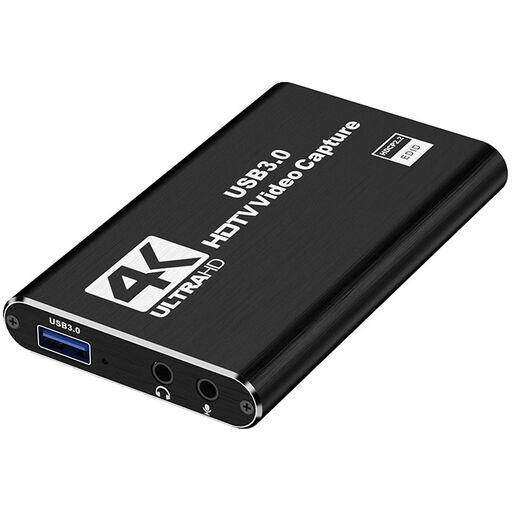 No image available
For connecting an external HDMI source to a PC or laptop. Compare the input resolution with the actual output from your source.
USB 3.0; HDMI input up to 4K/30 Hz; 4K passthrough; recording at 1080p/60 Hz.
 No image available
For recording an external HDMI source on your computer. The listed operating systems are Windows, macOS and Linux.
USB 3.0; recording at 1080p; 4K HDMI passthrough.
Performance may be limited when connected via USB 2.0, according to the product description.
 No image available
For connecting an external HDMI source to your computer. The extra audio connections don’t replace the need to check for background noise.
USB 3.0; video recording up to 1080p; 4K HDMI passthrough; UVC and UAC support; microphone input and headphone output.
Yes. OBS Studio lets you record a specific window. Make a short test recording to check that it captures slide changes and the audio you need.
No. Capturing HDMI video and recording audio through a microphone are separate things. OBS Studio describes noise suppression as a possible help with mild background noise, not loud noise; stronger filtering can alter your voice.
First, check that the camera outputs an unencrypted HDMI signal that’s compatible with the grabber. In OBS Studio, you can select a recognised capture card as a video capture device. Then check the picture and sound in a test recording.
According to the manufacturer, standalone mode on the Hauppauge HD PVR Pro 60 requires an SD card and a separate USB power supply, which isn’t included. Check what’s included with other models separately.
Buying a capture card doesn’t give you blanket permission to record. The German Data Protection Conference’s 2020 guidance on organisational video conferences discusses checking the legal basis for recording and informing the people affected. People in your home may also be affected by the processing of image and audio data. Whether a specific recording is permitted depends, among other things, on who is involved, the purpose and how the recording will be used.