
Lieferung heute & morgen

Qualitätsgarantie

Willkommens-Angebote freischalten: KOSTENLOSE Lieferung | Bis zu 80 % RABATT | Kostenlose 30-Tage-JoyPlus-Testphase
App herunterladen
A printer is one of those devices whose true costs and limitations often only become clear after you buy it. A low purchase price tells you little about the cost of ink cartridges or toner, the paper sizes it supports or how much space it needs. So if you’re looking for a printer for working from home, studying, photos, labels or creative projects, don’t focus solely on resolution and print speed.
With an inkjet printer, cartridges can make up a large share of the ongoing costs. Before you buy, check:
A laser printer uses toner and is often a good choice for regular text documents. A black-and-white printer doesn’t need colour cartridges, while a colour printer offers more flexibility for presentations, graphics and photos.
A Wi-Fi printer usually needs a compatible network and the right setup via an app or driver. A Bluetooth printer, on the other hand, connects directly to a smartphone or tablet, but may not be designed for multiple users or large print jobs.
Check which standards the printer actually supports: Wi-Fi, Bluetooth, USB, AirPrint, Mopria or Wi-Fi Direct. A mobile printer can be useful when you’re out and about, while a home-office printer will often also need a scanner, copier and larger paper tray.
The stated speed often applies only under specific conditions, such as printing on standard paper in black and white. Actual print times may vary for photos, colour documents or complex graphics. So consider whether you need a fast printer for high page volumes or a more versatile option for occasional jobs.
A4 is the main standard for everyday documents in Germany. If you need to print labels, envelopes or index cards, check which media and paper weights the printer supports. A printer with duplex printing prints on both sides automatically or manually. This can reduce paper use, but you’ll need to configure the driver and paper settings correctly.
An all-in-one printer combines printing, scanning and copying. For multi-page documents, an automatic document feeder, or ADF, is useful. Also check the paper tray capacity and maximum monthly duty cycle.
Measure the space where you plan to put the printer, allowing for cables and the paper tray when open. Compact models such as the Pantum BP2300W are worth considering for small desks. If the printer has a scanner or ADF, you’ll also need room to open the lid.
For Germany, the power supply and operating voltage should be compatible with the local mains supply. Specifications such as 220–240 V, 50/60 Hz are explicitly listed for several of the office printers in our selection. Regardless of the printer type, follow the manufacturer’s guidance on safety clearances and ventilation.
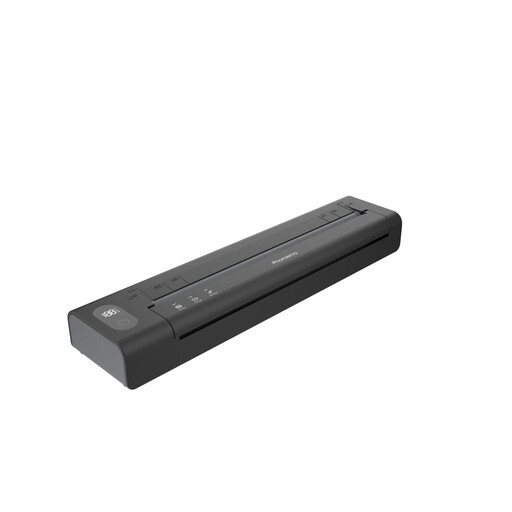
Why it suits this user: Weighing just 600 g, this wireless printer is designed for printing documents on the go, at university or for occasional use at home. It connects via Bluetooth using an app for iOS and Android.
According to the product details, its ink-free printing technology doesn’t require ink or toner cartridges. Even so, check which specialist print media are available before you buy.
Weighs 600 g, has a rechargeable battery and can print up to 150 pages per charge, according to the supplier.
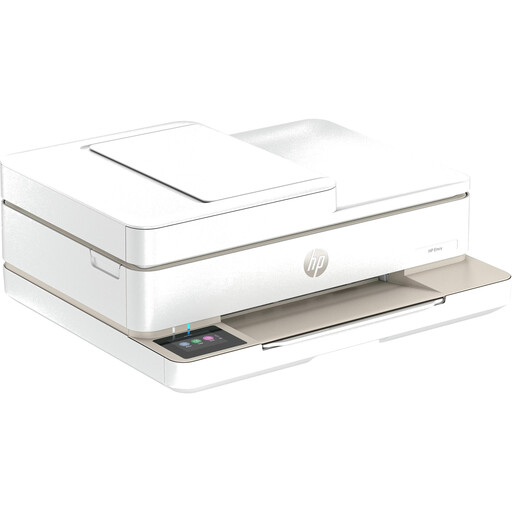
Why it suits this user: This all-in-one printer combines printing, scanning, copying and mobile faxing. With several functions in one device, it’s a good option for families, people working from home and smaller workspaces.
The specifications include automatic duplex printing, dual-band Wi-Fi, Bluetooth and USB. This gives you a choice of connection to suit your device and network.
ADF for multi-page documents, automatic duplex printing and print speeds of up to 13 pages per minute in black and white, according to the product details.
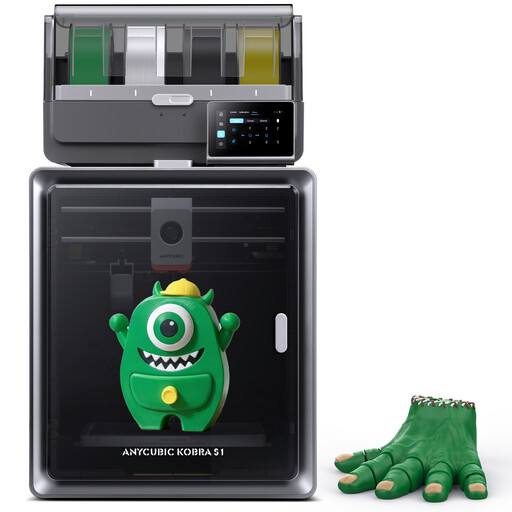
Why it suits this user: This 3D printer is aimed at makers and tech enthusiasts who want to create models using PLA, PETG, TPU, ABS or ASA. It has a print volume of 250 × 250 × 250 mm.
The supported materials, nozzle temperature of up to 320 °C and automatic levelling are all clearly specified. High temperatures mean you’ll need a suitable, supervised location for the printer.
CoreXY structure, multicolour printing with 4 or 8 colours, and a stated maximum print speed of 600 mm/s.
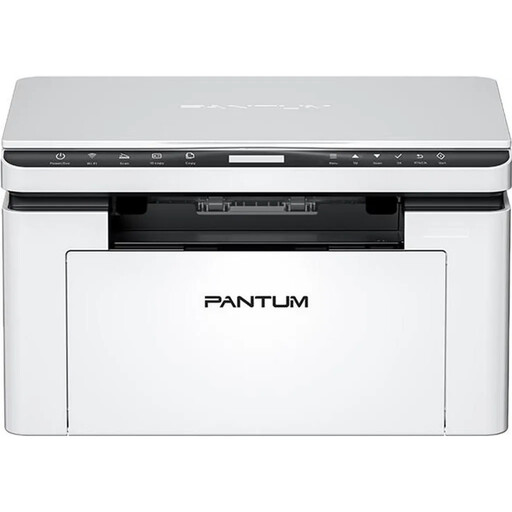
Why it suits this user: This black-and-white all-in-one printer is designed for documents in a home office or small business, combining printing, copying and scanning.
The printing technology, A4 format, toner configuration and recommended monthly volume of 250 to 2,000 pages are all clearly specified.
Print speeds of up to 22 pages per minute, dual-band Wi-Fi, Bluetooth, USB and a paper tray that holds up to 150 sheets, according to the product details.
We’ve put together a complete, regularly updated list of products that meet these strict selection criteria and fully comply with the safety regulations in force in the EU.
An all-in-one printer with Wi-Fi, a scanner and duplex printing is often a practical choice for working from home. If you mainly print text, you could choose a black-and-white laser printer with enough paper capacity. For colour graphics and occasional photos, an inkjet printer may be a better fit. The key factors are print volume, cartridge or toner costs and the space you have available.
A printer’s lifespan depends on print volume, maintenance, paper quality and the printing technology it uses. Avoid damp or dusty locations, don’t block the ventilation openings and use the device according to the manufacturer’s instructions. For laser printers, factor in toner and the fuser unit; for inkjet printers, consider cartridges and printhead maintenance.
Costs include supplies, paper and, where applicable, maintenance. Divide the price of an ink or toner cartridge by its stated page yield, then add the cost of the paper. If you’re using a photo or thermal printer, remember to include the cost of the relevant specialist paper too.