
Lieferung heute & morgen

Qualitätsgarantie

Willkommens-Angebote freischalten: KOSTENLOSE Lieferung | Bis zu 80 % RABATT | Kostenlose 30-Tage-JoyPlus-Testphase
App herunterladen
If you’re looking to buy a printer, you’ll soon find yourself facing a bewildering choice. Laser printers, multifunction printers, Wi-Fi printers, portable photo printers and 3D printers differ not only in price, but also in running costs, space requirements and ease of use. So the key isn’t finding the longest list of features, but choosing a printer that suits the way you’ll actually use it.
A figure such as ‘up to 600 mm/s’ for a 3D printer or ‘22 pages per minute’ for a laser printer refers to a maximum or standardised value. In practice, warm-up time, file size, materials, print quality and the first page all affect the result. A fast printer won’t necessarily be right for every workspace.
Before buying an inkjet or specialist printer, check the cost of consumables. These can include toner, photo paper, UV ink, filament or resin. Portable printers often use proprietary paper formats, too. A model that doesn’t use conventional ink may save you from buying cartridges, but it will still need compatible thermal or Zink paper.
‘Duplex’ can mean automatic double-sided printing or simply that you have to turn the paper over manually. Wi-Fi doesn’t necessarily mean that every service, such as AirPrint, Mopria or Wi-Fi Direct, is supported. So check the exact specifications and compatibility with your operating system.
For text documents in a home office or small business, a monochrome laser printer is often straightforward to maintain and run. A colour laser printer is a good choice if you regularly print colour graphics or presentations. A multifunction printer combines printing, scanning and copying, saving you from needing a separate device.
Creative projects call for different considerations:
A4 is suitable for most personal and business documents. Other sizes may be useful for photos, labels or creative projects. Your monthly print volume should suit the class of printer you choose. According to the product information, the recommended operating range for the Pantum BM2300NW is 250 to 2,000 pages per month, while its maximum duty cycle is listed as 10,000 pages. These figures are intended as a guide, not as a recommendation to run the printer at full capacity all the time.
With automatic duplex printing, the printer turns the paper over for you. This reduces manual work and can cut paper use when printing long documents. If this feature isn’t available, the product description should clearly distinguish between automatic and manual duplex printing.
A Wi-Fi printer should work with your network and devices. Relevant specifications include 2.4 GHz or 5 GHz Wi-Fi, Bluetooth, USB, Ethernet, AirPrint, Mopria and the manufacturer’s app. Also check that it supports Windows, macOS, Linux, Android and iOS. For a home office printer, easy set-up is just as important as having a good signal where you plan to put it.
Place the printer on a stable, dry and well-ventilated surface. Bear in mind that laser printers have hot internal components. FDM and resin printers need extra care because of moving parts, heat or liquid resin. Follow the manufacturer’s instructions and the applicable disposal rules for electrical equipment and consumables.
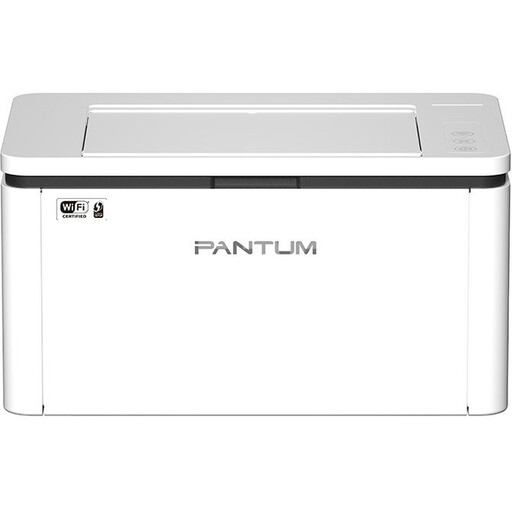
Why it suits this profile: This compact monochrome laser printer is designed for A4 text documents, invoices and paperwork in a home workspace. Wi-Fi, Bluetooth, USB, AirPrint and Mopria offer a range of connection options.
The specifications explicitly state that duplex printing is manual. This makes it clear what to expect before you buy, rather than leading you to assume the printer turns pages automatically.
Print speeds of up to 23 pages per minute, a 150-sheet input tray, 256 MB of memory and an 800 MHz processor, according to the product information.
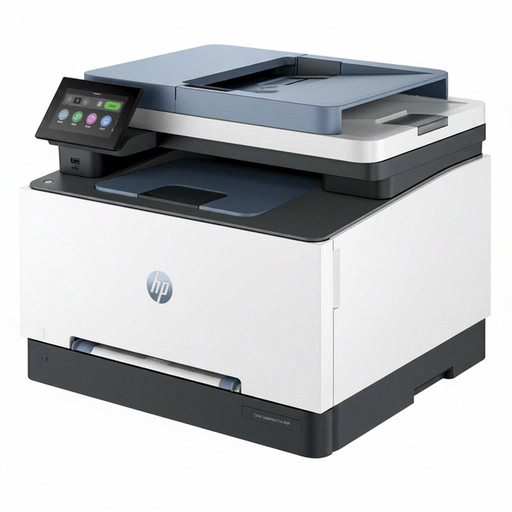
Why it suits this profile: This colour laser multifunction printer combines printing, scanning and copying with automatic double-sided printing, plus Wi-Fi, Ethernet and USB connectivity.
The specifications explicitly list automatic double-sided printing. They also state that the printer has two paper trays and a total capacity of 350 sheets.
Print speeds of up to 25 pages per minute in colour and black and white, plus touchscreen controls, according to the product description.
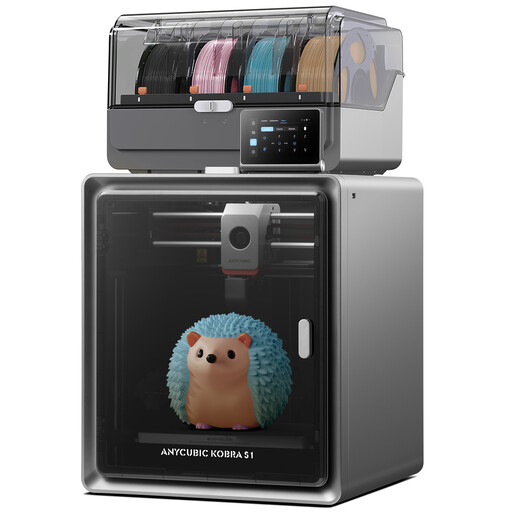
Why it suits this profile: This enclosed CoreXY multicolour 3D printer is aimed at makers and model builders looking to combine multiple colours, larger components and automated features.
The colour capacity is clearly stated: four colours as standard, expandable to up to 16 colours with compatible units. So check which accessories are included before buying.
260 °C? No: the maximum nozzle temperature is 320 °C, according to the specifications. It also offers a 250 × 250 × 250 mm build volume, filament drying at up to 65 °C and print speeds of up to 600 mm/s.
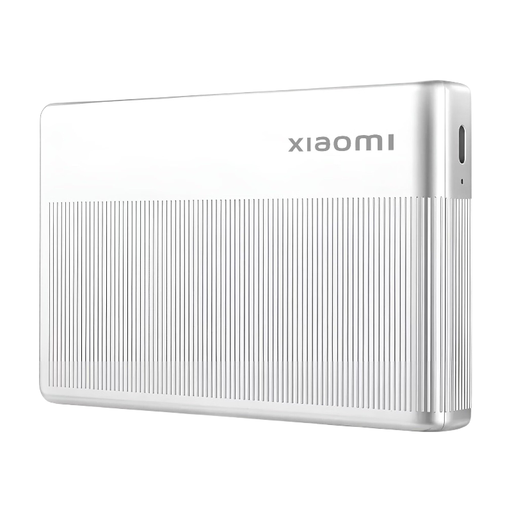
Why it suits this profile: This compact model prints small photos straight from your smartphone. Thanks to Zink technology, it doesn’t need ink cartridges or ribbons.
The print size is clearly specified: 50 × 76 mm or 2 × 3 inches. If you need to print A4 documents, choose a suitable document printer instead.
Weighs 180 g, connects via Bluetooth, holds up to ten sheets and supports iOS and Android.
We’ve put together a complete, regularly updated list of products that meet these strict selection criteria and fully comply with the safety regulations in force in the EU.
If you mainly print black-and-white text, a monochrome laser printer is worth considering. If you also need to scan and copy, a multifunction printer is more practical. For colour presentations or graphics, choose a colour model with clearly stated running costs.
Factor in the cost of toner or ink, paper, specialist media and any replacement parts. For 3D printers, include filament, resin, build plates and cleaning products in your budget. For a portable photo printer, compatible Zink paper is a significant ongoing cost.
A printer’s lifespan depends on print volume, maintenance, its surroundings and the consumables you use. Clean the print head, print bed or scanner as instructed by the manufacturer, keep the printer away from damp and avoid running it at full capacity all the time. For 3D printers, check the nozzles, build plates and filament storage regularly.