
Lieferung heute & morgen

Qualitätsgarantie

Willkommens-Angebote freischalten: KOSTENLOSE Lieferung | Bis zu 80 % RABATT | Kostenlose 30-Tage-JoyPlus-Testphase
App herunterladen
Empty printer cartridges are a recurring nuisance, and finding a solution is often more expensive and complicated than necessary. When buying replacement cartridges, many users fall into traps that not only strain their wallets but can also jeopardise the printer's functionality. From supposed bargains that clog the printhead to compatibility issues that paralyse the printer – the selection is overwhelming.
As your Joybuy Product Recommendation Officer, I'll help you navigate these pitfalls. We will focus on the crucial, objective criteria to help you find the right ink cartridges or toner for your needs, without being swayed by marketing promises.
Before we turn to the solutions, it's important to understand the most common problems that lead to frustration and unnecessary costs.
To avoid a bad purchase, you should focus on verifiable facts. These three parameters are essential for making an informed decision.
This is the most important factor. Every printer uses a specific series of cartridges. You can find this number on the old cartridge, in the printer's manual, or on the manufacturer's website. Examples include HP 303XL, Canon PG-540, or Brother TN-247. When buying printer cartridges, matching this number is crucial, whether you opt for original printer cartridges or compatible printer cartridges. An incorrect number will inevitably lead to incompatibility.
The page yield indicates how many pages a cartridge can print. To allow for an objective comparison, this is measured according to international standards like ISO/IEC 24711 for ink cartridges or ISO/IEC 19752 for monochrome laser printers. This specification (e.g., "up to 600 pages") is based on a standardised test document with 5% page coverage. Look for this standard to calculate the true cost per page and identify cost-effective printer cartridges with high efficiency.
The choice between ink and toner depends on your printing habits:
Here are some recommendations tailored to different needs and budgets, specifically designed to avoid the pitfalls mentioned.
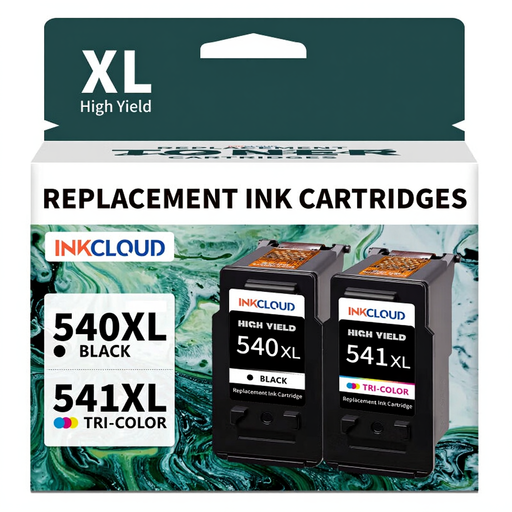
Why it's a good fit: This set is an economical solution for families and home offices that regularly print documents, schoolwork, or occasional colour prints. It covers the needs of common Canon PIXMA printers.
The XL capacity offers a higher page yield and thus a lower cost per page than standard cartridges. The clear model compatibility (PG-540XL/CL-541XL) minimises the risk of a bad purchase.
Provides a complete set of high-capacity black and colour cartridges at an attractive price-performance ratio.
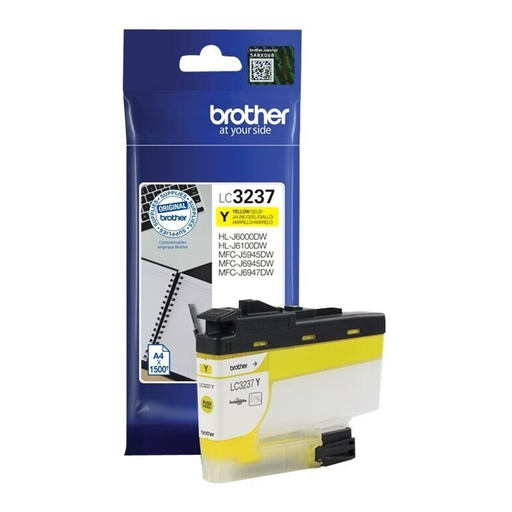
Why it's a good fit: For office environments where reliability, document permanence (PTS certification), and consistently high print quality are crucial. Ideal for high-volume Brother business inkjet printers.
As an original manufacturer's cartridge, it eliminates all compatibility and quality issues. The high yield of up to 1,500 pages (according to ISO 24711) ensures a predictable and low cost per page.
Guarantees full printer functionality and protects the device warranty. The PTS certification ensures document permanence for official records.
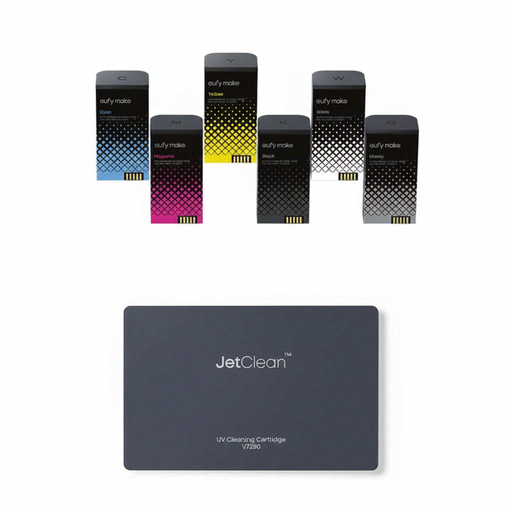
Why it's a good fit: This set is designed exclusively for professional studios and workshops using the eufyMake E1 UV printer to print on a variety of materials like glass, metal, or plastic.
With specialty devices like UV printers, using non-specified ink is extremely risky. This original set guarantees chemical compatibility, adhesion on over 300 materials, and protects the expensive printhead.
Includes a complete 6-colour UV ink set (CMYK, White, Varnish) as well as an integrated cleaning cartridge for automatic maintenance and extending the printhead's lifespan.
We have compiled a complete, up-to-date list of products that fully meet these strict selection criteria and UK regulations.
The decision depends on your priorities. Original printer cartridges (OEM) offer manufacturer-guaranteed compatibility, quality, and reliability. They are often the safest choice, especially for new printers or when top print quality is essential. Compatible printer cartridges from reputable third-party suppliers offer significant savings potential and are a good option for everyday printing tasks. Look for suppliers who conduct quality checks and provide a functional guarantee.
Unopened and originally packaged printer cartridges generally have a shelf life of about two years. The manufacturing or expiration date is usually printed on the packaging. Once the seal is broken, an ink cartridge should ideally be used within six months, as the ink can otherwise dry out and clog the printhead nozzles. Store cartridges in a cool, dry, and dark place.
First, check that you have purchased the correct cartridge number for your printer model. Remove all protective films or clips from the cartridge. Sometimes it helps to turn off the printer, unplug it from the power source for a few minutes, and then restart it with the cartridge installed. In some cases, a recent printer firmware update may be the cause. If so, contact the cartridge seller for a solution.