
Lieferung heute & morgen

Qualitätsgarantie

Willkommens-Angebote freischalten: KOSTENLOSE Lieferung | Bis zu 80 % RABATT | Kostenlose 30-Tage-JoyPlus-Testphase
App herunterladen
Whether you work from home, study or run a small office: printer cartridges and toner cartridges must above all be suitable for your printer model. A similar name is not enough. Even a different serial number, another colour variant or an incompatible chip can prevent the printer from recognising the cartridge.
This buying guide explains what to look for when choosing compatible printer cartridges, original printer cartridges, XL versions and toner cartridges.
“Canon”, “HP”, “Epson” and “Brother” are only the first indication. The exact model range and cartridge number are what matter. A Canon printer cartridge for a PIXMA series will not automatically fit every Canon device. The same applies to HP printer cartridges, Epson printer cartridges and Brother printer cartridges.
Before buying, check:
XL printer cartridges generally contain more ink than standard versions. However, the higher yield does not mean that the cartridge will fit all devices from the same brand. For example, a 953XL printer cartridge is intended for certain HP OfficeJet models, while a 912XL printer cartridge is suitable for selected HP OfficeJet devices in the 8000 series.
Canon and Epson also offer different series, such as 510XL, 511XL, Canon CLI-581 and Epson 603XL. The number must match the printer model’s approved cartridge specification.
Yield figures depend, among other things, on the print mode, colour coverage, document type and ISO standard. A high page count can decrease considerably faster with extensive colour graphics than with black-and-white printing containing little text.
Therefore, check whether the yield:
For toner cartridges, an approximate page count is usually given. This also depends on the printed image.
The cartridge code is the most important technical feature. Examples from popular series include Canon PGI-1500XL, Brother LC-3237Y, HP 953XL and HP 912XL. Do not search only for “Canon ink cartridges”; combine the brand, model and code.
The same applies to toner. A compatible toner, Canon toner, Brother toner or HP toner must be approved for the specific printer series. With laser printers, you should also check whether it is a complete cartridge with an integrated drum or a separate toner container.
Original printer cartridges come from the printer manufacturer. They are tailored to specific device series and are often chosen when reliable recognition, manufacturer support or a consistent colour profile is important.
Compatible printer cartridges are made by third-party manufacturers. When choosing, buyers should look for the following information:
With remanufactured cartridges, an existing casing is reused. This can be an alternative for budget-conscious users, but it requires precise model matching.
Ink cartridges are used in inkjet printers. Depending on the device, they are suitable for documents, graphics or photo printing. Toner cartridges belong to laser printers and contain fine toner powder. An ink cartridge is not compatible with a laser printer.
When handling both types of product, follow the safety instructions on the packaging. Ink should not come into contact with the eyes or mouth. Toner cartridges should be handled carefully and protected from heat, moisture and direct sunlight.
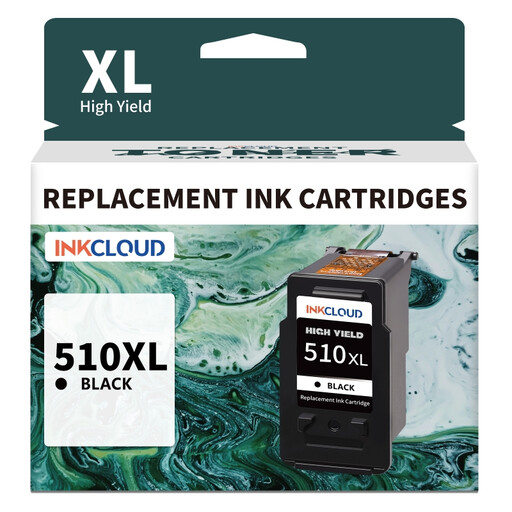
Why this product suits the profile: This remanufactured cartridge is intended for selected Canon PIXMA models such as iP2700, MP495 and MX410, and is aimed at users who regularly print documents.
The product description names specific PIXMA models and their compatibility with PG-510/CL-511 systems. This makes it easy to check compatibility before buying.
XL black cartridge; remanufactured design for use with the specified Canon PIXMA models.
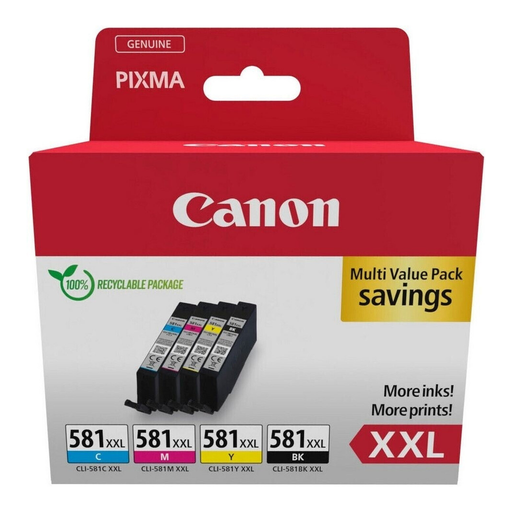
Why this product suits the profile: The multipack contains black and the three primary colours for compatible Canon PIXMA models such as TR8550, TS8150 and TS9150.
The compatibility list narrows down the suitable PIXMA series. The XXL capacity is not presented as universal compatibility.
Original multipack; four separate cartridges for replacing individual colours.
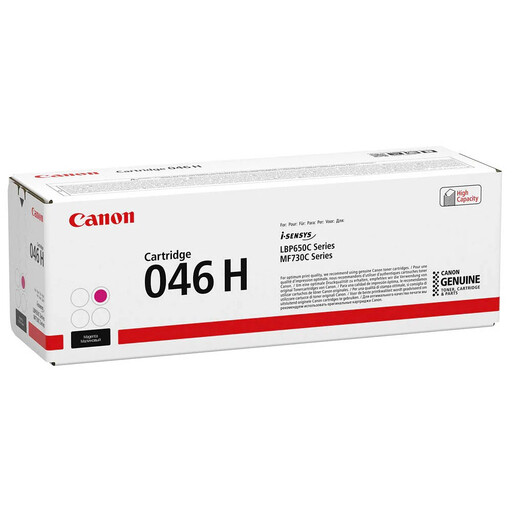
Why this product suits the profile: This original toner cartridge is intended for selected Canon i-SENSYS and imageCLASS models such as LBP653cdw and MF735cdw.
The product details specify the colour, cartridge code, printing technology and compatible product ranges. This prevents confusion with ink cartridges.
Magenta toner for laser printers; according to the product details, a yield of up to 5,000 pages at 5% coverage.
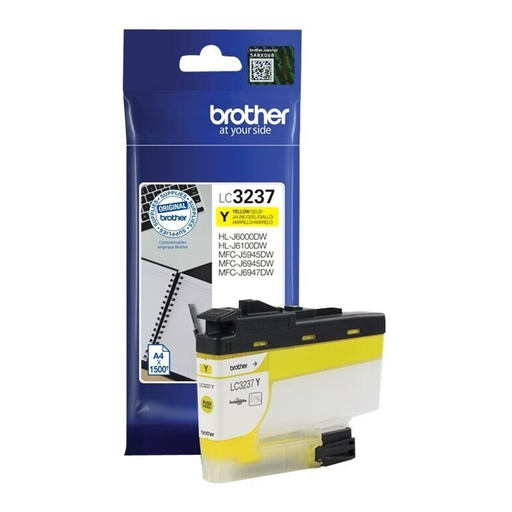
Why this product suits the profile: This individual yellow cartridge is suitable for compatible Brother devices such as MFC-J5945DW, MFC-J6947DW and HL-J6000DW.
The individual cartridge means you do not have to buy a complete set when only yellow has run out. The model list supports the compatibility check.
Original Brother cartridge; according to the product details, up to 1,500 A4 pages according to ISO 24711.
We have put together a complete, regularly updated list of products that fully meet these strict selection criteria and the safety regulations applicable in the EU.
First, find the exact printer model number. Then compare the cartridge code, colour and printing technology. The term “compatible” alone is not sufficient proof that the cartridge will fit.
The service life in the printer depends on the print volume, area coverage and cleaning cycles. According to the product details, XL cartridges can contain more pages than standard versions. With inkjet printers that are used infrequently, ink can affect print quality after the printer has been unused for an extended period.
The unit price is often lower, but it should be considered together with yield, ink quantity and replacement frequency. Wherever possible, compare the cost per stated page and check whether individual cartridges or multipacks better suit your usage.