
Lieferung heute & morgen

Qualitätsgarantie

Willkommens-Angebote freischalten: KOSTENLOSE Lieferung | Bis zu 80 % RABATT | Kostenlose 30-Tage-JoyPlus-Testphase
App herunterladen
An empty printer can quickly become a problem when you work from home, study or manage a busy family household. There is a wide choice of printer cartridges, ink cartridges and toner cartridges. However, the lowest unit price is often not what determines a good result. Compatibility, page yield and intended use are just as important.
Cartridge references such as HP 912XL, HP 953XL, Epson 603XL and Canon CLI-571XL may seem clear at first glance. However, small differences in printer series, chip version or colour variant can be crucial. For example, a cartridge for the HP OfficeJet 8020 will not automatically fit every HP device.
Before buying, check:
XL printer cartridges usually contain more ink than standard versions. However, the actual yield depends on the print content, ink coverage and print mode used. A colour-intensive photo uses considerably more ink than a short black-and-white document.
So do not just compare the pack price. Also look at:
Compatible printer cartridges are not original printer cartridges made by the device manufacturer. They can be a lower-cost alternative, but may differ in ink formulation, chip version and packaging information. For cartridges with a chip, the product description should clearly state which printer models and firmware versions they are designed for.
A toner cartridge with a chip is particularly relevant for colour laser printers. Among other things, the chip communicates information about the fill level and identifies the consumable. An up-to-date chip version may increase the likelihood of trouble-free recognition, but it does not replace checking the exact printer model.
The model list on the product page should name your device as fully as possible. When choosing HP cartridges, for example, look for the specific OfficeJet or OfficeJet Pro series. With Epson, the WorkForce and Expression Home ranges must be clearly distinguished. Depending on the printer series, Canon uses references such as PG, CLI and PGI. Brother cartridges are often identified by codes such as LC-223 or LC-3237.
Many printers use separate tanks for black, cyan, magenta and yellow. This is convenient because you only need to replace the colour that has run out. Before placing an order, check whether you need an individual cartridge or a complete colour set.
Photo printers may require additional colours such as grey, red or Matte Black. For example, a Canon CLI-571GY Grey cartridge should not be confused with an ordinary black printer cartridge.
Original printer cartridges are made by the printer manufacturer and matched to the relevant device series. They are the obvious choice when manufacturer specifications, consistent colour reproduction or documented page yields are particularly important.
Compatible and remanufactured cartridges may be worth considering for regular document printing at home or when working from home. What matters is a clear model list, a transparent ink capacity, a working chip and easy-to-follow installation instructions. With both types, remove the protective film and packaging immediately before installation, and do not touch the contacts or nozzles.
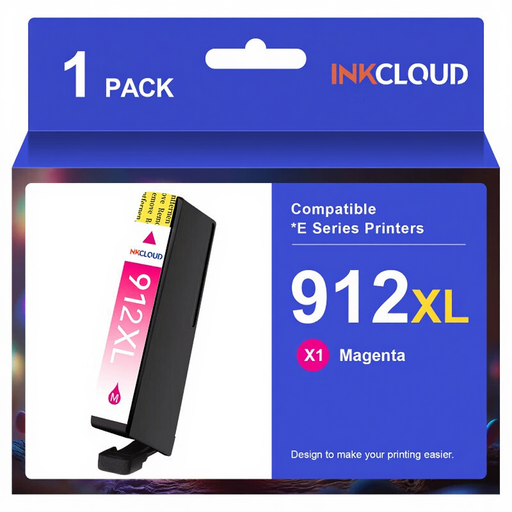
Why this product suits this profile: This individual magenta cartridge is designed for users of the HP OfficeJet 8020, 8022, 8024 and 8025 who only want to replace one colour.
The product name clearly states the supported HP models and the colour. You should still check it against your own printer before buying.
XL version and single pack; compatible option for the HP OfficeJet models listed.
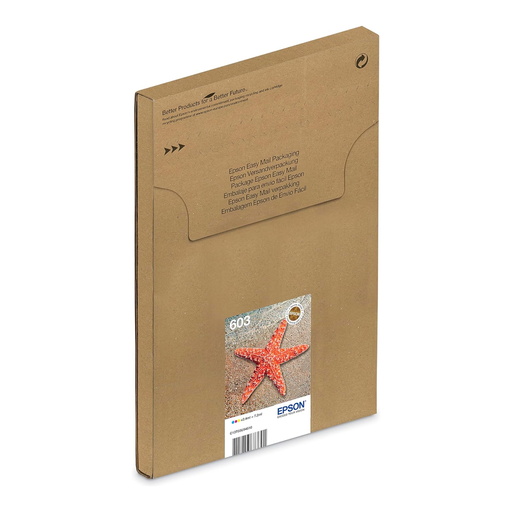
Why this product suits this profile: According to the product information, this original multipack contains three colours and is designed for numerous WorkForce and Expression Home models.
The model overview and original-product labelling make it easier to check compatibility before buying. The yield still depends on the type of printing you do.
Original Epson product, three-colour multipack and packaging described in the product information as supporting recycling.
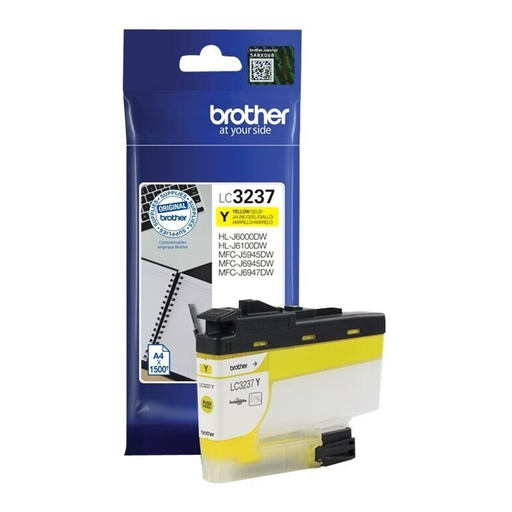
Why this product suits this profile: According to the product information, the yellow Brother LC-3237Y cartridge is designed for selected MFC and HL devices and offers a stated yield of up to 1,500 pages according to ISO 24711.
The specific printer list reduces the risk of choosing the wrong cartridge. The page figure is based on the ISO standard and will not be identical in every printing situation.
Original Brother consumable and stated high-yield version for specific devices.
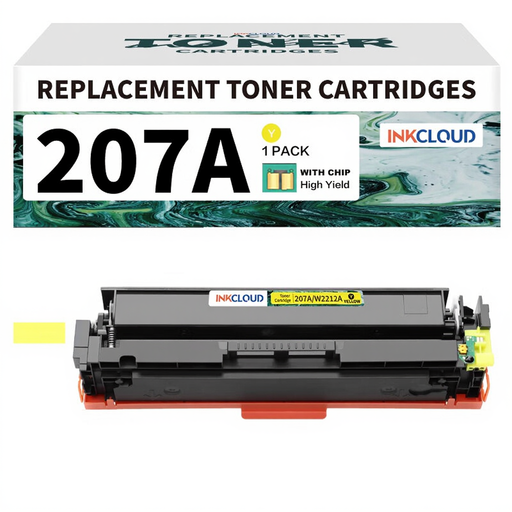
Why this product suits this profile: For compatible HP colour laser printers used in a home office, a toner cartridge with a chip can be a suitable option, provided the exact model matches.
The product information lists the intended HP models and states that a chip is pre-installed. Even so, check the printer reference before placing your order.
Colour laser toner rather than an ink cartridge, with a chip for communication with the HP printers listed.
We have put together a complete, regularly updated list of products that fully meet these strict selection criteria and the safety regulations applicable in the EU.
After opening the cartridge, remove the protective films as instructed in the user manual. Do not touch the chip or nozzle area. Insert each cartridge into the colour-coded slot, then run a nozzle check or print a test page.
Store unopened ink cartridges in a dry, cool place away from direct sunlight. Ink can stain skin, textiles and surfaces. If it comes into contact with your eyes, rinse them with plenty of water. Depending on your local authority’s requirements, empty cartridges should be taken to a collection scheme or recycling point rather than automatically placed in household waste.
The safest approach is to compare the printer model with the cartridge code. You can usually find both details on the old cartridge, in the printer menu or in the user manual. Also check the colour and whether you need a standard or XL version.
This depends on the ink capacity, print mode and colour coverage. An ISO yield provides a useful basis for comparison, but does not reflect every type of home or business use. If you only print in colour occasionally, storage and the time since opening may also matter more than the number of pages alone.
The purchase price is often lower, but it should not be considered in isolation. Compare the page yield, price per page, contents and returns policy. Frequent error messages or an unrecognised cartridge can reduce the practical saving.