
Lieferung heute & morgen

Qualitätsgarantie

Willkommens-Angebote freischalten: KOSTENLOSE Lieferung | Bis zu 80 % RABATT | Kostenlose 30-Tage-JoyPlus-Testphase
App herunterladen
Whether you need them for your home office, personal documents, photos or a small office workspace, printer cartridges must first and foremost be compatible with your device. A low price alone says little about page yield, printer recognition or the actual ongoing costs. If you search only by brand and colour, you risk buying the wrong product.
This buying guide explains what to look for when choosing compatible printer cartridges, original printer cartridges, XL versions and toner cartridges. Filament accessories for 3D printing users are also covered.
Names such as HP 912XL, HP 953XL and HP 117A may look similar, but they belong to different printer series. A cartridge for the HP OfficeJet 8020 is not automatically suitable for an OfficeJet Pro 8700. Always check:
The printer name on the casing is not always enough. Also consult the manual or the printer’s menu.
XL printer cartridges generally contain more ink than standard versions. However, the actual number of pages depends on coverage, print mode and the paper used. A statement such as “up to” is therefore a guideline, not a guarantee for every application.
For occasional printing, a standard cartridge may be more economical, as ink can dry out during long-term storage. If you print regularly at home or in the office, an XL cartridge can extend the intervals between replacements.
A multipack is not automatically cheaper if individual colours are used up at different rates. When printing colour documents, check whether the printer uses separate tanks for cyan, magenta, yellow and black. Individual colour cartridges reduce unnecessary replacement when only one colour has run out.
Also pay attention to:
Compatible printer cartridges are not made by the printer manufacturer, but are designed for specific models. With these products, information about the chip, firmware and supported devices is particularly important. An “Advanced Chip System” may support recognition; nevertheless, you should compare the specific printer list with your device.
Original printer cartridges are supplied by the respective manufacturer. They are generally clearly assigned to a particular printer series. Examples include Canon PIXMA cartridges such as CLI-551M, CLI-526 Y and PG-540, as well as Epson 603XL.
Colour inks differ in their colour names and cartridge series. A black printer cartridge may use pigment-based ink for text, while colour inks are often formulated on a dye basis. Laser printers, on the other hand, use toner cartridges rather than ink cartridges.
For photos or graphic work, check whether your printer uses additional colours such as Photo Blue, Red or Matte Black. The Canon CLI-581 PB, for example, is a single Photo Blue ink cartridge for selected PIXMA series. For a laser printer such as the HP Color LaserJet Pro 178nw, you need a suitable 117A toner cartridge.
Manufacturers’ page-yield figures generally refer to defined test conditions. According to the manufacturer, the Epson 603XL Cyan, for example, delivers up to 350 pages; the Canon CLI-36 is stated to deliver up to 249 A4 pages per colour tank in standard mode. These figures are only comparable when the measurement conditions are the same.
Store ink and toner:
Where possible, avoid touching the chip or nozzles on cartridges. After installation, it is advisable to run a nozzle check or print a test page. Empty cartridges should be disposed of in accordance with local requirements or through take-back schemes.
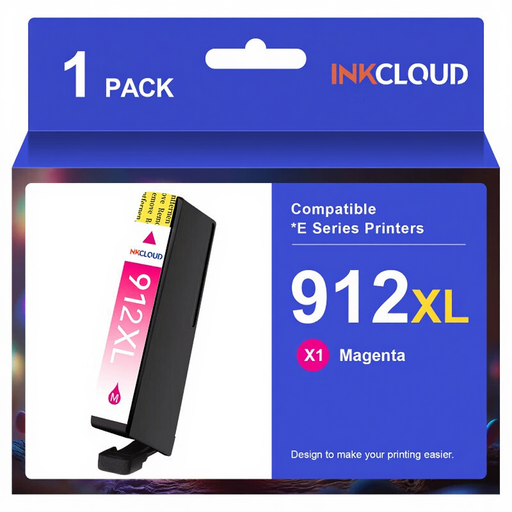
Why this product suits this profile: This single magenta cartridge is aimed at users of the listed HP OfficeJet models who are looking for an XL alternative for regular colour printing.
The compatible HP models are listed specifically, making it easy to check the model number before buying.
Single XL magenta colour cartridge; according to the product information, it is designed for HP OfficeJet 8020, 8022, 8024 and 8025.
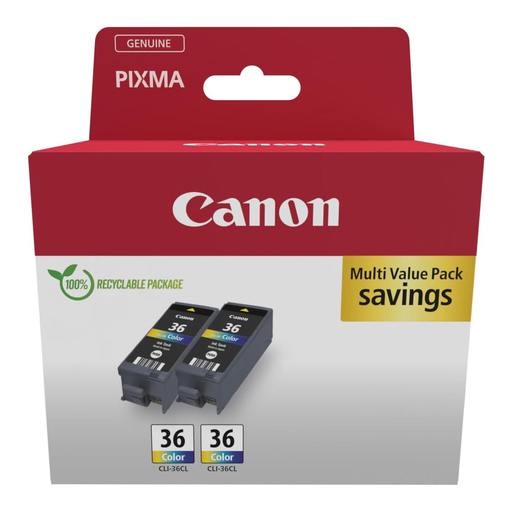
Why this product suits this profile: This original multipack is designed for mobile Canon PIXMA printers such as the iP100, iP110 and TR150, making it suitable for printing photos and documents on the go.
The compatible devices and yield of up to 249 A4 pages per tank are specified in the product information.
Original Canon ink, separate colour tanks and recyclable packaging according to the product description.
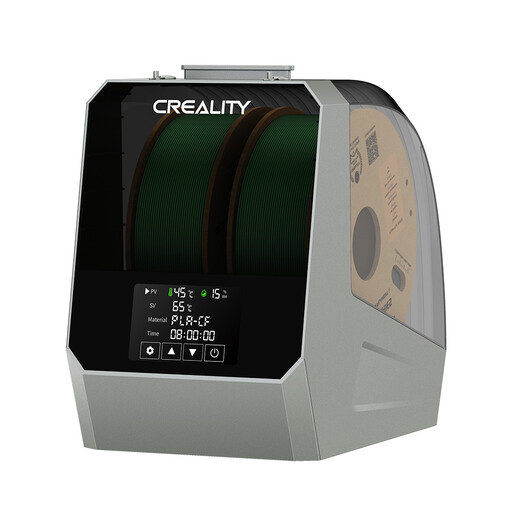
Why this product suits this profile: For 3D printing users who want to store PLA, PETG, ABS, TPU or other filaments and keep them at the right temperature while printing.
A temperature range of 45 to 70 °C and an adjustable duration of 0 to 48 hours are specified. However, you should still check the heat resistance of the spool.
Drying box for 1.75-mm and 2.85-mm filament with LCD control and the option to store filament in the chamber.
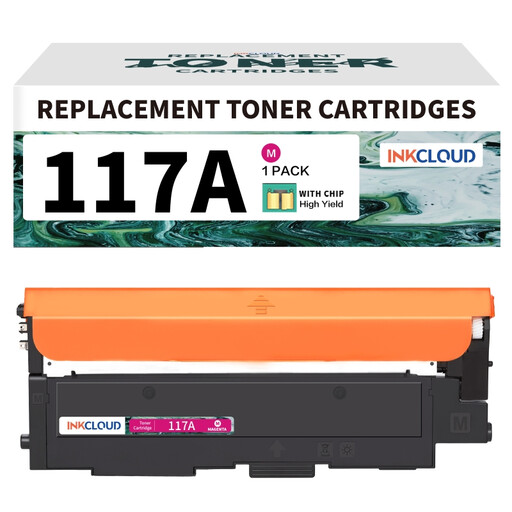
Why this product suits this profile: This magenta toner cartridge is designed for selected HP Color LaserJet Pro multifunction devices such as the 178nw and 178nwg.
The 117A cartridge series and supported printer models are clearly stated, helping to prevent confusion with ink cartridges.
Compatible toner for colour laser printers; installation and recognition are handled via the cartridge solution designed for this series.
For HP printers, HP 953XL cartridges are also available alongside 912XL. Here, you should take particular care to distinguish between OfficeJet and OfficeJet Pro models. For Epson WorkForce and Expression Home printers, the Epson 603XL series may be relevant.
Canon PIXMA printers use different systems depending on the device: CLI-551M as magenta ink, CLI-571XL Y as a yellow XL cartridge, PG-540 as a black printer cartridge, or PGI-72 as a multipack with Matte Black and colour inks. Photographers should check whether their printer uses special inks such as Matte Black, Red or Photo Blue.
Creative applications involving UV printing have different safety requirements from ordinary ink cartridges. A UV ink set such as the eufyMake set for the E1 is intended exclusively for the device it was designed for. Follow the manufacturer’s hazard information, personal protective equipment requirements and disposal instructions.
We have put together a complete, regularly updated list of products that fully meet these strict selection criteria and the safety regulations applicable in the EU.
Make a note of your printer’s full model number and compare it with the cartridge’s compatibility list. Also check the colour, cartridge series and whether you need an XL or standard size. Laser printers require toner rather than ink.
This depends on page yield, print coverage, paper and how frequently you print. Unopened cartridges should be stored in a dry, cool place protected from light. After installation, printing regularly can help prevent extended periods of inactivity. The relevant manufacturer’s specifications are authoritative.
Compatible cartridges often have a lower purchase price, but you should consider this alongside page yield, the recognition chip and return options. Original printer cartridges offer clear assignment to the respective brand. The key consideration is which combination of price, yield and printing reliability best suits your printing volume.