When choosing a monitor for product photography on a small desk, start with your intended output: an sRGB-focused screen may suit digital work, while a workflow using a wider colour gamut and hardware calibration has different requirements. Next, measure the space available, including the stand, and compare the native resolution and connections with your computer. A monitor alone can’t guarantee that your file, screen and printed product will match.
What different users need
Product photographers who need colour accuracy
If you edit product images regularly, you’ll want to assess colours using a suitable monitor and colour management workflow. EIZO explains that calibration is part of a consistent workflow, and that the print result and on-screen image may differ depending on the output profile.
Photo editors with limited desk space
On a small desk, the monitor stand, input devices and workspace all need to fit together. So compare the full dimensions of the specific model; BenQ and ASUS list the width and depth of their respective models, including the stand.
Image editors who need fine detail
If you check fine edges and areas of colour while keeping your tools visible, compare the native resolution with a screen size that suits your desk. The specifications from BenQ, EIZO Deutschland and ASUS Deutschland list different resolutions for the models considered here.
What to look for when buying
First decide whether you’ll mainly be working for digital output or as part of a print workflow. You can then compare desk space, image detail and connections more effectively.
When choosing a monitor for product photography on a small desk, your priorities will depend on colour matching, available space, image detail and how the monitor connects to your computer.
| What you need |
What to check before buying |
Who will find this most important? |
| Assess colours consistently |
Check the colour mode, calibration options and the specific model’s sensor requirements. EIZO points out that calibration can’t compensate for a colour gamut that’s too small or panel uniformity issues. |
If you edit product images regularly, you’ll want to assess colours using a suitable colour workflow; around 34% of consumers put repeatable colour assessment first. |
| Desk space and working position |
Compare the width and depth available with the full dimensions, including the stand. BenQ lists a depth of 262.6 mm with the stand for the SW242Q; ASUS lists 19.04 cm for the PA248QFV. |
On a small desk, you’ll need room for input devices and workspace as well as the monitor; around 33% of consumers therefore prioritise the space available. |
| Image detail and tools |
Compare native resolution and aspect ratio: BenQ lists 2560 × 1600 pixels for the SW242Q, while EIZO Deutschland and ASUS Deutschland each list 1920 × 1200 pixels for their respective models. |
If you want to check fine image detail while keeping your tools in view, the display should suit your preferred scaling; around 20% of consumers put image detail first. |
| The right connection for your computer |
Check that your computer’s video output and charging requirements match the monitor. BenQ lists 90 W USB-C Power Delivery for the SW242Q, while EIZO Deutschland lists up to 70 W for the CS2400S. |
If you want to keep the number of cables to a minimum, the video signal and charging power need to suit your computer; around 13% of consumers prioritise the connection. |
Avoid common buying mistakes
-
Confusing colour gamut coverage with accurate colour matching
A wide colour gamut alone won’t make up for an unsuitable workflow or differences between your monitor and printed output. EIZO also points out that a colour gamut that’s too small or panel uniformity issues can’t simply be calibrated away.
Start by deciding on your output, then check the colour mode, calibration process and, where appropriate, a suitable soft-proofing profile.
Depending on your workflow, you may need a suitable measuring sensor, as well as time for setup and recalibration.
-
Buying based on screen size alone, rather than the whole stand
The screen’s diagonal measurement doesn’t tell you how much desk space the stand will take up. Even a compact screen may have a stand that’s too deep for the space you’ve set aside.
Measure the available desk space and compare it with the full dimensions of the model you’re considering.
If you use a mount instead of the stand, you may need a compatible bracket.
-
Assuming USB-C guarantees a one-cable setup
Both video output and charging power need to work with your computer and the specific monitor. A USB-C connection alone doesn’t confirm that a particular laptop will receive a video signal and enough power over one cable.
Check the specifications of both devices before making docking features a deciding factor.
Depending on your computer and connection, you may need a separate charger or suitable cables.
Key brands at a glance
BenQ
The PhotoVue SW242Q is a 24.1-inch model with a wide colour gamut and hardware calibration.
- BenQ Deutschland lists 99% Adobe RGB, 100% sRGB, 2560 × 1600 pixels and 90 W USB-C Power Delivery for the SW242Q.
- The listed depth with the stand is 262.6 mm, so check it against the space available on your desk. These manufacturer specifications apply to this model.
EIZO
The ColorEdge CS2400S is a 24-inch model for workflows using a wide colour gamut and hardware calibration.
- EIZO Deutschland lists 99% Adobe RGB, uniformity correction and up to 70 W USB-C power delivery for the CS2400S.
- The native resolution is 1920 × 1200 pixels. Manufacturer specifications aren’t an independent comparative test.
ASUS
The ProArt PA248QFV is a 24.1-inch model with a 16:10 workspace for an sRGB-focused setup.
- ASUS Deutschland lists 100% sRGB, 1920 × 1200 pixels and VESA 100 × 100 mm.
- The listed depth with the stand is 19.04 cm. If you’re planning an Adobe RGB workflow, check the specifications for the specific model and workflow.
HP
The Series 5 Pro 524pf is a 23.8-inch FHD model for a compact, sRGB-focused setup.
- HP lists 100% sRGB and 1920 × 1080 pixels for the 524pf.
- Compare the listed colour gamut and intended workflow with your requirements, rather than assuming on that basis alone that it will be suitable for print output.
Dell
The UltraSharp U2424H is a 23.8-inch FHD model where adjustability and connections may matter alongside image editing.
- Dell lists 1920 × 1080 pixels and a height-adjustable stand for the U2424H.
- For a specialist colour workflow, check the colour gamut and calibration specifications for the exact model; the U2424H is not the U2424HE.
Joybuy monitors for compact workspaces
The Joybuy products below are compact FHD monitors with screen sizes from 23.8 to 24 inches. If accurate product colours are important to you, also check the colour gamut and calibration process for the specific model.
 No image available
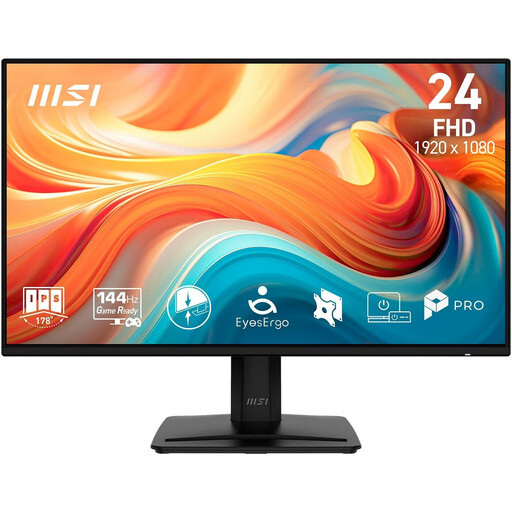
MSI PRO MP242DE E14A, 23.8-inch, Full HD, IPS
Could suit a compact FHD workspace if its full dimensions fit your desk.
23.8 inches, 1920 × 1080 pixels and IPS. The product description lists a depth of 18.8 cm with the stand, as well as VESA 100 × 100 mm.
View at Joybuy
 No image available
KOORUI MB24V29FS4, 24-inch, FHD, IPS
Could suit sRGB-focused editing if the stated colour gamut figure works for your workflow; it’s no substitute for a consistent colour workflow.
24 inches, 1920 × 1080 pixels, IPS and a 99% sRGB figure listed in the product title. VESA 100 × 100 mm and a tilt-adjustable stand are also listed.
View at Joybuy
 No image available
KTC H24B9S, 24-inch, FHD, IPS
If you’re considering this model for product photography, first check what the stated sRGB figure refers to; it can’t automatically be taken as sRGB coverage.
24 inches, 1920 × 1080 pixels and IPS. The product title lists 116% sRGB and a tilt-adjustable screen.
View at Joybuy
 No image available
Acer Vero B247YGbmiqprx, 24-inch, FHD, IPS
Could suit a compact workspace if the listed dimensions and mounting option work for your desk.
24 inches, 1920 × 1080 pixels and IPS. The product description lists a width of 54.03 cm, a depth of 18.61 cm, VESA 100 × 100 mm, height adjustment and pivot functionality.
View at Joybuy
 No image available
Acer Vero B248YGbemiqprcuzx, 23.8-inch, with 5 MP IR webcam
Could be a good fit if you want to add an FHD monitor with a height-adjustable stand and pivot functionality to your workspace.
23.8 inches and 1920 × 1080 pixels. The product title lists a 5 MP IR webcam with microphone; the product description includes height adjustment and pivot functionality.
View at Joybuy
Frequently asked questions
Is 99% Adobe RGB enough to make a print look the same as a product photo?
No. Colour gamut and calibration are only part of the workflow; the printing process and materials can affect the result. For a particular photo product, a suitable soft proof using the provider’s profile may help, if one is available.
What should I set up for colour assessment once my monitor is in place?
Set up your monitor for your intended output and take the lighting in your workspace into account. For printed products, Saal Digital recommends a calibrated monitor and the relevant product’s ICC profile; profiles and export settings won’t automatically work with other providers.
Can I connect any USB-C monitor to my laptop with one cable?
Not without checking compatibility: the laptop needs to output a suitable video signal through the connection you’re using, and its charging requirements need to match the monitor’s power delivery. BenQ lists 90 W for the SW242Q, while EIZO lists up to 70 W for the CS2400S.


