
Lieferung heute & morgen

Qualitätsgarantie

Willkommens-Angebote freischalten: KOSTENLOSE Lieferung | Bis zu 80 % RABATT | Kostenlose 30-Tage-JoyPlus-Testphase
App herunterladen
A programmable robot can be a fascinating gateway into the world of technology for children. However, the market is crowded, and not every product advertised as an "educational robot" delivers on its promise. Many parents invest in an expensive toy that ends up unused after a short time. This guide will help you avoid common purchasing traps and find a model that fosters creativity and technical understanding for the long run.
Before you make a decision, you should be aware of the common issues that can quickly put an end to the fun.
To make an informed choice, focus on these three objective criteria.
The programming environment is the heart of any educational robot. There are two main types:
A good STEM building kit for kids often provides an app that starts with simple block commands and later unlocks more complex functions.
The control method significantly influences interactivity. A remote-controlled robot with a physical remote is often more accessible for younger children and works without a smartphone. An app-controlled robot, on the other hand, usually opens up advanced possibilities such as:
Look for a stable 2.4 GHz radio connection for the remote control and a reliable Bluetooth connection for app control. Models that offer both options are the most flexible.
A single robot that performs only one function quickly becomes boring. A build-it-yourself robot consisting of a set of components offers much greater long-term value. Check how many different models can be constructed from the included parts. Systems that are compatible with common building blocks further expand creative possibilities and promote an engineering mindset.
Here are some recommendations tailored to different interests and age groups.

Why it's a great fit: Ideal for kids who love to build and experiment. With 604 pieces, five different models can be constructed, ensuring long-lasting engagement and sparking creativity. A great gift for boys and girls looking for a versatile first building kit.
The 5-in-1 modularity prevents the toy from becoming boring after the first build. The dual control via app and remote makes it independent of pure app functionality.
Five models from one set; control via 2.4 GHz remote and app (incl. block programming); rechargeable battery.
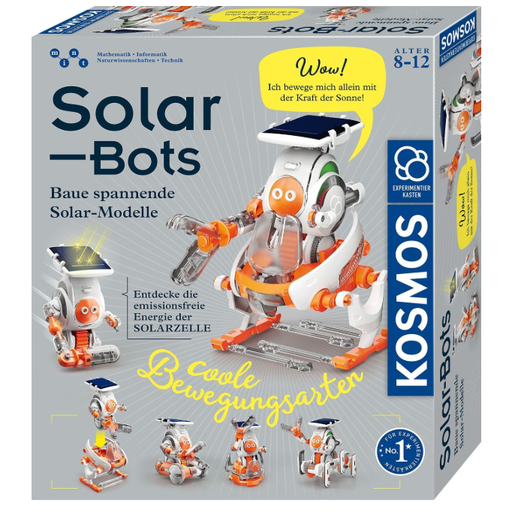
Why it's a great fit: For children interested in mechanics and renewable energy. The focus here is not on app programming, but on understanding physical principles. Building eight different solar-powered models imparts knowledge in a practical way.
This set avoids the trap of superficial programming by focusing on mechanical construction and the principle of solar energy. It is also independent of apps and batteries, which eliminates follow-up costs and compatibility issues.
Promotes understanding of renewable energy; eight different models can be built; works without batteries (solar cell); Easy-Click system for simple rebuilding.
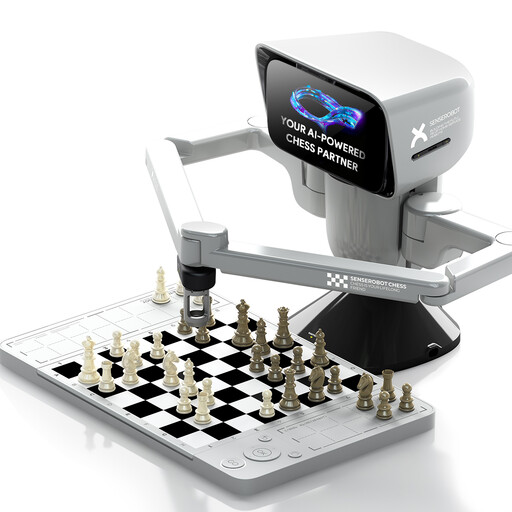
Why it's a great fit: For chess-loving kids and adults looking for an intelligent training partner. This device is not a building kit, but a highly specialised robot that physically executes moves on a real board and connects to a powerful AI via an app.
This product avoids the "jack-of-all-trades" trap through specialisation. Instead of many mediocre features, it offers one highly developed function: AI-powered chess. The quality and utility are clearly defined and not dependent on vague learning promises.
Physical robotic arm moves the pieces; app connection with AI at various levels; portable design for on-the-go play; supports custom 3D-printed pieces.
We have compiled a complete, up-to-date list of products that fully meet these strict selection criteria and UK safety regulations.
1. From what age is a programmable robot useful? This heavily depends on the model. Simple kits with visual block-based programming are suitable for children as young as 6. Complex sets with text-based programming or a focus on electronics and mechanics are better suited for children aged 10 or 12 and up. The manufacturer's age recommendation is a good starting point but should always be considered in relation to the child's individual interests and abilities.
2. Do you need prior programming knowledge? No, for most entry-level models, no prior knowledge is required. The visual programming environments are self-explanatory and designed to teach children the basics of logic in a playful way. The barrier to entry is intentionally kept low.
3. What should I look for in terms of battery life and charging? Favour models with an integrated, USB-rechargeable battery. This is more cost-effective and environmentally friendly than constantly buying disposable batteries. Pay attention to the manufacturer's specified playtime per charge—values around 30 minutes are common for building kits. Also, check the charging time; it should be reasonable in relation to the playtime.