For animated films in a small living room, the available image width and the distance between the lens and the projection surface should determine which type of projector is right for you. As ProjectorCentral explains, the throw ratio describes the relationship between image size and distance. If space is limited, a short-throw or ultra-short-throw model may be a good fit, provided the image size works with your wall. If you need to move the projector around, a flexible model is another option, but ambient light and your preferred image size remain important considerations.
Who is this choice relevant to?
Film fans with limited space for positioning
You want a large image, but first you need to match your available wall width to the distance between the lens and the projection surface. ProjectorCentral explains that the throw ratio describes the relationship between image size and distance.
Film fans with ambient light in the living room
You don’t always watch in a darkened room, so you should consider brightness, image size and the projection surface together. ProjectorCentral points out that additional room light affects how the image looks.
Fans of hassle-free film nights
You want to position your projector flexibly and get a film started with ease. Check the streaming options, connections and sound on the specific model; specifications and features can vary between models.
What should you look for when buying?
When choosing a projector for animated films in a small living room, the right choice depends above all on which need you want to address first.
| Priority |
What to check before buying |
Who is this most important to? |
| Image size with limited space |
Check the available wall width and lens distance against the throw ratio or image-size range of the exact model. |
If I have limited space for positioning, I still want the image to fit on the available wall. Around 31% of consumers put finding the right distance first. |
| Image quality in ambient light |
Consider your usual room lighting and planned image size; compare lumen figures and their units. |
If I can’t fully darken the room, I want to watch films in my usual lighting. Around 25% of consumers prioritise ambient-light conditions. |
| Detail and colour |
Check the resolution, the film format being played and the colour mode of the specific model. |
If fine drawings and colour gradations matter, I want to understand the image specifications clearly. Around 19% of consumers look first at image detail and colour. |
| Easy playback and sound |
Check that your preferred streaming services are available, along with the HDMI and audio connections and what’s included in the box. |
If I want to start a film without lots of extra devices, I need the right services and sound that’s good enough for me. Around 13% of consumers put ease of use and sound first. |
| Overall cost and requirements |
Consider the projection surface, media player, external sound, light source and warranty conditions you’ll need. |
If I’m planning a complete setup, I also want to factor in any extras and the light source. Around 12% of consumers prioritise the overall cost of their setup. |
Avoid common buying mistakes
-
Assuming the advertised maximum image size will work in your room
The throw ratio, available lens distance and any minimum image size limit what you can actually set up in your room.
Measure the available wall width and positioning space before choosing. Compare these measurements with the distance and image-size range for the exact model.
Depending on the model, you may need to position it differently or choose a projection surface of a different size.
-
Taking lumen figures as a guarantee of film brightness
Image size, ambient light and picture settings all affect perceived brightness and contrast; a higher quoted figure alone doesn’t guarantee a particular image quality.
Check the stated unit and measurement conditions, and assess the model in relation to your usual lighting and planned image size.
Dimming the room or choosing a suitable projection surface can help you get the image you want.
-
Assuming similarly named versions or specifications from other countries are the same
The XGIMI Elfin Flip 4K and the Elfin Flip Laser are different models; according to XGIMI, the Elfin Flip Laser is a Full HD version. Software specifications can also vary between Hisense versions.
Check the full model name, resolution and features of the version listed for Germany.
-
Focusing only on the projector and overlooking the extras you need
Depending on how you position and use it, you may need a projection surface, a media player or external sound. Models also vary in what’s included, their connections and their light source.
Check what’s included against your planned setup and work out which extras you’ll actually need.
Extra devices or a suitable projection surface can add to your setup; with lamp models, the light source is also relevant to ongoing use.
Brands and model ranges at a glance
BenQ
The TK710STi is a short-throw option for a fixed position with limited space. The TK710, without STi, has different projection optics and is a separate model.
- BenQ lists a throw ratio of 0.69–0.83:1, 3,200 ANSI lumens and an Android TV dongle for the TK710STi.
- The built-in speaker is rated at 5 W. These manufacturer specifications don’t determine how the image will look in your ambient light.
Hisense
The PX3-PRO is an ultra-short-throw model designed to sit close to the wall, while the M2 Pro is a mini projector with optical zoom. Each needs a different amount of space.
- The German product page lists an image size of 80–150 inches for the PX3-PRO, and optical zoom and VIDAA U9 for the M2 Pro.
- The PX3-PRO needs a suitable projection surface. In particular, check that its stated minimum image size will fit on your wall.
XGIMI
The Elfin Flip 4K is designed for flexible film-night setups; the Elfin Flip Laser is a separate Full HD alternative.
- XGIMI lists an optical zoom of 0.98–1.3:1, 1,600 ISO lumens and Google TV for the Elfin Flip 4K.
- According to XGIMI, the Elfin Flip Laser has a standard resolution of 1,920 × 1,080 pixels and isn’t the 4K version.
Epson
The EH-TW7000 is a home cinema option if you can find a suitable longer throw distance in your small room.
- Epson lists lens shift, optical zoom, two HDMI connections and equal white and colour brightness of 3,000 lumens.
- This model uses a lamp; Epson’s stated lamp life of 5,000 hours applies in Eco mode. The positioning needs to suit your preferred image size.
Samsung
The Freestyle 2nd Gen is a smart projector for flexible use and changing locations.
- Samsung describes automatic picture adjustment and built-in Smart TV. The setup guide specifies a distance of 2.0 m for a 75-inch image.
- The 550 LED lumens quoted by the manufacturer aren’t the same as 550 ANSI lumens. The Battery Base is sold separately; the manufacturer’s specifications don’t guarantee a particular image quality in ambient light.
Joybuy products for small living rooms
This selection includes ultra-short-throw projectors designed to sit close to the wall, as well as compact models for flexible film-night setups.
 Image unavailable
XGIMI Aura 2
As an ultra-short-throw projector, this model is designed to sit close to the projection surface; carefully match its position to your preferred image size.
The product title lists 4K, 2,300 ISO lumens, Dolby Vision, IMAX Enhanced and integrated 60 W Harman Kardon speakers.
View at Joybuy
 Image unavailable
MAGCUBIC HY350Max
This portable model could be a good option if you want to move your projector around the living room; check the distance needed for your preferred image size.
The product title lists native 1080p resolution, 900 ANSI lumens, Android 14 and a 180° rotation function.
View at Joybuy
 Image unavailable
XGODY Gimbal N6 Pro, white and gold
Its flexible positioning could work well for film nights in different spots; compare the available space with the distance needed for your preferred image size.
The product title lists native 1080p resolution, 700 ANSI lumens, 4K support, WhaleOS 3.0 and official Netflix apps.
View at Joybuy
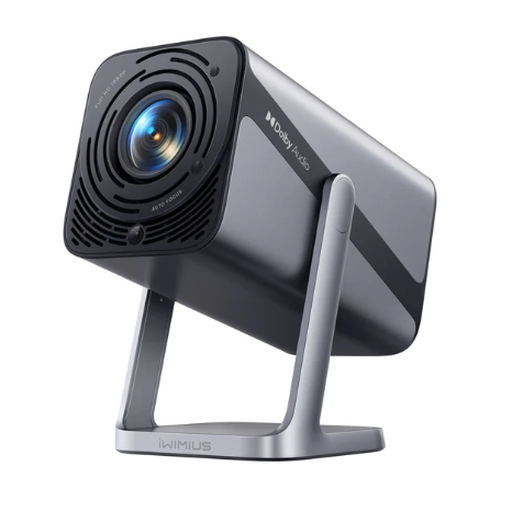 Image unavailable
iWIMIUS S29
The adjustable stand and built-in apps could be useful for flexible film-night setups; check that your preferred image size will work in the space available.
The product title lists 1080p and 600 ANSI lumens. The product description gives a throw ratio of 1.1:1 and an image-size range of 50–200 inches.
View at Joybuy
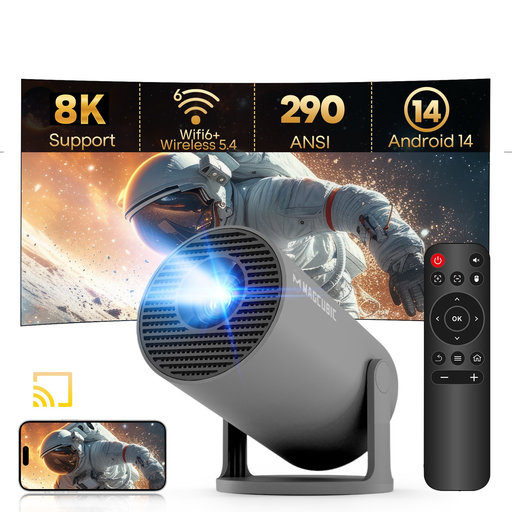 Image unavailable
MAGCUBIC HY300Pro, grey
This compact model could be a good choice for flexible film nights; make sure the stated image size and throw distance suit your room.
The product description lists a native resolution of 720p, 290 ANSI lumens, a throw ratio of 0.8:1, a throw distance of 0.6–2.5 m and an image size of 35–140 inches.
View at Joybuy
Frequently asked questions
How can I check whether my preferred image size will fit in my living room?
Measure the available image width and the actual distance you can get between the lens and the projection surface. Compare both with the throw ratio and image-size range of the specific model; for example, the German product page for the Hisense PX3-PRO lists 80 inches as the minimum size.
Can I simply put a flexible projector anywhere?
Even a portable projector needs a stable position and the right distance. Samsung specifies 2.0 m for a 75-inch image with The Freestyle 2nd Gen and recommends a stable surface; these figures don’t automatically apply to other models.
What should I check for streaming and sound before my first film night?
Check that your streaming service is available on the specific German model, and find out which HDMI and audio connections it has. BenQ lists an Android TV dongle with the TK710STi; the current German product page for the Hisense PX3-PRO lists VIDAA U9.
Are projectors with similar names technically the same?
No, model names alone aren’t enough to compare them. XGIMI distinguishes the Elfin Flip 4K from the Full HD Elfin Flip Laser, so check the full model name and resolution before buying.
How important is the light source for long-term use?
Compare the stated light-source life for the specific model and operating mode. Epson lists 5,000 hours for the EH-TW7000 lamp in Eco mode; BenQ gives a figure of 20,000 hours for the TK710STi laser light source. These manufacturer figures alone don’t tell you how long it will last in your particular use.


