What should you look for when buying?
First check the light levels and image size, then think about where the projector will go and how you’ll access your programme and hear the sound. This helps you choose a projector for the conditions in your own living room, rather than judging individual features in isolation.
| Priority |
What to check |
Who it matters most to |
| A clear picture in daylight |
Check the light coming through your windows at viewing time, your planned image size and the projector brightness, making sure the figures use a comparable measurement standard. BenQ Germany notes that ambient light is a reason to consider a brighter projector. |
If seeing details in plants matters to you, consider the remaining light and image size together rather than relying on a lumen figure alone. Around 36% of consumers say daylight is their main concern. |
| Image size and projector placement |
Measure the available screen width and projection distance, and check the throw ratio of the specific model. BenQ Germany defines it as the distance divided by the image width. |
If there’s no room behind the sofa, you’ll need a setup that suits your room, rather than simply assuming you can achieve your desired image width. Around 28% of consumers say projector placement is their main concern. |
| Access to programmes and sound |
Check that your chosen service or reception method is available, and look at the HDMI connections and audio options. Built-in apps don’t remove the need to check whether your specific service is available. |
If you want to start watching gardening programmes without extra steps and hear speech clearly from your seat, the whole setup needs to work together. Around 22% of consumers prioritise access to programmes and sound. |
| Upfront and ongoing costs |
Check what’s included, whether you’ll need a screen or mount, and the service terms for the light source. Your statutory rights and a voluntary guarantee are two different things. |
If you’re planning for accessories and future maintenance as well as the projector, consider the whole setup. Around 14% of consumers say ongoing costs are their main concern. |
Projectors at Joybuy
This selection includes projectors for streaming in the living room, rooms with limited projection distance and flexible positioning. For gardening programmes in a bright room, check the brightness rating, image size and remaining light separately from the other features.
 No image available
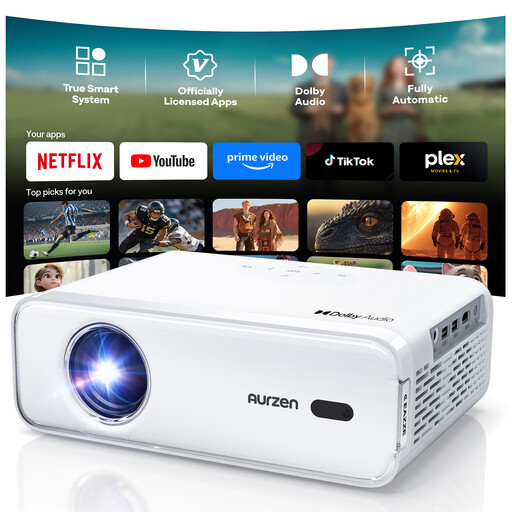
Aurzen Smart Projector, Full HD 1080p, 4K support
For fuss-free streaming, the product description lists pre-installed Netflix, Prime Video and YouTube apps, along with Dolby Audio.
Specifications include Full HD 1080p, autofocus, automatic keystone correction and HDMI. Two 8 W speakers are also listed.
View at Joybuy
 No image available
Philoent Smart Projector, Ultra-Short-Throw
Ultra-short-throw is designed for setups with limited projection distance. Before you buy, measure the available screen width and check the distance required for this specific model.
The title lists WiFi 6 and Bluetooth 5.4; the description mentions built-in apps, autofocus and keystone correction. Check whether your preferred streaming service is available.
View at Joybuy
 No image available
Projector with built-in apps and Play Store
If you want to stream without leaving a separate device connected, the product title lists built-in apps and the Play Store. Check that you can access the service you want to use.
Other specifications in the title include WiFi 6, Bluetooth, HDMI compatibility, automatic image correction, 180° rotation and digital zoom from 50% to 100%. The stated image size ranges from 50 to 200 inches.
View at Joybuy
 No image available
XGIMI Vibe One, 1080p
For flexible positioning, the product title lists a built-in 160° stand and autofocus. The stated brightness is 250 ISO lumens; consider it alongside the remaining light and your desired image size.
Other specifications include WiFi, JBL sound and keystone correction. ISO figures shouldn’t be compared directly with ANSI ratings.
View at Joybuy
 No image available
XGIMI Elfin Flip Laser, 1080p
If you’re considering a foldable projector with a laser light source, the product title lists an RGB triple laser and 1,600 ISO lumens. Check the brightness alongside the remaining light and your planned image size.
Other details in the title include autofocus and Harman Kardon. The brightness rating is given in ISO lumens and isn’t directly comparable with ANSI figures.
View at Joybuy
Frequently asked questions
Is a high lumen rating enough for watching gardening programmes in daylight?
No, a high lumen rating alone isn’t enough. Compare how the brightness is measured and take the image size and light falling on the projection surface into account. BenQ Germany suggests around 3,000 ANSI lumens as a guide for ambient light, but this isn’t a guarantee for your windows and screen.
How can I check whether I can get the image width I want before mounting the projector?
Measure the available projection distance and screen width. The throw ratio is the distance divided by the image width. Then check the permitted range and the position required for the specific model.
Does the gardening programme have to run through a built-in app?
No, a suitable HDMI input can also let you connect a separate streaming device. Check that you can access your chosen service and output the sound as you want.
Is the manufacturer’s guarantee the same as your statutory rights?
No. If a product is faulty, your statutory rights apply against the seller; a guarantee is a voluntary additional promise, subject to its own terms. The Verbraucherzentrale explains the difference.
Do I have a right to cancel when buying online in Germany?
For an online consumer contract, the cancellation period is generally 14 days from the date you receive the goods. The Verbraucherzentrale highlights some exceptions, so check the terms that apply to your specific contract.


