For watching a nature documentary in a bright living room, the projector’s brightness, screen size and ambient light all need to work together; a high lumen rating alone won’t guarantee good contrast in dark scenes. If you have limited space between the projector and the wall, an ultra-short-throw projector with a screen specifically confirmed as compatible could be an option. Conventional projectors, on the other hand, need the right distance from the screen. Brightness figures from different models and units aren’t a direct comparison with how they’ll perform in your own living room.
Who this projector guide is for
Daylight viewers
If you watch nature documentaries with some light still in the room, you’ll want to be able to make out animals and dark landscapes on your chosen screen. Consider the room lighting, projector brightness and screen together. BenQ notes that brightness depends on ambient light and screen size.
Nature film fans who value detail
If fine textures and colours matter to you, compare resolution and picture quality in the context of your lighting conditions too. Manufacturers’ claims about detail don’t replace independent testing in your living room.
Viewers short on space
If you can’t position the projector far from the wall, throw ratio and available distance are important factors. Check whether a conventional projector will fit, or whether an ultra-short-throw model and a compatible screen would work better in your room.
What to look for when choosing
First, measure your planned screen width and the available distance, then assess how much light will fall on the screen. This will help you check that the projection type, brightness rating and any source device you need are right for your living room.
| What matters |
What to look for when buying |
Who this matters most to |
| Visibility in ambient light |
Consider the light falling on the screen, your planned screen size and the brightness rating, including its unit. Only plan to use a screen that’s compatible with the specific projector model. |
If I watch nature documentaries with some light still in the room, I want to be able to make out dark scenes on my chosen screen; around 29% of consumers put visibility in ambient light first. |
| Fine picture detail and colour |
Check the resolution of the specific model and the signal formats it supports. Also assess picture quality in the lighting conditions you expect to use. |
If fine textures and colours matter most to me, I compare picture detail with the lighting conditions in the room; around 23% of consumers prioritise fine detail in nature footage. |
| Positioning and screen size |
Measure the screen width and usable distance. Check the specific model’s throw ratio, zoom and lens shift. |
If space is limited, I need to be able to achieve my desired screen width from the available distance; around 18% of consumers prioritise a suitable setup. |
| Streaming and sound |
Check that your chosen streaming service is available on the source device you plan to use, then check its connections and how sound will reach the projector. |
If I want to watch shows without having to switch between devices, I check the complete picture and sound setup; around 18% of consumers prioritise easy streaming and clear sound. |
| Total cost and lifespan |
Factor in the need for a screen, the light source type and the warranty terms separately. A manufacturer’s stated lifespan isn’t automatically a warranty. |
If I want to keep track of the cost of the whole setup, I consider the projector, any accessories I need and potential future costs together; around 12% of consumers put total cost first. |
Avoiding common buying mistakes
-
Comparing only the highest lumen rating
Screen size, room lighting and the unit used for the brightness rating all affect how it should be interpreted. Different manufacturers’ figures aren’t necessarily measured under the same conditions.
Compare figures only when you know how each one was measured, and check your planned screen size and the light falling on it. Treat claims about daylight performance as specific to the model.
-
Choosing an ALR screen without checking the projection type
A screen may be designed for specific projection types and models. Epson’s ELPSC35 is intended for listed Epson ultra-short-throw projectors and isn’t automatically compatible with other devices.
Check that the screen and projector are compatible before you buy. A suitable screen may also be needed to complete your setup, so take the available space into account too.
-
Relying entirely on keystone correction to fix poor positioning
BenQ notes that digital keystone correction can affect image edges and sharpness, among other things.
Measure the distance and screen width first. Then check the specific model’s optical zoom and lens shift before relying on digital correction.
-
Confusing warranty, statutory rights and lifespan
Your statutory rights when goods are faulty are separate from a manufacturer’s voluntary warranty. An advertised lifespan doesn’t automatically tell you what a warranty covers.
Read the warranty terms and information about the light source separately, and budget for the whole setup, including a screen if you need one.
Projector brands to consider
Epson
The Epson models mentioned here offer different setups: the conventional EH-TW7100 home projector and the EH-LS800B ultra-short-throw projector.
- Epson lists the EH-TW7100 at 3,000 lumens with two HDMI ports. The EH-LS800B is rated at 4,000 lumens.
- The models need different positioning. Epson says the ELPSC35 is designed for listed ultra-short-throw models, so check compatibility with your specific projector.
BenQ
The TK710 is an example of a conventional home projector. Its brightness, throw distance and image alignment should all be considered together.
- BenQ lists the TK710 at 3,200 ANSI lumens, with 4K UHD, a throw ratio of 1,15 to 1,5:1 and vertical lens shift.
- Daylight-use claims are manufacturer information, not measurements taken in your living room. Only compare brightness figures measured on the same basis.
Optoma
The UHZ66 is an example of a laser projector with a conventional throw distance.
- Optoma lists the UHZ66 at 4,000 lumens, with 4K UHD and a throw ratio of 1,4 to 2,24:1.
- Check the required distance against your planned screen width. The datasheet’s daylight claim is a manufacturer statement.
Hisense
The PX3-PRO is an example of an ultra-short-throw alternative if you want to project from close to the wall.
- Hisense lists this model at 3,000 ANSI lumens and describes it as suitable for smaller rooms.
- These claims don’t prove that any ALR screen will be compatible, or that the picture will look as you want in your room’s lighting conditions.
XGIMI
The HORIZON 20 Max is an example of a home projector with optical adjustment features.
- XGIMI lists 5,700 ISO lumens, optical zoom and lens shift.
- ISO lumens aren’t directly comparable with lumen figures stated using a different unit. Check the positioning and screen width for your specific room.
Projectors on Joybuy
The Joybuy products below are projector options for streaming shows and flexible use around the home. Pay particular attention to the stated brightness, screen size and positioning in relation to your room.
 No image available
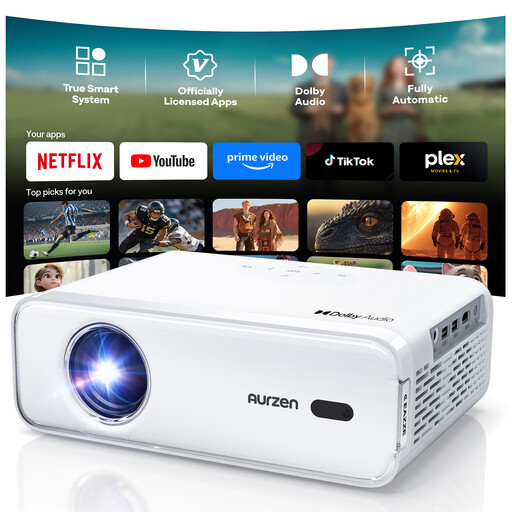
Aurzen Smart Projector, native 1080p
For watching shows using the listed built-in streaming apps, if native 1080p playback suits your picture requirements.
Native resolution: 1080p; according to the product description, a 4K input is displayed at the native 1080p resolution. Netflix, Prime Video and YouTube are listed as available; you can’t download additional streaming apps on this version.
Joybuy
 No image available
Philoent Mini Projector, 4K/1080P
Described as an ultra-short-throw projector for small rooms. Before buying, check that the projection type and desired distance from the wall suit your setup.
The product name lists 4K/1080P, Wi-Fi 6 and Bluetooth 5.4.
Joybuy
 No image available
Projector with built-in apps and Play Store
An option if built-in apps and flexible positioning suit your streaming setup. Check that your preferred streaming service is available before you buy.
The product name lists a 50–100% digital zoom, 180° image rotation and HDMI compatibility. Keep the ventilation openings clear and use the supplied adapter.
Joybuy
 No image available
XGIMI Vibe One
The built-in stand and automatic focus are described as making it easy to position. To assess whether it’s suitable for a bright living room, consider your planned screen size and the light coming into the room.
The product name lists 1080p, 250 ISO lumens and Netflix access.
Joybuy
 No image available
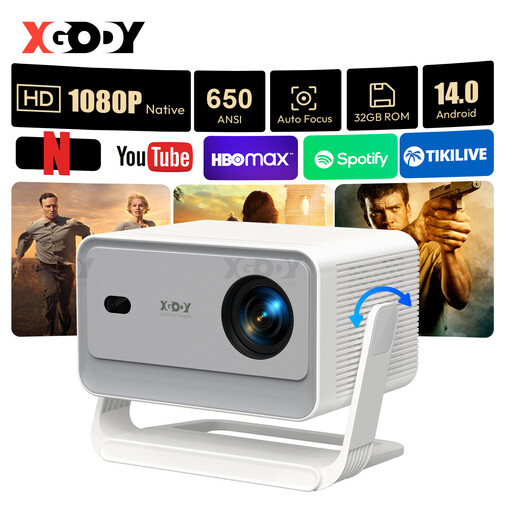
XGODY Gimbal A6 Pro
For native 1080p playback with the listed streaming and audio features. In a bright room, take particular care to consider screen size and ambient light.
The product name lists 650 ANSI lumens, Android 14.0, Wi-Fi 6 and Bluetooth 5.4. BenQ gives around 3,000 ANSI lumens as a guide for 100 to 120 inches with additional ambient light; this isn’t a guarantee for every room and screen setup. Don’t look directly into the lens, and keep the ventilation openings clear.
Joybuy
Frequently asked questions about projectors in bright living rooms
Are 3,000 ANSI lumens enough to watch a nature documentary in daylight?
There’s no one-size-fits-all answer. BenQ gives around 3,000 ANSI lumens as a guide for 100 to 120 inches with additional ambient light. Your specific screen size and the light falling on it are still key, particularly for dark scenes.
How can I work out the required throw distance before installation?
Measure your planned screen width and check the throw ratio of the specific model. BenQ describes this as the throw distance divided by the screen width. Also check that your chosen position is within the zoom and alignment range.
Can I use any ALR screen with an ultra-short-throw projector?
No, compatibility depends on both the projector and the screen. Epson designed the ELPSC35 for its ultra-short-throw laser projectors and lists compatible models. Check the compatibility information for any other combination you’re considering.
What should I connect for streaming and sound?
First check that your specific source device provides the streaming service you want, then check the connections and how the sound will be routed. Epson lists two HDMI ports and built-in stereo speakers for the EH-TW7100; BenQ lists HDMI inputs and eARC for the TK710.
What are my rights in Germany if a product is faulty or I buy online?
If a product is faulty, your statutory rights are against the seller and are separate from any voluntary warranty. According to the consumer advice centres, online purchases generally come with a 14-day right to cancel; the terms of your specific purchase apply.


