Who is this guide for?

Shared flats with limited space

If your living room, furniture and wall leave little room to manoeuvre, plan the picture width and possible lens distance together. BenQ Deutschland explains why standard, short-throw or ultra-short-throw projection may suit your room, depending on its layout.

Shared flats where music takes centre stage

For concert films, speaker placement and connectivity matter just as much as the picture. Anker Deutschland lists detachable speakers for the Nebula P1, while NETZWELT assesses sound separately in its projector comparison.

Shared flats with changing viewing spots

If you don’t leave the projector set up permanently, or use the room in different ways, its position and source connections need to work wherever you’re watching. BenQ Deutschland explains why projection distance matters; XGIMI Deutschland lists an optical zoom for the Elfin Flip 4K.

What should you look for when buying?

Buying criterion What to look for Who is this especially important to?
Picture size and available space Measure the available wall width and possible lens distance; check the projection ratio for the specific model. When there’s little space between the furniture and the wall, I want to know whether the picture will be wide enough. Around 27% of consumers put available space first.
Concert sound Check the audio connections and possible speaker positions; wattage alone doesn’t describe how the sound will come across from your seat. For concert nights with friends, I want to plan sound that works for several seats rather than relying only on the projector’s speaker. Around 27% of consumers prioritise music sound.
Ambient light in the room Consider brightness and its measurement standard alongside picture size and the light falling on the screen; don’t assume ANSI and ISO lumens are directly comparable. If there’s still light in the room during our film night, I want to weigh up picture size and brightness for that specific space. Around 20% of consumers prioritise use in ambient light.
Content sources Check the apps or external devices you need, as well as compatible connections and audio output. If we want to use our usual film sources, I want to know in advance whether the projector works with an app, streaming stick, disc player or laptop. Around 13% of consumers put content sources first.
Operating noise Plan where to place the projector and how far away you’ll sit; assess its noise in the picture mode you intend to use. During quiet scenes, I don’t want to distract housemates or viewers with intrusive noise. Around 13% of consumers prioritise quiet operation.

Common buying mistakes

  • Comparing only the largest stated screen size

    The picture width you can achieve also depends on the distance between the lens and the wall, and the projection ratio of the specific model. BenQ Deutschland recommends choosing the projection type to suit your room and setup.

    Measure the wall width and possible lens distance before comparing standard, short-throw and ultra-short-throw projectors.

    An unsuitable distance may mean finding another place for the projector or adjusting your screen setup.

  • Focusing only on picture specifications for concert films

    Built-in speakers and external audio connections vary between models. Anker Deutschland lists detachable speakers for the Nebula P1; Dangbei lists HDMI eARC for the DBOX02 Pro.

    Decide where you want to place your speakers and check the audio connection on the exact model.

    If your existing audio system isn’t compatible, you may need extra speakers or connection components.

  • Assuming similarly named models are identical

    XGIMI Deutschland lists the Elfin Flip 4K and Elfin Flip Laser as different variants. Likewise, the Dangbei DBOX02 and DBOX02 Pro aren’t interchangeable just because their names are similar.

    Check the full model name and key specifications before comparing one model with another.

Key brands at a glance

BenQ

Worth considering if you’re comparing standard and short-throw projection for a space with limited room for the projector.

  • BenQ states a 0,8:1 projection ratio and 3.000 ANSI lumens for the TK705STi.
  • These manufacturer specifications apply to the TK705STi and don’t, on their own, predict how the picture or sound will perform in every shared flat.

Epson

The models described take different approaches: the Lifestudio Flex Plus EF-72 offers flexible placement, while the EH-TW6250 is designed more for a fixed home cinema setup.

  • Epson lists 1.000 lumens, 4K PRO-UHD, Google TV and Sound by Bose for the EF-72.
  • 4K PRO-UHD is Epson’s product terminology and shouldn’t automatically be treated as equivalent to every other 4K technology.

XGIMI

The Elfin Flip 4K is worth considering for changing projector positions, thanks to its optical zoom.

  • XGIMI lists a 0,98–1,3:1 optical zoom, Google TV and a built-in speaker for the Elfin Flip 4K.
  • According to XGIMI, the Elfin Flip Laser and Elfin Flip Plus are Full HD models, not equivalent alternatives to the Elfin Flip 4K.

soundcore Nebula

The P1 has speakers that can be placed separately for flexible room layouts; the Cosmos 4K SE is a different model designed for 4K.

  • Anker lists 1080p, 650 ANSI lumens and two detachable 10-W speakers for the P1.
  • The P1’s features don’t automatically apply to the Cosmos 4K SE or other Nebula models.

Dangbei

The DBOX02 Pro is a model whose manufacturer specifications for brightness, sound and connections can be checked individually.

  • Dangbei lists 2.000 ISO lumens, two 12-W speakers and HDMI eARC for the DBOX02 Pro.
  • The DBOX02 without “Pro” is a different model name; specifications for one variant don’t confirm the features of the other.

Projectors for flexible film nights in shared flats

These Joybuy products cover short-throw and flexibly positioned projectors. Before choosing, check that the projection distance, content sources and sound setup suit your shared-flat room.

Philoent Smart Projector

Philoent Smart Projector, Ultra-Short-Throw

The ultra-short-throw design may suit a setup with little space between the projector and wall; check the actual picture width in the spot you plan to use.

The product title lists support for 4K/1080p content, Wi-Fi 6, Bluetooth 5.4 and automatic keystone correction.

View at Joybuy

Projector with built-in apps and Play Store

Projector with built-in apps and Play Store

The rotation and zoom features listed in the title may come in handy if you move the projector between locations; check that the desired picture position works in your room.

Features listed include 180° rotation, digital zoom, automatic picture correction and compatibility with HDMI devices, TV sticks, USB drives and laptops.

View at Joybuy

XGIMI Vibe One portable projector

XGIMI Vibe One

The built-in stand and portable design suit changing locations; remember to take the room’s lighting conditions into account.

The title lists 1080p, 250 ISO lumens, a built-in 160° stand, a JBL sound system, autofocus and keystone correction.

View at Joybuy

XGIMI Elfin Flip Laser, 1080p

XGIMI Elfin Flip Laser, 1080p

The foldable design and portability make it suitable for changing viewing spots. This model isn’t the same as the Elfin Flip 4K.

The product title lists 1.600 ISO lumens, an RGB triple laser, Harman Kardon sound and autofocus.

View at Joybuy
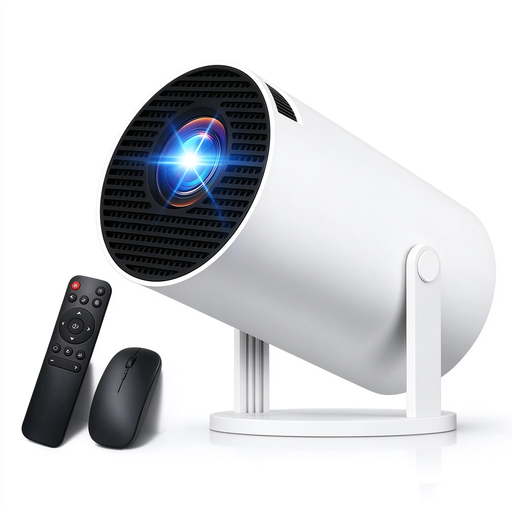
Portable projector with rotation function

Portable projector with 180° rotation

The portable design and rotation function may suit changing locations; check whether you can set up the picture where you want it.

The title lists support for 4K and 1080p content, Wi-Fi 6, Bluetooth 5.4, automatic keystone correction, and compatibility with HDMI, USB and laptops.

View at Joybuy

Frequently asked questions

Is a clear wall enough, or do we need a screen?

The key factors are the available picture width, the wall surface and the possible lens distance. A stated maximum screen size doesn’t guarantee the picture will fit your space; check the setup and the picture size you want together.

Can we position the projector at an angle next to the sofa?

Keystone correction can square up an angled projection, but it doesn’t replace a suitable setup. BenQ points out that correction can affect picture quality.

What should we test before watching a concert film with external speakers?

Check that the audio connection on your specific projector works with your source device and existing audio system, then test the sound from the seats you plan to use. Detachable speakers on the Nebula P1 and HDMI eARC on the Dangbei DBOX02 Pro are different solutions for specific models.

What details matter when buying a projector in Germany?

For retailers, the German Federal Network Agency lists requirements including correct CE marking, device identification, manufacturer details and, where applicable, EU importer details, as well as German-language instructions for non-commercial users. A CE mark is the manufacturer’s own declaration of compliance; it isn’t proof that every product on offer has been independently tested.

Who should we contact if the projector develops a fault after purchase?

For a consumer purchase in the EU, you have a statutory two-year guarantee against the seller, starting from the day you receive the goods. An additional manufacturer’s warranty doesn’t replace this; keep your proof of purchase and delivery documents.