Which option is right for you?

Showing your family archive without internet access

If you’re bringing videos on a storage device, first check whether the media player on the specific projector supports its file system and your video and audio formats. BenQ Europe lists support for USB storage up to 128 GB and the NTFS, FAT and FAT32 file systems for the GP100, among other details.

Showing videos to a larger group in the living room

For several viewing positions, the image size, throw distance and room lighting all need to work together. The specifications published by BenQ Germany and Epson Germany refer to specific models; they are not a guarantee for every image format or room.

Showing videos in different locations

If you move your projector around often, weigh portability and battery life against brightness and the option to run it from the mains. Anker Germany and XGIMI Germany publish battery life figures for specific models and operating conditions.

What should you look for when buying?

Direct playback from USB storage

Best for: showing videos without a laptop, provided your files match the formats explicitly supported by the projector.

Bear in mind: A USB port alone doesn’t guarantee video playback. Check the specifications for the exact model and test your files, including the audio.

Playback via laptop and HDMI

Best for: videos that play on your laptop, or when you have a mix of file formats.

Bear in mind: You’ll need a laptop, a compatible connection and a power supply. HDMI is not the same as direct playback from USB.

Portable battery-powered projector

Best for: moving the projector between rooms or using it somewhere without a mains socket.

Bear in mind: Battery life figures apply to specific modes. For longer videos, plan to use mains power and check the brightness when running on battery.

What to consider What to check before buying Who needs to consider this?
Playing local files Check the media player, file system, storage capacity, and video and audio codecs supported by the exact model. If I want to show videos without a laptop, I’ll test several original clips, including the audio. Around 36% of consumers put file playback first.
Visibility in the room Work out your preferred image size and throw distance; compare lumen figures only when you know the measurement standard and operating mode. If everyone needs a clear view, I’ll take the available room lighting into account too. Around 29% of consumers prioritise visibility.
Portability and power Compare the stated battery life for the specified operating mode with the length of your video session, and check the power supply at your destination. If I’m setting up the projector in different locations, I care about being able to use it without a mains cable. Around 21% of consumers put portability first.
Sound and positioning Check the speakers or a suitable audio output, and measure the available throw distance. If dialogue in the family videos needs to be easy to hear and the projector has to fit the room, I’ll check the sound and positioning. Around 14% of consumers prioritise these requirements.

Avoid common misconceptions

  • ‘Has USB’ doesn’t automatically mean it can play videos

    A USB port may be intended for another purpose, and even a projector with a media player might not support the profile used by your files.

    Check the formats documented for the exact model and play several original files, including their audio, before your get-together. If you’re using a laptop, test its connection to the projector too.

  • Similarly named models or bundles aren’t necessarily identical

    The XGIMI MoGo 4 and MoGo 4 Laser are different variants with different manufacturer specifications. A bundle may also differ from the standalone product in its accessories and model name.

    Before matching accessories or performance figures to a product, check the full model name, variant and contents against the manufacturer’s information.

  • Battery life alone doesn’t tell you how bright the image will be

    The battery life quoted for the soundcore NEBULA Capsule 3 refers to Eco mode. COMPUTER BILD describes the MoGo 4 Laser as being noticeably dimmer when running on battery.

    Test the image size and readability in the lighting conditions you expect to use. If your viewing session may run longer, check whether mains power is available where you plan to set up.

Brands to consider

BenQ

The GP100 is worth considering if you’re looking at playing local files directly.

  • BenQ Europe lists support for USB storage up to 128 GB and the NTFS, FAT and FAT32 file systems for the GP100. BenQ Germany specifies Full HD and 1,000 ANSI lumens for this model.
  • The stated storage and codec support applies to the GP100, not automatically to other BenQ projectors or every video file.

Epson

The mains-powered CO-FH01 is an option for Full HD viewing via HDMI with a connected playback device.

  • Epson Germany lists HDMI and 3,000 lumens for the CO-FH01.
  • The manufacturer’s brightness figure isn’t a measurement taken in your intended setup, and it doesn’t confirm direct video playback via USB.

XGIMI

The MoGo 4 and MoGo 4 Laser are portable models and should be treated as different variants.

  • XGIMI Germany lists 450 ISO lumens for the MoGo 4 and 550 ISO lumens for the MoGo 4 Laser, with up to 2.5 hours of battery life for the Laser.
  • COMPUTER BILD describes the MoGo 4 Laser as being noticeably dimmer when running on battery. The model name alone doesn’t tell you whether it can play your local files.

soundcore NEBULA

The Capsule 3 is a compact battery-powered option for moving between locations.

  • Anker Germany lists 200 ANSI lumens, HDMI and up to 2.5 hours of battery life in Eco mode for the Capsule 3.
  • These specifications don’t confirm direct playback of family videos from USB storage; the battery life applies to the stated mode.

Acer

The H6533BDi is an example of a mains-powered HDMI alternative.

  • Acer Germany lists 5,200 ANSI lumens in Standard mode for this model.
  • The documented USB-A port is intended for a wireless dongle and doesn’t confirm direct video playback. Acer also lists power consumption of 290 W in Standard mode.

Projectors for laptop playback

These Joybuy product suggestions list HDMI as a possible way to play local files from a laptop. Before buying, check the details for the relevant model and test the setup with your videos.
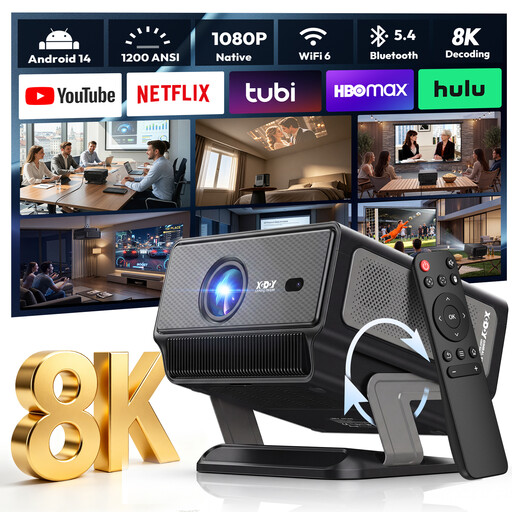
XGODY Gimbal A8 projector

XGODY Gimbal A8 projector

The stated HDMI port offers a possible way to play local videos from a laptop.

Native 1080P; 1200 ANSI; HDMI; two 8 W speakers; adjustable gimbal with 0–90° positioning.

View on Joybuy

XGODY Gimbal N6 Pro portable projector

XGODY Gimbal N6 Pro portable projector

The HDMI port is one possible way to play local videos from a laptop.

Native 1080P; 700 ANSI; HDMI; autofocus and automatic keystone correction.

View on Joybuy
Dangbei Atom portable laser projector

Dangbei Atom portable laser projector

HDMI offers a possible way to play locally stored family videos from a laptop.

1200 ISO lumens; 1080p; HDMI; two 5 W speakers.

View on Joybuy

Magcubic HY350Max projector

Magcubic HY350Max projector

The HDMI port mentioned in the product name can be used for playback via a laptop.

Native 1080P; 900 ANSI; HDMI; 180° rotation; automatic keystone correction.

View on Joybuy

XBJ 360° portable smart projector

XBJ 360° portable smart projector

The stated HDMI port offers a possible way to play videos from a laptop.

Full HD 1080P; 500 lumens; HDMI; 360° rotation; built-in 5 W speaker.

View on Joybuy

Frequently asked questions

Is a USB port enough to play my video files?

No. A USB port alone doesn’t mean the projector can play video files. Acer describes the H6533BDi’s USB-A port as a connection for a wireless dongle, while the file systems and supported codecs for the BenQ GP100 are documented. Check what the exact model can do and test your videos before your get-together.

How should I prepare the projector for a family get-together?

At the intended viewing location, test the image size, distance, room lighting, power supply and sound using your original clips. If you’re playing them from a laptop, check the HDMI connection. If you’re using battery power, compare the stated battery life for the relevant mode with the planned viewing time.

What are my rights if my new projector is faulty?

For ordinary claims relating to defects, § 438 BGB generally provides for a limitation period of two years from delivery. Your statutory claims against the seller are separate from any voluntary manufacturer’s guarantee; special statutory rules may apply in individual cases.

Can I show the videos to the general public?

A private family get-together doesn’t automatically allow you to show videos to the general public. Under § 15 Abs. 3 UrhG, whether a screening counts as a public communication depends, among other things, on the personal relationships between those attending. If you’re inviting a wider or open group, check the rights to any protected works and the specific use separately.

How should I dispose of an old projector?

In Germany, electrical and electronic waste must not be put in household rubbish. The Federal Environment Agency lists recycling centres and retailers among the options for disposal, subject to the applicable take-back conditions.