What should you look for when buying?
First decide when you’ll watch and where the picture will be positioned. Then assess the screen, setup and sound for that exact spot.
| Consideration |
What to check before buying |
Who is it most relevant to? |
| Picture in daylight from windows |
Assess the light at your usual viewing time alongside the brightness rating, picture size and screen type. |
If I want to watch musical films during the day despite having tall windows, the picture at the intended viewing spot matters more to me than a single brightness rating. Around 36% of consumers put a picture that remains visible in daylight at the top of their list. |
| Vocals and music sound |
Check the speaker configuration and the audio output you need on the specific model. |
When watching musical films, I want vocals and accompaniment to sound right, and I want to know whether I can connect my existing system. Around 29% of consumers prioritise music sound. |
| Positioning and screen |
Measure the picture width and available distance, and check that the screen is approved for the projection type. |
If my living room only has one fixed spot for the projector, the device, screen and furniture all need to work together. Around 21% of consumers put positioning and the screen first. |
| Running costs and playback devices |
Check the light source type, the HDMI and audio connections you need, and your preferred playback method. |
Before buying, I want to know what extra devices I’ll need for films and sound, and what to consider about the light source. Around 14% of consumers prioritise running costs and playback devices. |
Projectors at Joybuy
These projectors may suit different positioning and sound requirements when watching musical films. The brightness figures quoted on their own do not tell you how the picture will look in daylight from windows.
 No image available
ETOE Dolphin 2 RGB laser projector, 1080p Full HD
If you’d rather not rely on a nearby mains socket, the product title lists a built-in battery with a 2-hour runtime.
800 ANSI lumens; two 5-W speakers; HDMI 2.1 and USB-C.
View at Joybuy
 No image available
XGODY N7 Cine smart projector, native 1080p
If you’re looking for a projector with built-in speakers and a stated projection distance, the product description lists two 8-W stereo speakers and a 60-inch picture at 1.33 m.
1,000 ANSI lumens; native 1080p, 4K support; Wi-Fi 6 and Bluetooth 5.4.
View at Joybuy
 No image available
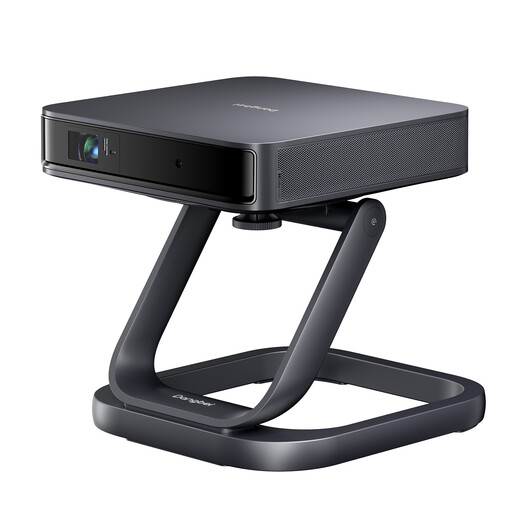
Dangbei Atom portable laser projector with desktop stand
If you’re looking for a portable projector, the product title describes this model as a portable laser projector and lists a desktop stand as an extra.
View at Joybuy
 No image available
Philoent Smart Projector 4K/1080P, ultra-short-throw
If you have very little space between the projector and the screen, the product title describes this as an ultra-short-throw projector.
Wi-Fi 6; Bluetooth 5.4; automatic keystone correction.
View at Joybuy
 No image available
2026 projector with built-in apps and 180° rotation
If you’re looking for flexible positioning, the product title lists 180° rotation and a picture size of 50–200 inches.
Wi-Fi 6 and Bluetooth; 50–100% digital zoom; HDMI compatible.
View at Joybuy
Frequently asked questions
Is a particularly bright projector enough for tall windows, without any other measures?
Not reliably if direct sunlight falls on the screen. Check the light at the time you’ll actually be watching, and consider the picture size, screen and, where necessary, light control. BenQ Germany discusses outdoor projection in its explanation, but does not specify a threshold for a living room.
Can I use any ALR screen with an ultra-short-throw projector?
No. The screen material needs to match the projection type. Epson specifically lists the ELPSC36 as a screen for selected ultra-short-throw laser projectors, so check the compatibility information for your particular model.
How should I plan the setup and regular use?
Measure the distance and the picture width you want, then compare both with the throw ratio of the specific device. For regular use, also check the manufacturer’s information on the light source and operating mode, and follow the model’s instructions.
What costs and connections should I consider in addition to the projector?
Check whether your setup will need a suitable screen, external speakers, connection cables or, if you choose a lamp model, a replacement lamp later on. Whether your playback device and audio system will work depends on the connections available on the specific model.
What should I look out for when buying and disposing of a projector in Germany?
As part of its market surveillance, the Federal Network Agency checks matters including CE marking, product and manufacturer information, and German-language instructions with the necessary warnings. This does not confirm that a particular model complies with the relevant requirements. The German Environment Agency notes that waste electrical equipment must be collected separately from household waste.


