Daytime viewers
If you watch nature documentaries in daylight, what matters is how the picture looks in your usual room lighting. ProjectorCentral recommends considering your preferred picture size alongside the brightness you need.


Choose your projector based first on the light falling on the screen, the picture size you want and the available projection distance – a high lumen rating alone doesn’t guarantee good contrast. For landscape colours and fine detail, the image quality in the right mode, your source device and a screen suited to the projection type also matter. If direct light falls on the screen, first see whether you can block it out.
If you watch nature documentaries in daylight, what matters is how the picture looks in your usual room lighting. ProjectorCentral recommends considering your preferred picture size alongside the brightness you need.
Pay particular attention to landscape colours and detail in both bright and dark scenes. Epson and BenQ list resolution and picture mode specifications for certain models; you should assess the results using comparable film scenes and lighting conditions.
If there’s no suitable space at the back of the room, compare short-throw and ultra-short-throw projectors for your particular set-up. For either type, the distance, picture size and screen need to suit the projection method.
Start by checking the room lighting, picture size and projection distance. Then you can better assess picture detail, source connections and the cost of the complete set-up.
| Buying consideration | What to look for | Who is this important to? |
|---|---|---|
| Visibility in daylight | Check the light levels when you’ll be watching, your preferred picture size and the measurement standard used for the brightness rating. Make sure the screen is suitable for the projection type. | If I watch during the day, I want to know how the picture will look in my usual room lighting and keep as much contrast as possible. Around 31% of consumers say daylight performance is their main concern when buying. |
| Natural colours and detail | Compare the picture modes and resolution specifications of the specific model, and check that your source device is compatible. Any demonstration should use similar film scenes and lighting conditions. | When watching landscapes and wildlife, I want to assess colours and detail in both bright and dark scenes. Around 25% of consumers say picture detail is their main concern when buying. |
| A suitable set-up | Check the picture width and lens-to-screen distance against the throw ratio of the exact model. Check the alignment and screen compatibility. | If space is limited, I still need to get the picture size I want from the available position. Around 19% of consumers say set-up is their main concern when buying. |
| Source devices and sound | Count the HDMI ports you’ll need and check the audio connection you want to use. Confirm whether any mentioned dongle is actually included in the package. | I want to know in advance which connections I can use with my documentary source and sound system. Around 13% of consumers say source connections are their main concern when buying. |
| Total cost and lifespan | Factor in a suitable screen, the type of light source and any model-specific replacement parts. Check any optional warranty terms separately. | When planning the whole set-up and how I’ll use it over time, I want to take possible add-ons and maintenance into account. Around 12% of consumers say total cost and lifespan are their main concern when buying. |
Picture quality also depends on picture size and ambient light. A manufacturer’s brightness specifications don’t automatically tell you how much contrast you’ll get in your living room.
Only compare brightness ratings that use the same measurement standard, and check how the picture looks in your usual lighting.
Screen materials aren’t automatically suitable for every projection direction and type of projector. The wrong screen material can compromise the picture quality you’re looking for.
Check specifically that the screen you’re considering is compatible with your projector and projection type.
An unsuitable screen may need to be replaced.
Projectors vary in their light source, what’s included and set-up requirements. Also check the warranty terms and replacement part availability for the specific model.
Before you buy, make a note of the components you’ll need for your picture source, sound system and screen.
Depending on your set-up, you may also need a suitable screen, a source device and, for lamp models, replacement parts later on.
The EH-TW7100 is a 3LCD home cinema projector for set-ups where optical zoom and lens shift are useful.
The TK710 is a standard-throw option, while the TK710STi offers a short-throw alternative for rooms with limited depth.
The HU925V is an ultra-short-throw option if you want to place the projector right in front of the screen.
The UHZ66 is another standard-throw laser projector for rooms with enough space for projection.
These projector options have different specifications for set-up and features. For a bright living room, check the brightness measurement standard, your preferred picture size and the screen in your own space.
 No image available
The short projection distance mentioned in the title may suit a position where room depth is limited; check the distance needed for your preferred picture size.
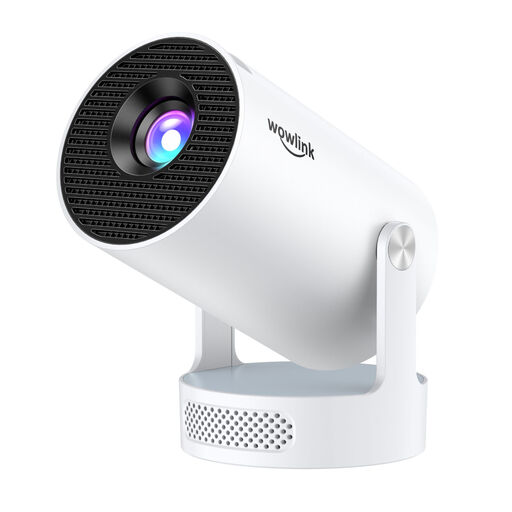
The product title lists 4K/1080P, Wi-Fi 6 and Bluetooth 5.4.
 No image available
If you’re looking for flexible positioning, check whether the rotation and automatic picture correction mentioned in the title suit your space.
The title lists a projection range of 50–200 inches, digital zoom of 50–100% and HDMI compatibility.
 No image available
Before choosing this projector, check that its brightness, measurement standard and screen suit the usual lighting in your living room.
 No image available
If you’re looking for a portable projector for indoor and outdoor use, check above all that its brightness rating suits your preferred picture size and room lighting.
The product title lists 1080p and 250 ISO lumens.
 No image available
If you’re considering a compact model, check that its projection type and position suit your preferred picture size.
The product title lists 1080P, RGB Triple Laser and 1600 ISO Lumens. Check that the screen is suitable for this particular projection type.
No. Consider your preferred picture size alongside the light falling on the screen; manufacturer claims about daylight suitability don’t replace checking the projector in your own viewing conditions.
Not without checking first. Elite Screens distinguishes between screen materials for standard projectors and ultra-short-throw models; make sure the screen is suitable for your particular projection type.
Measure your preferred picture width and the available distance from the lens to the screen, then check these against the throw ratio of the specific model. Optoma points out that a distance calculator only provides an estimate, so test the set-up before mounting the projector.
No. When consumers buy goods, they have statutory rights against the seller; a manufacturer’s warranty is voluntary and subject to its own terms. The Verbraucherzentrale states that faulty goods are generally covered by a two-year statutory warranty in Germany.
No. In Germany, electrical waste must be disposed of separately. The Umweltbundesamt lists local collection points and suitable retailer take-back schemes as ways to dispose of it free of charge; check the terms of any specific retailer take-back scheme separately.