What to consider when buying
First, compare the seats at the far edges of your viewing area with the viewing angle of your chosen screen. Then you can match the brightness, picture detail and projector positioning to your room.
| Consideration |
What to check before buying |
Who it matters most to |
| Viewing from the side |
Compare the furthest seating positions with the viewing angle of the specific screen. celexon states 165° for Expert PureWhite, while Elite Screens Europe gives 90° for CineGrey 3D. |
If we’re sitting to the side, we want the picture to remain clear from the seats at either end. Around 36% of consumers in this usage scenario are mainly concerned with side viewing. |
| Picture detail in the evening |
Check the native resolution and signal processing of the exact model separately, and take the image size and room darkening into account. |
If we want to see fine landscape details and dark scenes, the combination of resolution and room lighting matters. Around 29% of consumers prioritise picture detail. |
| Viewing with ambient light |
Consider the brightness rating, including its unit and measurement method, together with the material of the specific screen. |
If there’s still some light in the living room, we want a picture that suits the room and seating positions. Around 21% of consumers are particularly concerned with viewing in ambient light. |
| Projector placement |
Check the projection distance, throw ratio, zoom, and the horizontal and vertical lens-shift range of the exact model. |
If the projector can’t be positioned to suit the screen, or needs to be moved frequently, placement is our main concern. Around 14% of consumers prioritise flexible positioning. |
The viewing-angle figures apply to the screens named, not to every screen in a particular material category. For CineGrey 3D, Elite Screens Europe also specifies a minimum projection distance of 1.5 times the image width and says it is not compatible with ultra-short-throw projectors. An ALR screen is therefore not automatically suitable for every room or seating position.
Projectors at Joybuy
This selection at Joybuy includes portable home cinema projectors, models designed for close-to-wall placement, and devices with streaming or set-up features. For side seating, the viewing angle of your chosen screen remains crucial.
 No image available
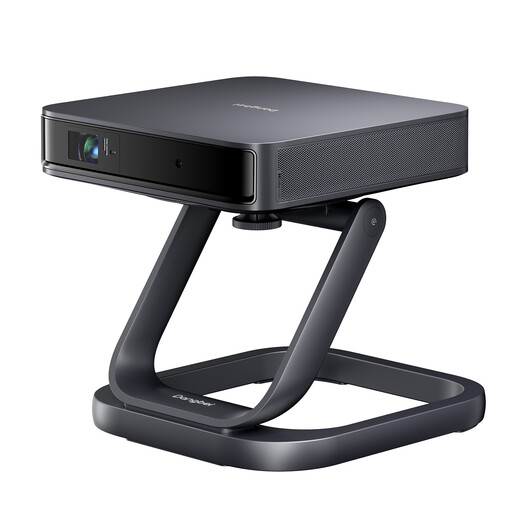
Dangbei Atom Portable Laser Projector with Special Desktop Stand
For home cinema documentaries when you’re looking for a portable laser projector.
1080p native resolution; 1,200 ISO lumens; 1.2:1 throw ratio.
The product description mentions Google TV and official Netflix.
View at Joybuy
 No image available
XGIMI Elfin Flip Laser 1080P Smart Mini Portable Projector
A portable option for watching documentaries on a projection screen.
1080P; 1,600 ISO lumens; autofocus and keystone correction.
The product is described as having a foldable design and an integrated stand.
View at Joybuy
 No image available
Yoton Y6 Bluetooth 5.2 projector, native 1080p resolution
For documentaries in dark or dimly lit rooms, as stated in the product description.
Native 1080p resolution; Bluetooth 5.2; two HDMI ports.
For streaming services, the description recommends a TV stick; it doesn’t specify whether one is included.
View at Joybuy
 No image available
XGIMI Aura 2 4K ultra-short-throw laser projector
For home cinema with the projector placed close to the wall; check first that your chosen screen is suitable for ultra-short-throw projection.
4K; 2,300 ISO lumens; ultra-short-throw.
Elite Screens Europe states that its CineGrey 3D screen isn’t compatible with ultra-short-throw projectors.
View at Joybuy
 No image available
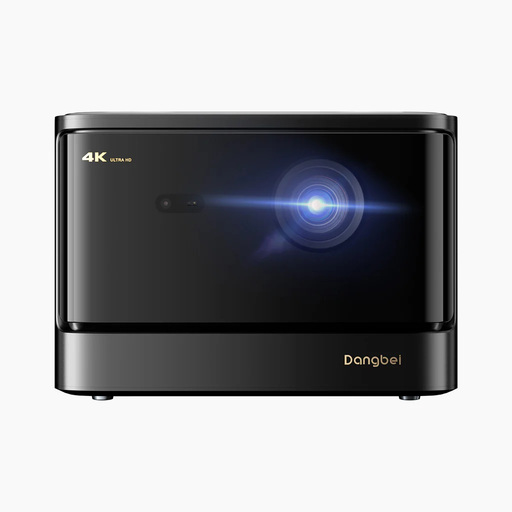
Dangbei DBOX02 4K laser projector
For home cinema documentaries when you want streaming features and automatic set-up.
4K; 2,450 ISO lumens; HDR10+; automatic focus and keystone correction.
The description mentions Wi-Fi and officially licensed Netflix.
View at Joybuy
Frequently asked questions
Does lens shift help if I’m sitting to the side of the screen?
No. Lens shift changes the position of the projected image, not the viewing angle of the screen. So check whether you can see the specific screen clearly from your seat.
Can I use any ALR screen with any projector?
No, suitability depends on the specific screen and projector. Elite Screens Europe states that CineGrey 3D isn’t compatible with ultra-short-throw projectors and requires a minimum projection distance of 1.5 times the image width. Check the specifications of your chosen screen rather than treating ALR as a single, standardised product category.
What should I know about automatic screen alignment?
The digital alignment described by XGIMI can adjust the image only within the original projection area. XGIMI recommends, among other things, using a screen with a black border; according to the manufacturer, certain optical coatings can affect detection.
What are my rights when buying online in Germany?
For an eligible online purchase from a trader, you generally have a 14-day right to cancel from the date of delivery; exceptions and any return costs should also be taken into account. The statutory warranty for new goods bought from a trader is separate from a voluntary manufacturer’s guarantee.
Can I put an old projector in household rubbish?
No. The German Environment Agency explains that old electrical appliances must be collected separately, for example at a recycling centre or an appropriate retailer take-back point. Where possible, remove any batteries that can be taken out and dispose of them separately.


