If you sit to one side, the first thing to check is the viewing angle of the specific screen material. Lens shift moves the projected image, but it won’t fix a narrow viewing angle. If the projector also needs to sit to one side, its horizontal lens shift, throw distance and your desired image width all need to work together. For star fields, also consider how bright and dark parts of the image appear together, as well as how well you can control the room lighting. A dynamic contrast figure alone won’t answer this question.
Who is this guide for?
Viewers at either end of the sofa
If you want a good view even from the end seat and can position the projector centrally, first check the viewing angle of the screen material. Stewart Filmscreen and ProjectorCentral explain how different screen surfaces affect off-axis viewing.
Fans of dark space scenes
In a room where you can dim the lights, you’ll want to make out bright stars against a dark background. Look at contrast when bright and dark parts of the image appear at the same time; RTINGS covers this type of scene in its contrast tests.
Homes where the projector needs to sit to one side
If you can’t position the projector centrally, check the horizontal lens shift and throw distance for your planned set-up. Epson and BenQ describe lens shift as an optical way to move the image; the right combination depends on the specific model and room.
What should you look for when buying?
First, distinguish between where you sit and where the projector will go. Then measure the distance to the screen and assess how the image looks in the room lighting you normally watch in.
| Consideration |
What to check when buying |
Who should pay particular attention? |
| View from a side seat |
Decide where the furthest seat will be and check the viewing angle of the specific screen material. |
When I watch from the end of the sofa, I want to make out stars and details without a noticeable loss of brightness. Around 31% of consumers would therefore make off-axis viewing their top priority. |
| Stars against a dark background |
If possible, watch a scene with bright and dark parts on screen at the same time, and take the room lighting and measurement method into account. |
In dark space scenes, I want to distinguish bright stars from the black background. Around 25% of consumers would put the display of dark scenes first. |
| Positioning the projector to one side |
Check the lens’s horizontal and vertical shift, as well as the ranges that can be combined on the exact model. |
If the projector needs to sit off-centre from the screen, I need an optical alignment that suits my room. Around 25% of consumers would focus primarily on where the projector can be placed to one side. |
| Image size, distance and room lighting |
Measure the throw distance and desired image width, then compare the required throw ratio with the model’s range. |
When space is limited or some ambient light remains, I want to plan the image size to suit the room rather than focus on just one projector specification. Around 19% of consumers would prioritise these room and lighting conditions. |
Common planning mistakes
-
Confusing side seating with placing the projector to one side
The viewing angle of the screen material and image shift on the projector serve different purposes. Lens shift changes the image position, not the screen’s viewing angle.
Mark the seats and the projector lens position separately on a room plan.
-
Planning to use the maximum horizontal and vertical lens shift at the same time
For the XGIMI HORIZON 20 Max, the advertised horizontal shift of up to ±45% applies only when the vertical shift is zero.
Check the combined shift ranges in the manual for the specific model before deciding where to mount it.
-
Treating digital keystone correction as a lossless alternative to optical alignment
Digital correction processes parts of the image and can reduce perceived sharpness.
First plan a suitable lens position and use optical shift. Use digital correction deliberately if flexibility in where you place the projector matters more to you.
-
Using the dynamic contrast figure alone to judge star fields
A sequential bright-dark measurement on its own doesn’t show how stars look against a dark background.
Compare the measurement methods and, if possible, look at scenes with bright and dark elements on screen at the same time, in the room lighting you normally use.
Projector brands to consider
Epson
The EH-LS11000W is an example of a home cinema model with motorised optics.
- Epson specifies ±47,1% horizontal lens shift and a 2,1x zoom for the EH-LS11000W.
- You need to check the shift, throw distance and image size together to make sure they suit your room. Epson says its 4K display uses pixel shifting rather than native 4K panels.
BenQ
The W4000i is a 4LED home cinema projector with horizontal and vertical lens shift.
- BenQ specifies ±15% horizontal lens shift, a throw ratio of 1,15–1,50 and HDR formats including HDR10+ for the W4000i.
- The stated horizontal shift doesn’t guarantee that every off-centre position will work in your room. A dynamic contrast figure is no substitute for comparing stars against a dark background.
XGIMI
The HORIZON 20 Max is a home projector with optical lens shift; other XGIMI models shouldn’t be assumed to offer the same feature.
- XGIMI specifies up to ±45% horizontal shift for the HORIZON 20 Max.
- This maximum applies only when the vertical shift is zero. So you can’t freely use the advertised maximum horizontal and vertical values at the same time.
JVC
JVC says the DLA-NZ500 combines D-ILA technology with native 4K resolution and a home cinema design suited to dark scenes.
- JVC specifies a native contrast ratio of 40.000:1. PRAD reported high measured native contrast and ±28% horizontal lens shift for the DLA-NZ500.
- The manufacturer’s figure and PRAD’s measurement are not the same measurement. You should also consider your room layout and the space needed for the projector when planning.
Projectors at Joybuy
These projectors may suit a range of home cinema and positioning needs. Whatever the projector model, check the screen’s viewing angle if you’ll be sitting to one side. If the projector will sit off-centre, check how it will actually align in your room.
 No image available
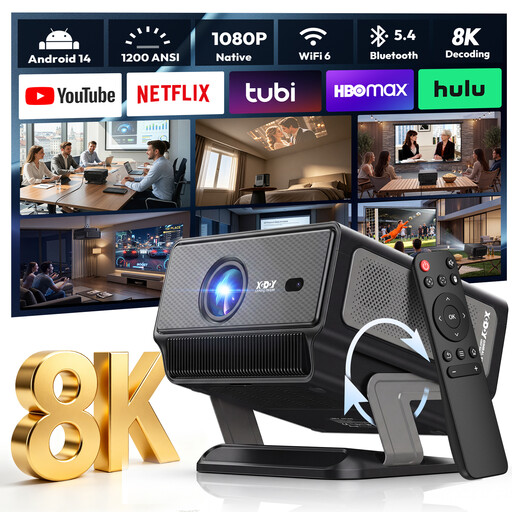
XGODY Gimbal A8 projector
The gimbal is useful if you want to adjust the projection direction freely, but it doesn’t replace checking the screen’s viewing angle from the side.
Native 1080P; 4K/8K video decoding; 1200 ANSI; Android 14.0; Wi-Fi 6 and Bluetooth 5.4; 2 GB RAM and 16 GB ROM; auto focus and keystone correction.
View at Joybuy
 No image available
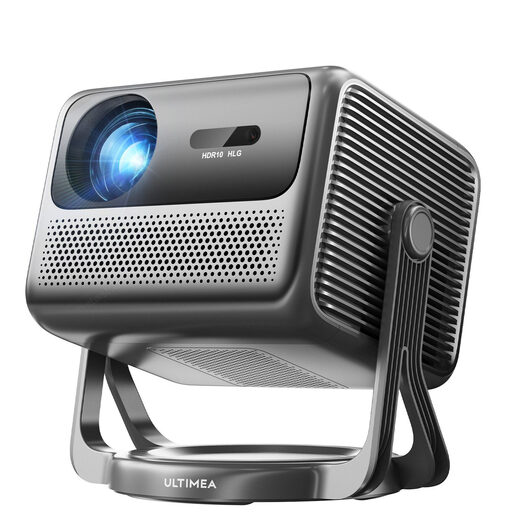
ULTIMEA Nova C40 Android TV 4K projector
The integrated 90° gimbal can be handy if you want flexibility over the projection direction. You’ll still need to plan the image position around your screen and seating.
600 ANSI lumens; 1080P Full HD; HDR10+HLG; Dolby Audio; 90° gimbal stand.
View at Joybuy
 No image available
XGIMI Elfin Flip Laser 1080P
The portable build and foldable design are useful if you want to move the projector around. The right position for side seating will still depend on the screen and how you set everything up.
1080P; RGB triple laser; 1600 ISO lumens; auto focus; foldable design.
View at Joybuy
 No image available
XBJ portable projector, native 1080P
The rotating stand can be useful for flexible projection, including towards the ceiling. Check the actual viewing angle and where you plan to position the screen.
Native 1080P; 700 ANSI lumens; 280° rotating stand; HDR10; auto focus and keystone correction.
View at Joybuy
 No image available
XGIMI Aura 2 4K ultra-short-throw laser projector
The ultra-short-throw design is worth considering if space is limited. Check the throw distance required for your desired image width against the specific model.
4K; 2300 ISO lumens; Dolby Vision; IMAX Enhanced; integrated 60 W Harman-Kardon speakers.
View at Joybuy
Frequently asked questions
Do I need lens shift just because I sit to one side?
No. Lens shift moves the image when positioning the projector; for your seat, what matters is the viewing angle of the specific screen material. If the projector will also sit to one side, check its horizontal shift separately.
How do I plan the throw distance?
Measure from the planned lens position to the screen and decide on your desired image width. Divide the distance by the image width to get the throw ratio you need. Compare it with the range for the exact model and check its shift capabilities too.
Does a high dynamic contrast figure prove that a projector displays star fields well?
No. Star fields show bright and dark image elements at the same time. So also consider measurements for this type of image and the lighting conditions in your room.
Who is responsible if a product is faulty after purchase in Germany?
For a consumer purchase, your statutory rights are against the seller and are separate from any voluntary manufacturer’s guarantee. EU consumer purchases are generally covered by a statutory guarantee of at least two years from receipt of the goods; check any additional guarantee terms separately.
What are the rules on CE marking and disposing of a projector?
CE marking is required for products when the relevant harmonised EU rules say it is; the manufacturer must identify the requirements that apply to the specific product. In Germany, take an old projector to an authorised collection point.


