First, measure the available image width and the possible distance from the lens to the projection surface. This will determine whether a standard, short-throw or ultra-short-throw projector will work in your living room. Then choose one to suit your usual room lighting, and check image detail, colour, streaming access, sound and operating noise from your seat when watching nature documentaries.
Who are the different features best suited to?
Viewers with limited space for setup
If you want a large image but can’t position the projector far from the wall, image width, lens distance and throw ratio are key. BenQ Deutschland and LG Deutschland recommend considering the setup distance alongside your desired image size.
Nature documentary fans watching with some ambient light
If you watch in a living room that isn’t completely dark, check the stated light output and how the image looks on your screen at your usual viewing time. Epson Deutschland and Anker Deutschland list light output and projector features for specific models, but that doesn’t automatically tell you how the image will look in your room.
Fans of hassle-free evenings watching series
If you want to stream without a complicated setup and hear dialogue clearly, check the apps, connections, sound options and operating noise from your planned seat. Epson Deutschland, XGIMI DE and Anker Deutschland describe different features for specific models.
What should you look for when buying?
Start by measuring the distance and image width. Then you can weigh up room lighting, image detail and ease of use for your evenings watching series.
| Buying consideration |
What to check before buying |
Who will find this especially important? |
| Image size and distance |
Check the available image width, the distance from the lens and the throw ratio of the specific model. |
If I have limited space between the projector and the wall, I want to know whether I can still get the image width I’m after. Around 33% of consumers prioritise limited space above all else. |
| Room lighting |
Check the light on the projection surface at your usual viewing time, as well as the model’s stated light output and unit of measurement. |
If I can’t completely darken the room while watching, how the image looks in my usual lighting matters to me. Around 27% of consumers give ambient light the greatest weight. |
| Detail and colour |
Check the resolution specification, supported signal formats and picture modes of the exact model. |
When watching nature footage, I want to judge fine textures and colours without assuming that a specification guarantees a particular picture quality. Around 20% of consumers consider image detail the most important factor. |
| Streaming and sound |
Check the app or HDMI source you want to use, the audio output and operating noise in the mode you’ll use. |
If I want to watch series without a complicated setup, I look for playback that suits my needs and clear sound. Around 20% of consumers prioritise straightforward series playback above all else. |
Avoid common buying mistakes
-
Choosing a projector based only on its maximum advertised screen size
The image width you can achieve depends on the available distance and the throw ratio of the specific model.
Measure the available image width and the distance from the intended lens position before comparing models.
An unsuitable setup location could mean changing where you place the projector or how you project the image.
-
Assuming ANSI, ISO and other lumen figures are directly comparable
Manufacturers may use different units of measurement, and room lighting and image size also affect how the picture looks.
Note the unit and consider the light output in relation to your usual viewing time and projection surface.
-
Assuming “smart” means suitable streaming and good enough sound
Built-in systems, connections and speakers vary by model.
Check the exact model for the playback method you want, the connections you need and the sound options.
Depending on the features, you may also need an HDMI streaming device or an external sound system.
-
Ordering a screen without checking the projection type
A screen won’t necessarily suit every projection type or setup. Epson specifically describes the ELPSC35 as being designed for Epson ultra-short-throw laser projectors.
Check that the screen is listed as compatible with your chosen projector and its setup.
Notable brands and model ranges
BenQ
The TK710STi is a short-throw model designed for rooms with limited projection distance.
- BenQ lists a throw ratio of 0.69–0.83:1 and 3,200 ANSI lumens for the TK710STi.
- According to BenQ, operating noise is 31 dB in typical use and 28 dB in Eco mode. How loud it seems from your seat depends on the setup.
LG
The CineBeam S PU615U is an ultra-short-throw option if you want to position the projector close to the screen.
- LG lists a throw ratio of 0.25:1 and an image size of 40–100 inches for the PU615U.
- The stated light output is 500 ANSI lumens. Check carefully that this suits your room lighting and desired image size.
Epson
The Lifestudio Flex Plus EF-72 and EH-TW7000 offer different playback and setup options.
- Epson lists Google TV and built-in sound for the EF-72, while the EH-TW7000 features optical zoom, lens shift and two HDMI connections.
- The EF-72’s features don’t automatically apply to the EH-TW7000, or vice versa.
XGIMI
According to the manufacturer, the Elfin Flip 4K combines optical zoom with built-in streaming.
- XGIMI lists a throw ratio of 0.98–1.3:1, 1,600 ISO lumens and Google TV for this model.
- The built-in speaker is rated at 7 W. ISO lumens can’t be directly compared with the ANSI lumens used for other models.
soundcore Nebula
The portable P1 is aimed at people who want to move their projector around and position the sound flexibly.
- Anker promotes the P1’s detachable speakers.
- If you’re planning a permanent setup in a small living room, check the projection distance, light output and possible speaker positions against your layout.
Joybuy products for small living spaces
These Joybuy products include ultra-short-throw and short-throw models, as well as compact projectors for evenings watching series. Before choosing, compare the distance to your screen with the specifications for each model.
 No image available
Philoent Smart Ultra-Short-Throw Projector (4K/1080P support)
If you want to position the projector close to the wall, compare the actual image width with the available lens distance.
The title mentions 4K/1080P support; Wi-Fi 6, Bluetooth 5.4, autofocus and automatic keystone correction are also listed. Check whether it supports the app and playback method you want.
View at Joybuy
 No image available
XGIMI Aura 2 4K Ultra-Short-Throw Laser Projector
As an ultra-short-throw model, it may suit a setup close to the wall. Check that it can produce your desired image width in the intended location.
The product title lists 2,300 ISO lumens, Dolby Vision and built-in 60 W Harman Kardon speakers. ISO lumens aren’t directly comparable with the ANSI lumens used for other models.
View at Joybuy
 No image available
XGODY Gimbal N6 Pro Portable Projector
If you’re looking for flexible positioning and built-in streaming apps, check the projection distance first and make sure the services you want are available on the specific device.
Specifications include native 1080p resolution, 700 ANSI lumens, WhaleOS 3.0, autofocus and automatic keystone correction. The stated projection range is 1–5 m.
View at Joybuy
 No image available
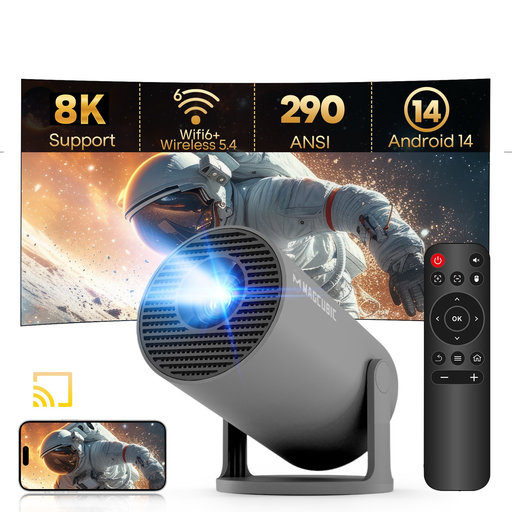
MAGCUBIC HY300Pro Mini Projector
If a short throw ratio is important for your setup, compare the stated image size with the distance to the wall.
The description lists a throw ratio of 0.8:1 and 290 ANSI lumens. Native resolution is 720p, with 1080p listed as a supported format. Native resolution is an important consideration if you want to see fine detail in nature footage.
View at Joybuy
 No image available
MAGCUBIC HY350Max Smart Projector
If you’re looking for a compact projector with streaming features, check that the stated projection distance will give you the image width you want.
The description lists a throw ratio of 1:1, a projection distance of 1.35 m, native 1080p resolution and 900 ANSI lumens. It also lists Android 14, Wi-Fi 6, autofocus and a built-in 15 W speaker.
View at Joybuy
Frequently asked questions
How do I work out the right image size before buying?
Measure the available width of your wall or screen and the distance from the intended lens position to it. Compare both measurements with the throw ratio and permitted image size for the specific model; room size alone isn’t enough.
Can I use an ultra-short-throw projector with any screen?
No. Check that the projection surface is suitable and that the screen is designed for your device. Epson specifically describes the ELPSC35 as being designed for Epson ultra-short-throw laser projectors; this isn’t a general compatibility guarantee for other models.
Will I need a separate streaming device or speaker?
That depends on the model and how you want to watch. Epson lists an HDMI connection for streaming devices and a lamp life of 5,000 hours in Eco mode for the EH-TW7000; the EF-72 is offered with Google TV. Check what’s included, app access, sound options and any future maintenance needs, without assuming the stated lamp life means it will need replacing at a set time.
What are my rights when buying online in Germany?
When you buy as a consumer online, you generally have the right to cancel within 14 days of receiving the goods; exceptions and the details of your contract also apply. The Verbraucherzentrale also distinguishes between your statutory rights against the seller and a voluntary guarantee.
What should I know about safety and disposal?
Electrical projectors must meet the relevant EU product safety requirements. According to the European Union, CE marking is required where the harmonised rules that apply to the specific product call for it; it isn’t an independent quality mark. The Umweltbundesamt says that end-of-life projectors should be taken to a separate collection point for waste electrical equipment, not put in household rubbish.


