When choosing a projector for watching tennis from the back of the room, first work out the picture height you need at the furthest seat. Then check that the throw ratio and room lighting suit your setup. In daylight, managing ambient light and choosing a suitable projection surface are key. A high lumen rating or resolution alone won’t guarantee that the ball and score are easy to see.
Who might need a projector for watching tennis from the back of the room?
Tennis fans sitting further back
If you watch from the back row of the sofa or with other people, plan your seating distance and picture height together so the ball, court lines and score remain visible. Epson Germany explains why viewing distance and picture size need to be matched.
Tennis fans in a bright living room
If you also watch during the day and can’t darken the room very much, consider the incoming light, projector and projection surface together. Epson Germany and ProjectorCentral point out that ALR screens and viewing angle affect how the picture looks.
Tennis fans with limited space for their equipment
If there’s little room between the projector and screen, or the projector has to sit off to one side, check the viewing distance and throw distance separately. BenQ Germany describes throw ratio as the projector’s distance from the screen divided by the picture width.
What should you look for when buying?
Start with the furthest seat and the picture height you can achieve. Then check the room lighting and projector position, followed by the streaming source and sound.
| What matters |
What to check before buying |
Who is this particularly important for? |
| Visibility from a distance |
Consider the furthest seat, the picture height you can achieve and the resolution of the actual broadcast signal together. |
If I’m watching from the back row of the sofa, I want to be able to see the ball and score at a suitable picture height. Around 33% of consumers prioritise visibility from the furthest seat. |
| Visibility in ambient light |
Check the amount of incoming light when the match is on, the brightness rating and operating mode, and whether the projection surface is suitable. |
If I’m watching during the day and can barely darken the room, I want a picture that’s easy to see in my space. Around 27% of consumers prioritise visibility in ambient light. |
| Suitable projector positioning |
Measure the picture width you want and the available distance from the screen, then check the throw ratio and, where relevant, optical zoom. |
If I’m sitting a long way from the screen but the projector has to be close to it, I need a setup that works for both. Around 20% of consumers put projector positioning first. |
| Streaming, sound and ongoing costs |
Check that the source is available for the tournament you want to watch, and confirm the connections, sound setup and any subscription terms. |
If I want to watch a particular match, I need a suitable streaming source and clear sound. Around 20% of consumers prioritise streaming and ongoing costs. |
Avoid common buying mistakes
-
Confusing viewing distance with throw distance
A short-throw projector can sit close to the screen and still produce a large picture. But the distance between the projector and screen alone won’t tell you whether viewers at the other end of the room can make out the details.
Note down the viewing distance, possible picture height and distance between the projector and screen separately. Then check the throw ratio for your preferred picture width.
Depending on the room, you may also need to darken it further or choose a screen suited to the projector and viewing angle.
-
Planning for the projector but not the broadcast
The projector won’t automatically provide a tennis broadcast, and built-in speakers vary from model to model. A private streaming option isn’t automatically suitable for public screenings either.
Decide on your source, connections and sound setup before buying. For a specific tournament, check whether it’s available through your service. If you’re planning a public screening, find out what rights you’ll need.
Depending on your setup, you may also need a playback device, extra speakers, a subscription or, for public screenings, the necessary rights.
Brands to consider
Epson
The EH-TW840 and EH-TW6250 differ in their resolution technology and features.
- Epson says the EH-TW840 offers 4,000 lumens of white and colour brightness, as well as two HDMI inputs.
- The EH-TW840 has a built-in 2 W mono speaker. Epson describes the EH-TW6250 as 4K PRO-UHD; this shouldn’t be assumed to mean native 4K resolution.
Acer
The H6828BD is designed for standard-throw setups with enough space between the projector and screen.
- Acer quotes 4,000 ANSI lumens in Standard mode and 3,200 ANSI lumens in Eco mode, with a throw ratio of 1.5 to 1.65.
- It has 1.1x zoom, and a replacement lamp is listed as an accessory. The brightness figures are manufacturer specifications.
BenQ
The TK705i offers zoom and a variable throw ratio to suit different projector positions.
- BenQ quotes 3,000 ANSI lumens for the TK705i.
- Manufacturer claims about picture quality with the lights on aren’t an independent test of your specific room and screen combination.
XGIMI
According to the manufacturer, the HORIZON 20 Pro has optical zoom and lens shift for flexible positioning.
- XGIMI quotes 4,100 ISO lumens and lens shift.
- ISO and ANSI lumens shouldn’t be treated as directly equivalent measurements. Gaming latency figures don’t demonstrate a particular advantage for watching tennis broadcasts.
soundcore NEBULA
The X1 Pro is described as a portable all-in-one option with an integrated sound system.
- According to the manufacturer, the X1 Pro offers 3,500 ANSI lumens, optical zoom and a 7.1.4 sound system.
- The X1 Pro and X1 are different product names; features and specifications shouldn’t be assumed to apply to both models.
Joybuy projectors for watching tennis from further back
These products offer different features for picture size, flexible positioning and connecting a broadcast source. For each model, check that its specifications suit your screen, room lighting and planned seating position.
 No image available
XGIMI MoGo 4, Match Night EU Edition
The built-in battery can be handy if you move the projector between locations, but whether it suits a distant viewing position still depends on picture size and room lighting.
Full HD 1080p, 450 ISO lumens, Google TV and Harman Kardon audio. The bundle includes a battery with a 2.5-hour runtime and an EA SPORTS FC 26 game code.
View on Joybuy
 No image available
Projector with built-in apps, 50–200 inches
The stated alignment options may be useful if you need to position the projector in different places. Check the picture position from your actual viewing seat afterwards.
The title lists a picture size of 50–200 inches, 50–100% digital zoom, 180° rotation, HDMI compatibility, Wi-Fi 6 and Bluetooth. The description advises against looking directly into the lens and says to keep the vents clear.
View on Joybuy
 No image available
XBJ Portable Projector, native 1080p
The rotating stand may be useful if you need to project from an unusual position. The stated maximum picture size alone doesn’t tell you how clearly you’ll see details from the furthest seat.
Native 1080p, 700 ANSI lumens, a 280° rotating stand and a stated picture size of up to 300 inches. 4K support doesn’t mean native 4K resolution here; the description lists HDMI. Don’t look directly into the lens during use, and keep the ventilation openings clear.
View on Joybuy
 No image available
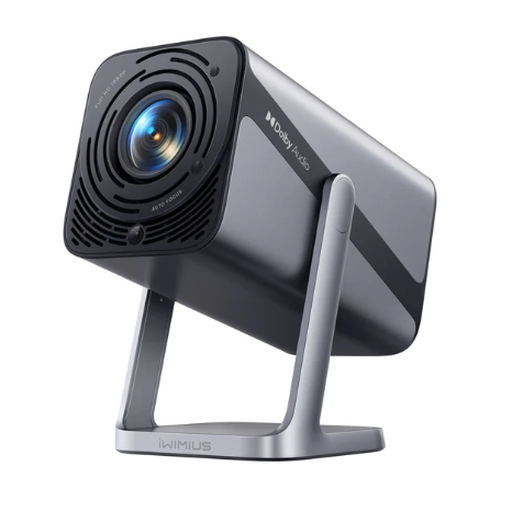
iWIMIUS S29 Smart Projector, 1080p
The adjustable stand and zoom are useful for different projector positions. Check that the picture size works in your room and from your viewing seat.
The title lists 600 ANSI lumens, 1080p, a picture size of 50–200 inches, zoom and a stand adjustable through 360°. 4K support shouldn’t be confused with native 4K resolution. The description warns against looking directly into the lens or blocking the vents.
View on Joybuy
 No image available
XGODY Gimbal N6 Pro, native 1080p
The gimbal stand can help with positioning. Match the intended projection distance to the picture width and viewing distance, rather than relying on the maximum picture size alone.
Native 1080p, 700 ANSI lumens and a stated picture size of 40–200 inches. The description lists a projection distance of 1–5 m and HDMI compatibility. Don’t look directly into the lens, and keep the ventilation openings clear.
View on Joybuy
Frequently asked questions
Does ‘from a distance’ mean the viewing position or the distance between the projector and screen?
They’re two different measurements. For viewers, what matters is the viewing distance and picture height. For projector positioning, check the throw distance and picture width using the throw ratio.
Can I simply point the projector at a blank wall during the day?
A flat wall can work as a projection surface, but light falling on it and the contrast from your actual viewing position affect visibility. Check the setup in the lighting conditions you’ll have during the match. A suitable screen or darkening the room may matter more than a higher resolution rating.
What should I connect and test before a live match?
Test the specific broadcast source using the input you plan to use, and check the picture size and sound from the furthest seat. You’ll need to check separately whether a particular tournament is available through your service on the date you want to watch.
What are my rights if I buy online and the setup doesn’t work at home?
For a typical distance purchase, consumers generally have a 14-day right to cancel, although statutory exceptions may apply. In the EU, faulty goods are covered by a statutory minimum guarantee period of two years from receipt. This is separate from a voluntary manufacturer’s warranty. The European Union explains these rules on its Your Europe portal.
Can I show a match to guests or in a sports bar in Germany?
You shouldn’t assume that the same usage rights apply to a private gathering and a public or commercial screening. For a public event, check the rights for broadcasting and showing the match, as well as the terms of the specific provider. Sky Business has a separate sports bar package that includes tennis; this doesn’t automatically mean you have permission to show every tournament or event.


