Viewers sitting to the side
If you watch from the dining table or another seat off to the side, consider how the specific screen looks from your viewing angle. BenQ Germany and Draper describe viewing angle as a screen characteristic.


For watching cooking shows from a seat to the side, start by choosing a projection screen with a viewing angle that suits where you sit. You don’t need lens shift or keystone correction as long as the projector is aimed straight at the screen. BenQ Germany and Draper treat screen choice and projector positioning as separate considerations. If the room lights will be on, also assess brightness, image size and screen together at the intended installation point. Projection distance and image correction only become separate considerations if the projector itself needs to sit to the side.
If you watch from the dining table or another seat off to the side, consider how the specific screen looks from your viewing angle. BenQ Germany and Draper describe viewing angle as a screen characteristic.
If you’ll be watching with the lights on, consider the planned image size, the light reaching the screen and the screen itself together. BenQ Germany and Draper explain that screens can be designed for different lighting conditions.
If the projector can’t be positioned suitably in front of the screen, check the projection distance and image alignment for the specific model. BenQ Germany describes keystone correction as a way to correct an angled projection; Sony notes that digital compensation can affect image quality and brightness.
First decide whether only your seat, or the projector too, will be off to the side. BenQ Germany, Draper and Epson Germany cover different aspects of screen choice, room lighting and projector positioning.
Suitable if: your seat is off to the side, but the projector can be aimed straight at the screen.
Consider: a viewing angle suited to side-on viewing won’t automatically determine how clearly the image shows with the lights on.
Suitable if: you want to watch cooking shows with the lights on and can take the image size and light reaching the screen into account.
Consider: ambient-light rejection and good side-on viewing are different screen characteristics. Also check compatibility with the intended projection type.
Suitable if: the projector itself, as well as your seat, needs to be positioned to the side of the screen.
Consider: first check the throw ratio and optical features of the specific model. Digital keystone correction can affect image quality and brightness.
| Priority | What to check when buying | Who it matters most to |
|---|---|---|
| Side-on viewing | Compare the viewing angle of the specific screen with your own seating angle; don’t confuse it with the projector’s positioning angle. | If I’m looking at the screen from the dining table, I want to be able to make out the ingredients and steps clearly. Around 36% of consumers are particularly concerned with seeing the image from the side. |
| Image with the lights on | Consider the light reaching the screen and the planned image size. For ALR screens, also check the viewing angle and projector compatibility. | If the lights stay on while I’m cooking, I want to be able to see the show clearly in those conditions. Around 29% of consumers are particularly concerned with having a clear image in ambient light. |
| Projector position and image geometry | Measure the available projection distance and check lens shift and horizontal keystone correction for the exact model. | If the projector has to sit to the side or can’t be placed directly in front of the screen, I need an image that can be aligned from that position. Around 21% of consumers prioritise projector placement. |
| Playback and use | Check HDMI, any included playback devices and the specific app you need on the model you’re considering. Follow the manufacturer’s positioning instructions. | If I want to watch cooking shows regularly using my usual viewing method, I want to know in advance whether a playback device or app will work. Around 14% of consumers are particularly concerned with straightforward playback. |
The screen’s viewing angle and the projector’s alignment solve different problems. If only your seat is to the side, you don’t automatically need an image-correction feature on the projector.
Mark the seating position, screen and possible projector positions separately on a room plan. First check how the screen looks from your actual seat.
If you misidentify the problem, you could spend extra on positioning features that won’t improve the view from your seat.
Screen materials can differ in how they reflect light from outside the main viewing direction. A screen designed for use with room lighting won’t necessarily suit every seat to the side or every projection type.
Compare the stated viewing angle and check compatibility with your specific projector and the lighting conditions in the room.
Digital correction can affect image quality and brightness. The level of correction and settings available vary by model.
Before buying, check the projection distance and alignment, then compare them with the optical lens shift and keystone correction documented for the exact model.
The home cinema models mentioned cover different positioning needs; features vary by model.
According to BenQ Germany’s technical specifications, the portable GV50 combines Full HD resolution with digital image correction.
Hisense Germany describes the C2 Pro as a 4K laser projector with optical zoom and a swivelling projector mount.
The Joybuy options below include projectors with image correction, flexible positioning or streaming features. A suitable projection screen remains a separate consideration if you’ll be sitting to the side.
 No image available
Could be worth considering if you need to position the projector differently, as the product title mentions automatic keystone correction. You’ll still need to choose a screen that suits viewers sitting to the side.
The title lists 4K/1080P, Wi-Fi 6, Bluetooth 5.4 and app support. Check that it supports the app and viewing method you need.
 No image available
The rotation feature may be useful if you need to change the projector’s orientation. It doesn’t replace checking the image geometry or choosing a suitable screen.
The title lists built-in apps, Wi-Fi 6, Bluetooth, automatic image correction and 180° rotation. The stated zoom is digital, so check whether it can achieve your desired image size and position.
 No image available
The built-in stand and automatic keystone correction may be useful if you need to change the projector’s orientation. If you’re sitting to the side, also assess the screen from your viewing angle.
The title lists native 1080p, 250 ISO lumens, a built-in 160° stand, autofocus and keystone correction. Check that the brightness is suitable for your planned image size and the lighting conditions where you’ll set it up.
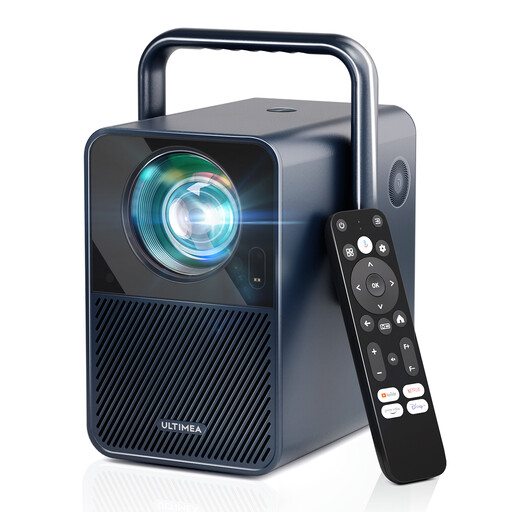 No image available
The listed autofocus and keystone correction can help with setup. Digital correction is no substitute for checking the projection distance and alignment in advance.
The title lists native 1080p, 1000 ANSI lumens, 6D auto keystone correction and Android TV 11.0 with Netflix. “4K supported” is not the same as native 4K resolution.
 No image available
Autofocus and automatic keystone correction can help with setup. Still check whether the projector can be aimed suitably at the screen from its intended position.
The title lists native 1080p, 700 ANSI lumens, WhaleOS 3.0, Netflix apps, Wi-Fi 6 and Bluetooth 5.4. Assess brightness alongside image size and room lighting.
No, not just because you’re sitting to the side. First consider how the screen looks from your viewing angle. Horizontal image correction is relevant if the projector itself has to sit at an angle to the screen.
First check that the specific screen is suitable for your projector’s projection type. For example, Epson Germany describes the ELPSC36 as designed for Epson ultra-short-throw laser projectors. Also consider how the screen looks from your seat to the side.
Check the manual for your exact model for installation and environmental requirements, then choose a position where you can meet them. Watching cooking shows doesn’t mean you need to mount the projector directly in the kitchen.
The German Federal Network Agency lists, among other things, the CE marking, manufacturer details and German-language instructions with the required warnings. It explains that the CE marking indicates the manufacturer’s declaration that the relevant requirements are met; it isn’t an independent quality mark for image performance.