Families with a bright living room
If daylight streams in through large windows, brightness on the screen, your preferred image size and clearly visible contrast are key things to consider.


For family videos in daylight, a projector’s lumen rating isn’t the only thing that matters. First, check how much light falls on the screen and how large you want the image to be. BenQ recommends considering brightness, ambient light and image size together. An ALR screen or blackout blinds may also help, but they’ll affect how you plan the room. If you have limited space between the projector and the wall, an ultra-short-throw projector could be a good fit, provided the projection geometry and screen are matched.
If daylight streams in through large windows, brightness on the screen, your preferred image size and clearly visible contrast are key things to consider.
If you can plan for a screen, consider the screen type, window position and seating together. BenQ Germany distinguishes between matte white screens for darkened rooms and ALR screens for brighter environments.
If there isn’t enough room for a long projection distance, the throw ratio, projector position and screen need to work together. Epson describes the EH-QS100W as an ultra-short-throw model.
Start by planning how much light falls on the screen and deciding how large you want the image to be. You can then assess brightness ratings, the screen and projector placement together.
| What matters | What to look for when buying | Who will find this especially important |
|---|---|---|
| Visibility in daylight | Check the light falling on the screen, your preferred image size and the brightness rating of the specific model. BenQ’s guidance of around 3,000 ANSI lumens applies to certain room and image-size conditions. | If you want family videos to remain easy to see during the day, even with large windows, what matters is the actual light level at the screen. Around 31% of consumers put daylight visibility first. |
| Screen and contrast | Compare matte white and ALR screens for your room’s brightness, and check the position of windows and seating. | If several family members will be watching from different seats, the screen needs to suit the room and projector. Around 25% of consumers prioritise the screen and contrast. |
| Placement in the living room | Check the throw distance, image width and throw ratio against the space available. If the model has zoom or lens shift, check which adjustments it allows. | If furniture or the distance from the wall limits where you can place the projector, the available projection distance becomes a key measurement. Around 19% of consumers prioritise placement. |
| Playing your own videos | Check that your playback device is compatible with the projector’s inputs and explicitly supported connection methods. A USB-C port alone doesn’t confirm that a device can output video through it. | If you want to play family videos from a smartphone, computer or another device you already own, the connection method needs to be compatible. Around 13% of consumers prioritise playing their own videos. |
| Purchase and ongoing costs | Check what’s included, what you may need to buy separately, and the model-specific information about the light source and maintenance. | If your plans include a screen, playback equipment and ongoing maintenance as well as the projector, consider the total effort and cost of ownership. Around 12% of consumers put purchase and ongoing costs first. |
Window light and image size affect how clear the picture looks. A brightness rating alone doesn’t tell you how a projector will perform in your room.
Before comparing models by their lumen ratings alone, consider how light falls on the screen you plan to use.
Depending on your room, you may also need blackout blinds or a suitable screen.
The screen material, ambient light and projection set-up all need to work together. Suitability also depends on where the projector and seats are positioned.
Check that the specific screen type is suitable for your planned projector position and seating.
A combination that isn’t right for your set-up could mean buying again or making changes to the room.
Built-in streaming services don’t automatically mean you can play videos from your existing smartphone, computer or storage device.
Before buying, check the entire connection path from your video source to the projector input. For USB-C video on the GV31, BenQ specifically notes that the connected device must support DisplayPort.
Depending on your video source, you may need a suitable adapter or an external playback device.
Worth considering if you’re looking at a projector with a standard throw distance or an ultra-short-throw model with a suitable screen.
Worth considering if you want to assess brightness ratings and screen choice together for a bright living room.
The LX700-4K is one option to consider if you’re looking for a laser home projector with placement adjustments.
The Cosmos 4K SE is worth considering if built-in smart features and automatic set-up matter to you and you can control the ambient light.
The following Joybuy offers include projectors for home videos, including portable models and options with a screen. In daylight, what matters is still how window light falls on the screen; the product features listed here alone don’t confirm suitability for direct sunlight.
 No image available
An option if you’re looking for a projector and screen together.
The product name lists FHD 1080P, 250 ISO lumens, Google TV, JBL audio, a built-in battery and a stand-mounted screen. Battery-powered video playback is listed as up to 1.2 hours in Eco mode.
 No image available
An option if you’re looking for a portable laser projector for a compact home cinema set-up.
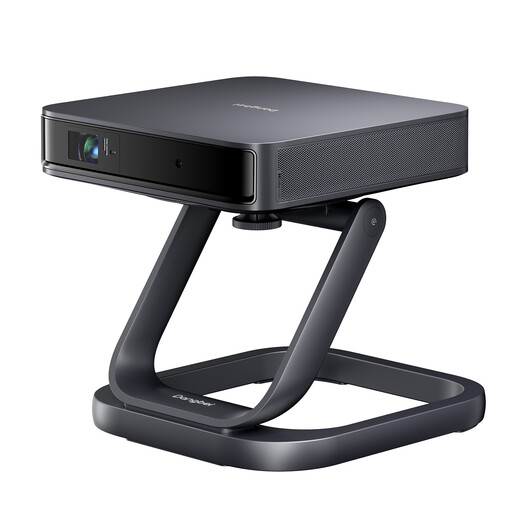
The product name describes the Dangbei Atom as a portable laser projector and lists a desktop stand as a gift.
 No image available
An option if you’re looking for a projector and a large screen together.
The product name lists a portable XGODY Gimbal A6 Pro and a 100-inch screen.
 No image available
An option if built-in apps and different ways to connect a video source are important to you.
The product name lists an image size of 50–200 inches, 180° rotation, 50–100% digital zoom, HDMI and USB. It also lists Wi-Fi 6, Bluetooth and compatibility with iOS, Android and laptops; check the specific connection method for your devices.
No image available
A possible choice if you’re looking for a projector for home videos and film nights.
The product name lists a white video projector; the description mentions home cinema and living room use as possible applications.
No, a high lumen rating alone isn’t enough to make a decision. Also check whether light falls directly on the screen, how large you want the image to be, and whether blackout blinds or a suitable screen are an option. BenQ’s brightness guidance applies to the room and image-size conditions described by the manufacturer.
Not just because there’s a USB-C port. For USB-C video playback on the GV31, BenQ specifically states that the connected device must support DisplayPort. So check that your smartphone, connection method and projector model are compatible.
First measure the available space, screen and projection distance, then check the maintenance instructions for the specific model. Epson describes the EH-TW840 as a lamp projector; ViewSonic describes the LX700-4K as a laser projector that doesn’t need a lamp change. Position the projector so children can’t look into the projection beam, and follow the safety instructions for the model.
For eligible distance sales, you generally have a 14-day right to cancel. For faulty goods bought from a business seller, EU consumer sales law also provides a legal guarantee of at least two years. A voluntary manufacturer’s warranty doesn’t replace your statutory rights.
EU energy labelling rules for electronic displays don’t apply to projectors. In Germany, an end-of-life projector is electrical waste and shouldn’t go in household rubbish. Possible return options include local collection points and eligible manufacturers or retailers.