What should you look for when buying?
Your seat, the projector’s position and the room lighting each affect different parts of your learning setup. Check them separately before choosing a positioning feature or portable model.
| What matters |
What to check before buying |
Who is it most important for? |
| Readability from the side |
Check the screen’s viewing angle and material; watch subtitles from a real lesson while sitting in your intended seat. |
If I’m sitting off to the side, I still need to be able to make out small subtitles and exercises. Around 36% of consumers say readability from a seat off to the side is their top concern. |
| Projector position and image size |
Measure the projection distance and desired image width; check the specific model’s zoom, Lens Shift and keystone correction direction. |
If the projector can’t be placed centrally or at the right distance, I need alignment features that suit its exact position. Around 28% of consumers say difficult positioning is their main concern. |
| Learning with the room lights on |
Watch a lesson under the lighting conditions you plan to use and check the brightness rating of the specific model; don’t treat ISO and ANSI lumens as equivalent. |
If I need the lights on to take notes, I should check how easy subtitles are to read in those conditions. Around 22% of consumers prioritise learning with the room lights on. |
| Portability and source connections |
Check that you can access your learning platform using your preferred connection and that the stated battery life is long enough for your planned lesson. |
If I often change where I study, easy set-up and a suitable connection to my video source are important. Around 14% of consumers prioritise portable set-up and source connections. |
Key brands to consider
The following models illustrate different features. The details apply to the specific devices listed and do not describe a brand’s entire range or guarantee availability.
Epson
The EH-TW7000 is a fixed home projector with Lens Shift, optical zoom and two HDMI ports. It’s worth considering if you can plan where to position the projector but need some flexibility when aligning the image.
- Epson quotes 3,000 lumens for both white and colour brightness on this model.
- It uses a lamp. The stated lamp life of 5,000 hours applies in Eco mode. Lens Shift does not change the screen’s viewing angle.
BenQ
The TH685i is a fixed Full HD projector with HDMI. It’s an example of a model suited to a set-up where the projector is carefully positioned in relation to the screen.
- BenQ quotes 3,500 ANSI lumens and a throw ratio of 1.127–1.46.
- The specifications list automatic vertical 1D keystone correction. This does not indicate horizontal correction or horizontal Lens Shift.
XGIMI
According to the manufacturer, the MoGo 4 is a compact projector with a battery and automatic image alignment, designed for use in different locations.
- XGIMI lists Full HD, 450 ISO lumens and battery life of up to 2.5 hours.
- The manufacturer’s specifications don’t confirm that subtitles will be easy to read with the room lights on. Automatic alignment does not change the screen’s viewing angle.
Nebula
According to Anker, the Capsule 3 Laser is a portable Full HD model for studying in different locations.
- Anker lists 300 ANSI lumens, HDMI and 2.5 hours of battery life in Eco mode for this model.
- Battery life in Eco mode does not automatically apply to other operating modes. The ANSI rating is not directly equivalent to XGIMI’s ISO lumens rating.
Joybuy products for flexible learning spaces
These products offer options for studying on the go and flexible set-ups. For each model, check that the image alignment, connections and picture quality suit your seat and room.
 No image available
Aurzen Tri-Fold DLP Mini Projector
A portable option if you want to use your projector in different locations and connect a source via USB-C.
Features a built-in battery with up to 1.5 hours of battery life; ToF autofocus and USB-C are listed in the product title.
The description notes a limitation on screen mirroring: it isn’t available with Google Pixel and Motorola smartphones or Chromebooks.
View on Joybuy
 No image available
XGIMI MoGo 4
A portable choice if you want to stream learning videos via Google TV and use your projector in different locations.
Full HD 1080p, 450 ISO lumens and battery life of up to 2.5 hours are listed in the product title.
View on Joybuy
 No image available
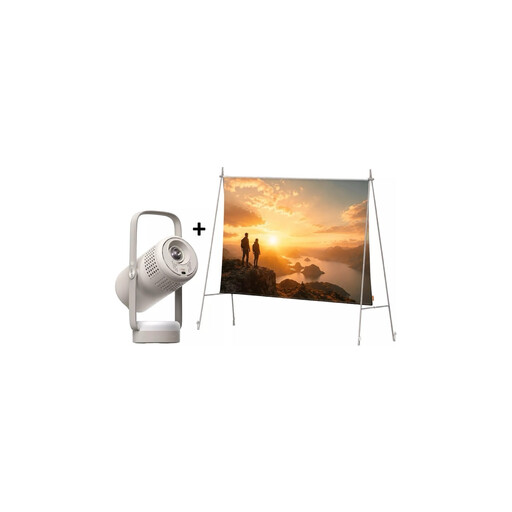
XGIMI Vibe One Match Night Collection
This bundle could be a good fit if you want to carry the projector and projection screen with stand together.
Full HD 1080p, 250 ISO lumens and a built-in battery are listed in the product title. It also mentions a projection screen with stand.
View on Joybuy
 No image available
Projector with built-in apps and Play Store
An option to consider if you want flexibility when positioning your projector and connecting via HDMI or one of the other source options listed in the title.
The description lists native 1080p resolution. The title specifies automatic image correction, HDMI compatibility and 180° rotation.
View on Joybuy
 No image available
XGIMI Vibe One Portable Mini Projector
A portable option if you want to factor a built-in stand and Bluetooth into your learning set-up.
1080p, 250 ISO lumens, Wi-Fi, Bluetooth and a built-in 160° stand are listed in the product title.
View on Joybuy
Frequently asked questions
Will keystone correction help if only my seat is off to the side?
No. Keystone correction adjusts an image distorted by the projector’s position. The screen and its viewing angle are what matter when you’re sitting off to the side. ProjectorCentral explains the relationship between gain and viewing angle from the side.
How can I check the image size and positioning before installation?
Measure the distance between the planned projector position and the screen, then check the throw ratio of the specific model. Next, view subtitles from your intended seat. Epson Deutschland highlights the relationship between image size and viewing distance; BenQ lists a throw ratio of 1.127–1.46 for the TH685i.
What should I check about maintenance and warranties?
If you’re buying a lamp-based model, consider its stated lamp life and whether suitable replacement parts are available. Epson lists a lamp life of 5,000 hours in Eco mode for the EH-TW7000 and offers a compatible air filter. Verbraucherzentrale distinguishes between statutory consumer rights and a voluntary guarantee; specific guarantee terms depend on the offer.
What should I bear in mind when buying and disposing of a projector in Germany?
Check the product details, CE marking and German-language instructions in the specific offer. The Bundesnetzagentur lists these points in connection with market surveillance of affected products. According to the Umweltbundesamt, a projector that has reached the end of its life must not go in household waste; it should be taken to a separate collection point for old electrical equipment.


