For German lessons in daylight from tall windows, lumens aren’t the only thing that matters: start by considering the light falling on the screen and the image size, then check how small subtitles look in the room. A bright Full HD projector may be suitable if several people are watching or you can’t do much to control the window light. Controlling the light, using a smaller image and choosing the right setup can all affect the projector you need.
Who watches German lessons?
Daytime learners using subtitles
If you study on your own and can’t always keep the light from tall windows out, the contrast where the image falls and the clarity of on-screen text are key. ProjectorCentral explains that ambient light and image size should both be taken into account when working out the brightness you need.
Study groups in bright rooms
If several people are watching from different seats, the image size, readability from the back row and screen viewing angle all need to work together. Check the smallest subtitles from more than just your own seat.
Learners who change their setup
If you set up the projector for individual lessons and put it away afterwards, consider the available projection distance, the connections you need and how easy it is to position. Measure the space before relying on digital image correction.
What should you look for when buying?
Start with the light falling on the screen and the image size you want. Then compare resolution, available space and the demands of day-to-day use.
| What matters when buying |
What to check |
Who is this important to? |
| Subtitles in window light |
Check the light on the image area at lesson time and the image size you’re planning. |
If I want to read small subtitles despite incoming daylight, I check the contrast at the intended image location. Around 36% of consumers put readability in window light first. |
| Small learning text |
Test the native resolution and text size from the planned seating position. |
If words and subtitles matter more to me than large video images, I test the course material from where I’ll be sitting. Around 28% of consumers prioritise small on-screen text. |
| Positioning and connections |
Measure the projection distance and image width; check HDMI and any adapters you need. |
If space in the room is limited, I want to connect the projector to my source device without unnecessary rearranging. Around 22% of consumers put setup and connections first. |
| Use and servicing |
Check the light source specifications, possible replacement parts and service terms for the model. |
If I watch lessons often, I want to consider the ongoing running costs and what help may be available if something goes wrong. Around 14% of consumers prioritise running costs and service. |
Common buying mistakes
-
Assuming a high lumen rating guarantees readable subtitles
Window light falling on the screen can reduce perceived contrast. Image size also affects how much brightness you need for the picture you want.
Check the light, image size and smallest subtitles in the room at your usual lesson time.
Curtains, a different image position or a suitable screen may mean extra purchases or adjustments.
-
Choosing an ALR screen based on its label alone
An earlier ProjectorCentral comparison tested screens in side-lit conditions and also considered viewing angles and image artefacts. The results from that particular test setup cannot be applied to all screens or rooms.
Check the screen type, the direction of incoming light and the view from every seat. An unsuitable screen may result in poor viewing angles or visible artefacts.
-
Assuming digital keystone correction is a substitute for correct positioning
BenQ notes that digital keystone correction can visibly alter the edges of an image. This may be particularly noticeable with text.
Check the projection distance and alignment first, then test the smallest subtitles with the correction you need.
Projector brands to consider
The model specifications below come from the manufacturers. They don’t show how readable the image will be in your specific window-light conditions.
Epson
Epson lists the EB-L270F as a Full HD laser projector for education and presentation spaces.
- Epson specifies 5,200 lumens, HDMI and a light source life of up to 20,000 hours for the EB-L270F.
- Wi-Fi is optional on this model. The brightness rating doesn’t prove that subtitles will remain readable in direct window light.
ViewSonic
According to ViewSonic, the LS740HD is a Full HD laser installation projector for education and meeting rooms.
- ViewSonic specifies 5,000 lumens, a 1.3x optical zoom and up to 30,000 hours of light source life for the LS740HD.
- The maximum image size alone doesn’t tell you whether small subtitles will be readable in window light.
Acer
Acer lists the X1526 as a Full HD projector for meeting rooms.
- Acer specifies Full HD and 4,000 lumens for the X1526.
- The manufacturer’s claim that it’s suitable for daylight isn’t a comparative test against the other models listed, nor a guarantee that subtitles will be readable in your room.
BenQ
BenQ lists the TH585P as a Full HD home projector.
- BenQ specifies 3,500 ANSI lumens, HDMI and image alignment features for the TH585P.
- The manufacturer’s specifications don’t prove that small subtitles will remain readable on a screen exposed to window light.
Projectors at Joybuy
The following Joybuy projectors list Full HD or 4K resolution in their product names, making them potential options for text-heavy lessons. Their brightness ratings are no substitute for testing your subtitles in the window light in your room.
 No image available
XGODY N7 Cine Smart Projector, native 1080P
Native 1080P resolution is relevant for lessons with small on-screen text; it doesn’t guarantee readability in window light.
1000 ANSI lumens; autofocus and keystone correction.
View at Joybuy
 No image available
XGIMI Elfin Flip Laser 1080P
Its portable, foldable design makes it an interesting option for flexible setups for individual lessons; check the available space and readability in your room.
1080P; 1,600 ISO lumens; RGB triple laser.
View at Joybuy
 No image available
XGIMI Aura 2 4K Ultra Short Distance Laser Projector
The ultra-short-throw design may suit rooms with limited projection distance, but it needs to be positioned correctly near the screen.
4K; 2,300 ISO lumens; integrated 60 W Harman Kardon speakers.
View at Joybuy
 No image available
XGODY Gimbal N6 Pro, native 1080P
Native 1080P resolution is a useful consideration for text-heavy lessons; subtitle readability also depends on the light and image size.
700 ANSI lumens; autofocus and automatic keystone correction.
View at Joybuy
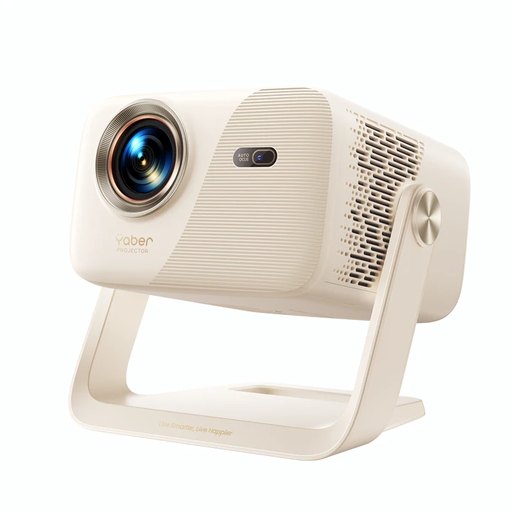 No image available
Yaber L2 Projector, native 1080P
The stated 360° gimbal allows flexible positioning; check that it suits your projection location and seating arrangement.
520 ISO lumens; two 5 W speakers; ceiling-mount compatible. Professional installation is recommended for ceiling mounting.
View at Joybuy
Frequently asked questions
Is a high lumen rating enough when daylight comes through tall windows?
No. A high lumen rating alone doesn’t guarantee readable subtitles. The light falling on the screen and the image size matter too; check the smallest subtitles at the intended image location at your usual lesson time.
How do I work out the right projection distance?
Measure the available distance and the image width you want, then compare both with the specifications for the model you’re considering. Align the projector with the screen as closely as possible before using more substantial digital keystone correction.
What should I consider if I use the projector often or it develops a fault?
Compare the light source life for the specific model, possible replacement parts and the service terms. Your statutory rights against the seller and a voluntary manufacturer’s warranty are two different things.
What marking should I look for when buying in Germany?
For products covered by relevant harmonised EU product legislation, the required CE marking is part of the requirements for placing them on the market. According to EU information, the manufacturer uses it to declare conformity; it isn’t an independent quality mark. Check the details for the specific product version.
Can I return a projector bought online?
For a consumer purchase made at a distance, you generally have a 14-day right to cancel from the date you receive the goods; exceptions and the specific circumstances of the contract may apply. This is separate from claims relating to faulty goods, as the Verbraucherzentrale explains.


