For quiz shows in a bright living room, first consider the light on the screen, the picture size you want and the projection distance together. A high brightness figure from the manufacturer alone doesn’t guarantee that questions will be easy to read. Then check the projection type and how you’ll receive the programme: for a livestream, you’ll need a suitable playback device or an app available on that device, as well as an internet connection. An ALR screen is only an option with projectors explicitly listed as compatible; Epson’s ELPSC35, for example, is designed for certain Epson ultra-short-throw laser projectors.
Who is a projector in a bright living room suitable for?
For watching along in daylight
If you don’t want to darken the living room completely, pay attention to the light on the screen, the picture size and the contrast. BenQ says the brightness you need depends, among other things, on the projection distance, picture size and ambient light.
For watching along with limited space
If the projector needs to sit close to the wall, its throw ratio, the available distance and the picture width you want should all work together. Epson and BenQ distinguish between standard-throw, short-throw and ultra-short-throw projectors.
For watching along via livestream
If you want to watch the programme online, check your playback device, the app or browser available on it, and your internet connection in advance. The BBC lists these as requirements for its livestreams.
What should you look for when choosing one?
First check how the picture looks in your room’s actual lighting, then make sure the projector has a suitable place to go, and finally check the entire signal path, including compatible accessories.
| What you need |
What to check when buying |
Who is this most relevant to? |
| Quiz questions that are easy to read in ambient light |
Assess picture size and the light falling on the projection surface together; compare brightness figures only when they use the same unit. BenQ highlights how brightness, picture size and ambient light work together. |
If I don’t want to darken the room completely while watching along, the picture needs to suit my space. Around 33% of consumers are likely to care most about readability in ambient light. |
| Picture size that suits the available space |
Match the picture width you want to the distance from the screen and the throw ratio; take the projection type into account too. |
If the projector needs to sit close to the wall, getting the right picture width is essential. Around 27% of consumers are likely to be most concerned about where the projector will fit. |
| Receiving the programme you want to watch |
Check the specific channel and how you’ll receive it. For livestreams, check the app or browser on your playback device and your internet connection. The BBC says its livestreams require a suitable device and a reliable internet connection. |
If I want to watch a quiz show live, the chosen signal path needs to work with my device. Around 20% of consumers are likely to prioritise TV reception. |
| Screen and complete setup |
Check the screen type and the projector compatibility stated by the manufacturer; also consider any playback device you need and the right picture size. |
If I want my equipment and screen to work together, I need a compatible combination rather than just a projector. Around 20% of consumers are likely to focus mainly on the complete setup. |
Which assumptions should you avoid?
-
Assuming the highest lumen figure is automatically the best
Brightness figures using different units aren’t directly comparable. Picture size and ambient light also affect how easy quiz questions are to read on the screen.
Check the unit and measurement basis, then assess your planned picture size in lighting conditions as similar as possible to those in your living room.
-
Ordering any ALR screen for any projector
Epson’s ELPSC35 is designed for certain Epson ultra-short-throw laser projectors, not as a one-size-fits-all option for standard- or short-throw models.
Check the projector’s full model name against the screen’s compatibility information.
-
Expecting a smart projector to receive every quiz show
Built-in apps alone don’t guarantee that the channel or livestream you want will be available on the device. The BBC says its livestreams require a suitable device and a reliable internet connection.
Check the specific channel and service on your playback device, and consider an external playback device or another way to receive the programme if needed.
Key brands to consider
BenQ
BenQ quotes 3,300 ANSI lumens for the TK860i and 3,000 ANSI lumens for the TK705STi, which has a throw ratio of 0.8.
- The models listed suit standard- and short-throw setups.
- Manufacturer figures don’t prove that quiz questions will remain readable in any level of light from the windows. With the TK705STi, the picture width and available space need to work together.
Epson
Epson quotes 2,800 lumens for both white and colour brightness, as well as 1.6x zoom, for the EH-TW6250. The ELPSC35 is an ALR screen for certain Epson ultra-short-throw laser projectors.
- The zoom can be useful when positioning the EH-TW6250.
- Zoom doesn’t replace checking the distance or assessing how the picture looks in your room. The ELPSC35 isn’t listed as a universal match for the EH-TW6250 or other types of projector.
XGIMI
XGIMI lists an integrated adjustable stand and 3,100 ISO lumens for the HORIZON S Max.
- The stand is useful if you need to change the projector’s position.
- The manufacturer’s figure doesn’t prove that the picture will remain just as easy to read in bright light from a window. ISO and ANSI lumens shouldn’t be treated as equivalent without checking.
Joybuy products for streaming and flexible positioning
The Joybuy products below are primarily suited to streaming and flexible positioning. For quiz questions in ambient light, you should also compare the brightness figure with the picture size and ambient light.
 No image available
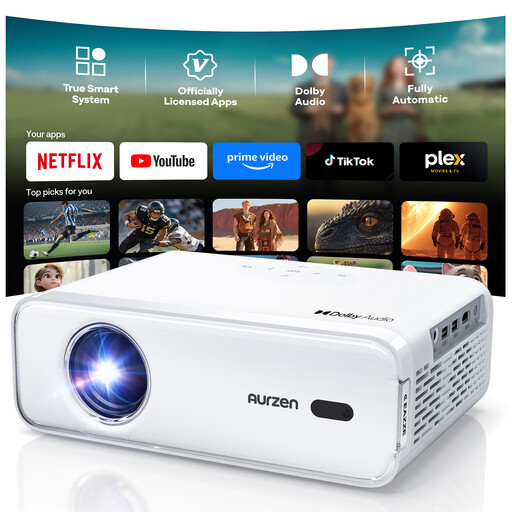
Aurzen Smart Projector
The apps and HDMI ports listed in the description may suit streaming or use with an external playback device.
The description lists Netflix, Prime Video and YouTube, as well as autofocus, automatic keystone correction and 50–100% zoom. It also says this version doesn’t support additional streaming apps downloaded separately.
View at Joybuy
 No image available
Philoent Smart Projector
The description categorises this as an ultra-short-throw projector for close-up positioning; check that the available space still suits the picture width you want.
Features listed include autofocus, automatic 4D keystone correction, Wi-Fi, Bluetooth and an HDMI port.
View at Joybuy
 No image available
Projector with built-in apps and 180° rotation
The listed ports and playback options may be useful when setting up external devices; check which connection your playback device needs.
The title lists built-in apps, 50–100% digital zoom and 180° rotation. Compatible playback options include HDMI devices, TV sticks, USB sticks, smartphones and laptops.
View at Joybuy
 No image available
XGIMI Vibe One
This portable projector with an integrated stand is described as suitable for flexible positioning; its brightness figure alone doesn’t prove that the picture will be easy to read in daylight.
The title lists 1080p, 250 ISO lumens, an integrated 160° stand, autofocus and keystone correction.
View at Joybuy
 No image available
XBJ projector, native 1080p
The rotating stand may be useful if you need a flexible setup; check that the positioning works for the screen area you want.
The title lists native 1080p, 700 ANSI lumens and a stand that rotates by 280°. The description lists HDMI playback.
View at Joybuy
Frequently asked questions
Are lots of lumens enough to make quiz questions easy to read during the day?
Not on their own: picture size and the light falling on the projection surface affect how the picture looks. Compare brightness figures only when they’re labelled on a like-for-like basis, and assess your planned setup in lighting as similar as possible to your room. BenQ’s general guidance is a manufacturer’s recommendation, not a guarantee for your living room.
Can I watch a quiz show live using just the projector?
Plan to use a suitable signal path via a playback device or livestream. For BBC programmes, the BBC describes livestreams via a browser or app and says a reliable internet connection is required. Check with the relevant service to confirm whether the specific programme you want is available.
Does an ALR screen work with every projector?
No. Epson’s ELPSC35 was designed for certain Epson ultra-short-throw laser projectors. Before buying, check the screen’s compatibility information against the projector’s full model name.
What should I check before positioning the projector?
Before permanently mounting it, work out the picture width you want and the projection distance available. Then follow the positioning, ventilation and care instructions for your specific model.
Are there any specific safety considerations with laser projectors?
The Federal Institute for Occupational Safety and Health gives general advice on handling laser products safely, including those intended for consumers. For a specific device, follow its labelling and instructions; these don’t establish the laser class of any of the models mentioned here.


