Which projector set-up is right for you?

Watching with a group of subtitle readers

If you want text to remain clear from even the least favourable seat, check the image size, focus and whether you can minimise digital image correction, rather than relying on a “4K” label alone. BenQ notes that digital keystone correction can affect sharpness.

Series night in a brighter living room

If you can’t always darken the room completely, consider brightness figures alongside your planned image size and the ambient light. Epson and XGIMI use different brightness ratings and measurement terms for their respective models.

Hosting with limited space for equipment

If you don’t want the projector to take up seating or block walkways, measure the space for the unit and the projection distance in advance. Compare standard placement and ultra-short throw separately against your room dimensions. ViewSonic specifies a 100-inch image with a 23,4 cm gap from the wall for the X2000B-4K.

What should you look for when buying a projector?

What matters What to look for Who is it important to?
Reading subtitles Image width and focus right to the edges of the text; check from the furthest and most off-centre seats. When I’m watching with other people, I want to be able to read the subtitles from even the least favourable seat. Around 33% of consumers put readability first.
Watching with some ambient light Check the brightness figure and its measurement term; assess your preferred image size in your usual room lighting. If the room isn’t completely dark during a series, the text should still be clear at the planned image size. Around 27% of consumers say ambient-light performance is their top buying priority.
Positioning the projector Measure the space for the unit and the projection distance; distinguish optical lens shift from digital keystone correction. If the projector shouldn’t block seats or walkways, I need to find a suitable position in the room. Around 20% of consumers put ease of placement first.
Streaming a series with subtitles Check the streaming app or HDMI playback device; select your preferred subtitle language for the specific title. If I want to start a particular series with a particular subtitle track, I want to check the entire playback set-up in advance. Around 20% of consumers say straightforward subtitle playback is their top priority. The Netflix Help Centre notes that language options depend on the title and supported device.

Which buying mistakes should you avoid?

  • Assuming “4K capable” means subtitles will be easy to read

    The stated resolution alone doesn’t tell you whether small text will be clear at your chosen image width, viewing distance and focus position.

    Watch a typical episode with subtitles switched on, from the least favourable seat. Check the text and the image edges, and distinguish between the input resolution and the resolution of the displayed image.

  • Relying on automatic keystone correction instead of getting the placement right

    Digital image correction can affect the image edges and sharpness. This matters particularly when you’re viewing small text.

    First, measure the projection distance and your preferred image width. Use optical zoom or lens shift, if your chosen model offers them, and position the projector as accurately as possible.

  • Overlooking lamp life and playback requirements

    The stated lamp life may only apply in a particular operating mode. And an HDMI port doesn’t automatically give you access to the streaming app you want.

    Check the light source, operating mode and planned playback set-up together.

    Depending on how you use a lamp-based model, you may need to replace the lamp. If you don’t already have a suitable streaming device, you may also need to buy one separately.

Which brands are worth considering?

BenQ

The W2720i is one example of a projector suited to a planned home cinema set-up, with optical zoom and support for external playback devices.

  • BenQ specifies 4K UHD output, 2.500 ANSI lumens, 4LED and a throw ratio of 1,0–1,3 for this model.
  • Lens shift is specified vertically. Don’t assume that small text will remain sharp when using digital correction for a sideways image shift.

Epson

For a fixed home cinema set-up, the EH-TW7000 combines optical zoom and lens shift with connections for external streaming devices.

  • Epson specifies 3.000 lumens for both white and colour brightness on the EH-TW7000.
  • The stated lamp life of 5.000 hours applies in Eco mode. Epson describes the technology as 4K PRO-UHD.

ViewSonic

The X2000B-4K is an example of an ultra-short-throw projector for rooms without a suitable conventional position in the viewing area.

  • ViewSonic specifies a 23,4 cm gap from the wall for a 100-inch image, and a laser phosphor light source with a stated life of 20.000 hours.
  • The image height, space for the unit and projection surface all need to suit your room.

XGIMI

The HORIZON S Max offers one approach to flexible placement, with an integrated stand and automatic set-up features.

  • XGIMI specifies 3.100 ISO lumens, autofocus and automatic keystone correction for this model.
  • Manufacturer brightness figures don’t replace checking small text from your actual seat. Digital correction isn’t a substitute for getting the placement right.

Joybuy projectors for TV series nights

This Joybuy selection includes projectors for streaming TV series, with different placement options and, in some cases, built-in streaming features. For each model, check the image size, subtitle readability from your seat and the playback set-up you plan to use.
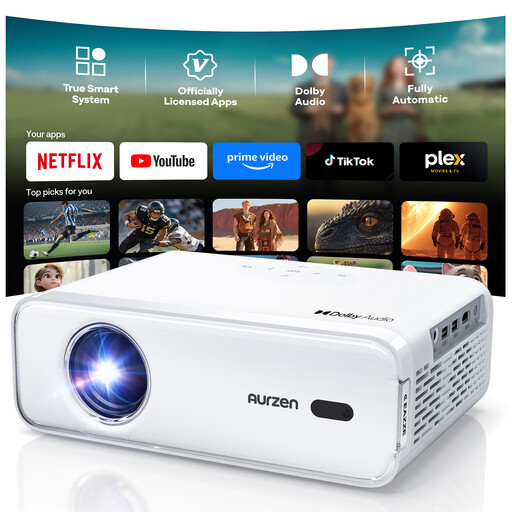
Aurzen smart projector for home cinema

Aurzen Smart Projector, Full HD 1080P, 4K support

An option to consider if you want built-in streaming; check the subtitles with your chosen title and device.

The product name specifies Full HD 1080P, autofocus, Netflix and Dolby Audio. The product details also list Prime Video and YouTube as pre-installed apps.

View at Joybuy

XGODY N7 Cine Smart Projector

XGODY N7 Cine Smart Projector, 1000 ANSI lumens, native 1080P

If built-in streaming matters to you, check which subtitle tracks are available for your series and planned playback set-up.

The product name specifies autofocus. The product details also list officially licensed Netflix and Whale TV OS.

View at Joybuy
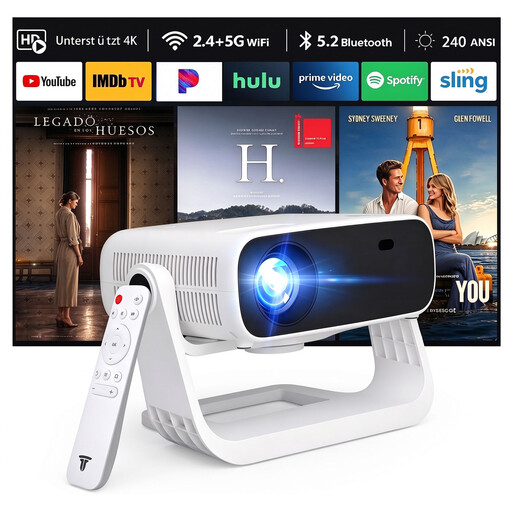
SRESNAIL AT-M269D projector

SRESNAIL AT-M269D, 1080P HD, 240 ANSI lumens

If you’re comparing wireless and wired playback options, check which connections your device and sound system need before you buy.

The product name specifies WiFi 6, Bluetooth 5.2, Android 11, automatic vertical keystone correction and 4K decoding support. Consider the 240 ANSI lumen brightness figure alongside the image size and room lighting.

View at Joybuy

Android 13 smart projector with rotating stand

Android 13 Smart Projector, 1080P HD, rotating stand

The rotating stand is worth considering if you want flexibility when choosing the projection direction. Afterwards, check subtitle readability from your intended seats.

The product name specifies WiFi 6, Bluetooth 5.0 and built-in streaming apps.

View at Joybuy

Philoent smart projector for short projection distances

Philoent Smart Projector, 4K/1080P, ultra-short throw

If a conventional position is difficult to find, the stated ultra-short-throw design may be worth considering. Check the wall gap, image position and subtitle readability from your intended seats.

The product name specifies WLAN 6, Bluetooth 5.4, autofocus and automatic keystone correction.

View at Joybuy

Frequently asked questions about projectors for series with subtitles

How can you check subtitles from every seat before buying?

Decide on the image width and seating positions, then watch a typical episode with subtitles switched on from the furthest and most off-centre seats. Check the focus and image edges. BenQ notes that digital keystone correction can affect sharpness.

Does every German series on a streaming service have the subtitles you want?

No, you can’t tell from the projector’s specifications alone. According to the Netflix Help Centre, the language options shown depend on the specific title and supported device, so check your title and playback set-up.

How much does it cost to run a lamp-based projector over time?

Running costs depend on factors including usage, your electricity tariff and whether the lamp needs replacing. Epson specifies a lamp life of 5.000 hours for the EH-TW7000 in Eco mode only. Before buying, check the intended operating mode and the availability of suitable replacement parts.

Who should you contact if a product develops a fault in Germany?

When you buy from a retailer, you have statutory rights against the seller. These are separate from any voluntary guarantee. The Verbraucherzentrale says that for contracts from 31 July 2026, the statutory warranty period is extended once by twelve months if you choose a repair instead of a replacement within the two-year period. This does not mean there is a general right to a repair for every type of projector.

Can you put an old projector in your household rubbish?

No. The German Environment Agency advises that waste electrical equipment should be collected separately and not put in household rubbish.