If streaming directly from your PS5 does everything you need, you don’t automatically need a capture card. But if you want to produce your stream on a computer, a capture card can send the console’s signal to your streaming software. First, choose an audio setup that works with your headset, party chat and microphone. Then compare passthrough for your screen separately from the recording quality for your stream. A Full HD card may be enough if 1080p60 meets your needs; for higher recording resolutions, frame rates or HDR, both the model and your computer need to meet the relevant requirements.
Who is this relevant to?
Headset and chat streamers
If you play quietly on a headset in a shared room, you’ll want to check that game audio, party chat and your voice are all coming through on the stream. PlayStation explains the audio options for PS5 broadcasts, while Elgato lists specific analogue connections and headset requirements for certain Chat Link setups.
Latency-conscious console players
If you play on a TV or monitor rather than using your computer’s preview, the passthrough resolution and frame rate need to suit your display. Elgato makes a clear distinction between the signal sent to the screen and the capture signal sent to the computer.
Streamers with limited desk space
If you want to connect your console and streaming software using a laptop or compact PC, check the USB connection, operating system and supported software for the specific model. Manufacturer specifications for Elgato and AVerMedia models show that connections and signal limits vary between devices.
What should you look for when buying?
| Buying priority |
What to look for |
Who is it important to? |
| Headset, chat and room audio |
Check line-in and headset compatibility; plan to capture your voice as a separate audio source. |
If I play quietly on a headset, I want to control whether party chat and my voice are included in the stream, without accidentally recording anyone else in the room. In this overview, around 33% of consumers put audio control first. |
| Gameplay without distracting preview lag |
Compare passthrough resolution and frame rate with your display; check capture specifications separately. |
If I play directly on a screen while streaming, its signal needs to match my preferred settings. In this overview, around 27% of consumers put getting the right gameplay image first. |
| Connection to your computer |
Check the USB connection, operating system and streaming software against the exact model. |
If I want to use an existing laptop or compact PC, I need a suitable connection and a working signal path to my software. Around 20% of consumers in this overview put computer compatibility first. |
| Recording quality |
Check the recording resolution and frame rate, as well as any HDR requirements. |
If the finished recording needs to reach a particular resolution or frame rate, a high passthrough specification alone won’t be enough. Around 20% of consumers in this overview prioritise recording quality. |
Common misconceptions
-
4K passthrough doesn’t automatically mean 4K recording
Passthrough describes the signal sent to your screen, while capture refers to the recording on your computer. NZXT explicitly states that the Signal HD60 can pass through a 4K signal, but can’t record or stream in 4K on a computer.
Compare the passthrough and capture specifications for the exact model separately.
-
Headset, party chat and your voice won’t necessarily all come through automatically
Audio from a headset connected to your console won’t necessarily reach your computer through the recording route you want to use. Elgato’s Chat Link Pro guide describes an analogue connection and specific headset requirements.
Before you stream, make a short test recording and check the game audio, chat and microphone separately.
Depending on your audio setup, you may need a compatible audio cable or a separate microphone.
-
Your computer’s preview may not be suitable for playing
The software preview may have additional lag compared with the image sent directly through to your screen.
Where possible, plan to play using a display connected through the appropriate passthrough, and check the resolution and frame rate it needs.
Key brands at a glance
Elgato
The HD60 X and Game Capture 4K S have different recording and passthrough specifications.
- Elgato says the HD60 X offers up to 4K60 passthrough and captures at up to 4K30; the 4K S is specified for recording at up to 4K60. According to the manufacturer, both models have an analogue line-in.
- According to the respective manufacturers’ specifications, HDR recording is currently available on both models only on Windows. These figures are not independent latency measurements.
AVerMedia
The Live Gamer MINI GC311 is a Full HD option; the Live Gamer ULTRA 2.1 GC553G2 is designed for higher signal specifications.
- AVerMedia specifies a maximum of 1080p60 for both passthrough and recording on the GC311. For the GC553G2, the manufacturer lists passthrough of up to 4K120, among other specifications.
- According to the manufacturer, the GC311 doesn’t support 4K, HDR or high frame rates. Certain higher capture specifications for the GC553G2 depend on the software and operating system.
NZXT
According to NZXT, the Signal HD60 can read and pass through a 4K signal if you don’t need to record in 4K on your computer.
- NZXT describes 4K signal passthrough as an option for setups where the gameplay image reaches the screen in 4K.
- According to NZXT, the Signal HD60 can’t record or stream the signal in 4K on a computer and doesn’t support HDR.
Capture cards at Joybuy
Here you’ll find external capture cards for streaming console gameplay via a computer, including models with 1080p recording and 4K passthrough.
 No image available
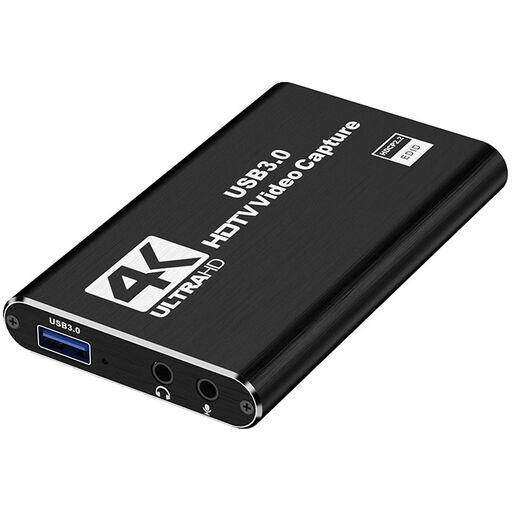
4K HDMI Capture Card, USB 3.0, Black
For streaming via a computer when 1080p60 recording is all you need.
HDMI input up to 4K30; 1080p60 recording; USB 3.0; microphone input and headphone output.
View at Joybuy
 No image available
4K USB 3.0 Video Capture Card, 5 Ports, Black
A potential choice if 4K60 passthrough is enough and you want to record in 1080p60.
4K/60 Hz input and passthrough; 1080p/60 Hz recording; USB 3.0; five ports.
View at Joybuy
 No image available
VIELLAN 4K HDMI Video Capture Card, USB 3.0
For streaming via a computer when 4K passthrough and 1080p recording suit your setup.
4K passthrough; 1080p recording, with no frame rate specified; USB 3.0; microphone input and headphone output. Windows, macOS and Linux are listed as compatible systems.
View at Joybuy
 No image available
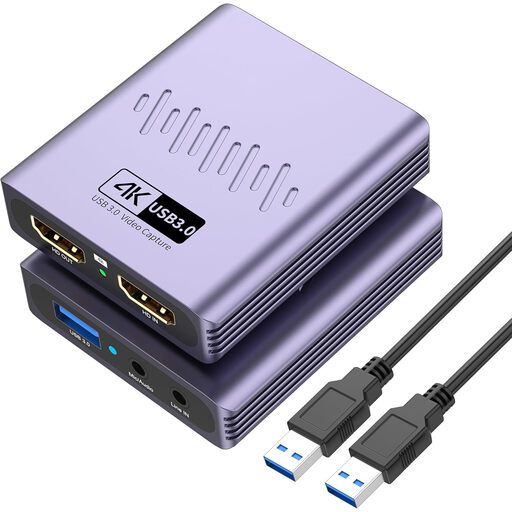
VIELLAN HDMI Video Capture Card, USB 3.0, 4K Passthrough
An option for streaming via a computer with 4K passthrough and recording at up to 1080p.
USB 3.0; microphone input and headphone output. Windows, Mac and Linux are listed as compatible systems; no recording frame rate is specified.
View at Joybuy
Frequently asked questions
Do I need a capture card to livestream from my PS5?
No. You can broadcast gameplay directly from your PS5 by linking a streaming service. A capture card is an option if you want to bring the console’s signal into a stream produced on a computer instead.
Is a headset enough to get party chat and my voice into a computer stream?
Not necessarily. For PS4 and PS5, Elgato describes an analogue connection from a compatible controller headset to the line-in using Chat Link Pro; depending on your setup, your own voice may need to be captured separately. Before streaming, check the audio routing for your specific devices.
How can I check the audio before streaming from a shared room?
Set up the console audio and microphone as the specific audio sources you want, then check them in a short test recording. The OBS Project notes that adding the same audio source twice can cause an echo. The PS5 also has settings for whether party audio is included in its broadcast.
Why is the PS5 picture black in the capture software?
For the HD60 X, Elgato lists HDCP being enabled as a possible cause. It explains that, for PS5 gameplay, you should disable HDCP in the system settings before connecting the card. This doesn’t make protected video or streaming content freely available to record.
Can I stream conversations or footage of the people I live with without asking?
In Germany, Section 201 of the Criminal Code (StGB) prohibits, among other things, recording someone else’s private spoken words without authorisation. Section 22 of the German Art Copyright Act (KunstUrhG) generally requires the consent of the person shown before their image is shared or displayed publicly. Whether these rules apply to a particular situation depends on the circumstances. Set up your microphone and camera so you don’t capture others unintentionally, and get their agreement before deliberately including them.


