Who are the different controllers suited to?

Puzzle gamers with an existing console

You’re looking for an extra controller or one with a different shape for your Switch, Switch 2, Xbox or PS5. First, check your exact console and whether your game supports the controller. Compatibility information is provided by Nintendo, Microsoft and Sony.

Players who use directional inputs frequently

You often use individual directions or button combinations and want to compare D-pads and button layouts carefully, rather than focusing solely on stick technology. 8BitDo, Microsoft and Nintendo, among others, list the features of their respective controllers.

Players gaming in a sunny room

You find it hard to see puzzle tiles in daylight and, as well as a suitable controller, need a way to reduce screen reflections. The German Social Accident Insurance describes glare as a possible cause of poor screen visibility.

What should you look for when choosing?

Nintendo Switch or Switch 2

A good fit if: You play on one of these consoles and want a separate D-pad. Nintendo confirms that the Switch Pro Controller can also be used with Switch 2.

Keep in mind: Similar product names don’t automatically mean the same platform compatibility. Nintendo estimates the Switch Pro Controller’s battery life at around 40 hours, depending on use.

PC or Xbox with a wired connection

A good fit if: A cable running from your seat to your device is practical. GameSir lists the G7 SE for Xbox and Windows PCs.

Keep in mind: The detachable 3-m cable specified by GameSir needs to reach your gaming spot. Hall Effect sticks don’t prove that the D-pad is a better fit for any particular puzzle game.

PC or Xbox with a wireless connection

A good fit if: You want to play wirelessly and use a hybrid D-pad. Microsoft lists Xbox consoles, Windows PCs, and iOS and Android devices as supported platforms for the Xbox Wireless Controller.

Keep in mind: Check which connection suits your device and how the specific model is powered.

Windows PC or Android with 8BitDo

A good fit if: You can use a 2.4 GHz receiver or USB on your Windows PC, or want to play on Android via Bluetooth. According to 8BitDo, this applies to the Ultimate 2C Wireless.

Keep in mind: The similarly named Ultimate 2C Bluetooth version supports different platforms, so check the full model name.

PS5 or a supported PC and mobile game

A good fit if: You play on PS5, or your device and game support the DualSense. Sony says that using it with devices other than the PS5 depends on the device, connection and game.

Keep in mind: Haptic feedback and adaptive triggers aren’t necessarily available in every combination outside the PS5, and they aren’t a universal advantage for puzzle games.

Buying priority What to check before buying Who prioritises this?
Platform and game compatibility Check the console or operating system, exact model variant, connection and whether the specific game supports the controller. 8BitDo models have different connections depending on the variant. I want to know before buying whether the controller works with the specific game on the platform I already own. Around 36% of consumers prioritise compatibility above all else.
D-pad, buttons and grip Compare the inputs you use most in games with the D-pad, button layout and grip of the exact model. Extra buttons are only relevant if they benefit the game or the way you play. If I often enter individual directions, I want to choose a D-pad and button layout that suit the way I play. Around 29% of consumers prioritise how the controls feel.
Screen visibility in daylight Before buying a controller, check whether reflections, screen position or the controls are actually the problem. A controller won’t change how the screen displays images. If puzzle tiles are hard to see, I want to check the light and screen position first. Around 21% of consumers prioritise screen visibility above all else.
Seating position and power Check the cable route, USB port, any receiver you may need and how the specific model is powered. GameSir lists a detachable 3-m cable for the G7 SE; 8BitDo describes a receiver for Windows with the Ultimate 2C Wireless. I want to play from my chosen seat without an awkward cable route and know whether I’ll need to charge the controller or use batteries. Around 14% of consumers prioritise connections and power above all else.

Which buying mistakes can you avoid?

  • Buying a controller to fix screen reflections

    Daylight and reflections can make screen content hard to see; changing the controller won’t solve the problem.

    Try the game at the time of day you usually play and check the screen position and glare protection first. The German Social Accident Insurance recommends measures to reduce glare at screen workstations.

  • Assuming similarly named 8BitDo models work with the same platforms

    8BitDo lists different platforms and connections for the Ultimate 2C Wireless and the Ultimate 2C Bluetooth.

    Compare the full model name and the connection table for the version on offer with your device.

  • Assuming extra features are automatically better for puzzle games

    A game won’t necessarily use haptics, triggers or extra buttons. Sony notes that the availability of individual DualSense features depends on the device, connection and game.

    First check which inputs you actually need, then decide how much extra features matter.

  • Assessing cable length or wireless connectivity without considering where you sit

    A wired G7 SE limits where you can sit because of the cable route. With wireless models, you’ll need to consider the intended connection and power supply for the specific version.

    Measure the cable route you’ll need and check the USB port, any receiver, and whether you’ll need to charge the controller or change its batteries.

Key brands to consider

Nintendo

Nintendo offers its own controllers for Switch and Switch 2. The right option depends on your console and game.

  • Nintendo describes the Switch Pro Controller as having a connected plus-shaped D-pad and confirms that it can be used with Switch 2.
  • Nintendo’s estimated battery life of around 40 hours depends on use. Features listed for the Switch 2 Pro Controller, such as GL and GR buttons, don’t automatically apply to this model.

Microsoft Xbox

Microsoft lists Xbox consoles, Windows PCs, and iOS and Android devices as platforms for the Xbox Wireless Controller.

  • Microsoft describes a hybrid D-pad, Bluetooth and the option to remap buttons.
  • That doesn’t make it especially suitable for a particular puzzle game or mean it will feel better to use than other models.

Sony PlayStation

The DualSense is designed for PS5; using it with other devices depends on the operating system, connection and game.

  • Sony promotes haptic feedback and adaptive triggers.
  • Sony says that some features may not be available outside PS5, depending on the device, connection and game. This doesn’t mean they’re universally useful for puzzle games.

8BitDo

The Ultimate 2C variants are designed for different platforms and connection types.

  • 8BitDo describes both variants as having an improved D-pad.
  • The Ultimate 2C Wireless and Ultimate 2C Bluetooth aren’t compatible with the same platforms. Response and battery life claims are provided by the manufacturer.

GameSir

GameSir offers the wired G7 SE for Xbox Series X|S, Xbox One and Windows 10/11.

  • GameSir lists Hall Effect sticks, two assignable rear buttons and a detachable 3-m cable.
  • The wired connection needs to suit where you sit. The manufacturer’s claim about drift resistance isn’t the same as an independent long-term test.

Controller options at Joybuy

These options suit gaming setups with Switch 2, Xbox or PC, and include both wired and wireless models. Screen reflections need to be dealt with separately, whatever controller you use.

Nintendo Switch 2 Joy-Con 2 set, blue and light yellow

Nintendo Switch 2 Joy-Con 2 Set, Blue and Light Yellow

For a Switch 2 setup if you want to use a left and right Joy-Con 2; the set is described as wireless.

Motion controls, HD Rumble 2 and mouse mode are listed for compatible games. According to the product details, the set is designed for Nintendo Switch 2.

View at Joybuy
Razer Wolverine V3 Tournament Edition, White

Razer Wolverine V3 Tournament Edition, White

For Xbox or PC at a fixed gaming spot, if a wired USB-C connection works with where you sit.

The product details list four rear buttons, six assignable buttons and Hall Effect sticks. These features alone don’t tell you whether the button layout will suit your puzzle game.

View at Joybuy

Microsoft Xbox Wireless Controller, Pulse Red

Microsoft Xbox Wireless Controller, Pulse Red

For Xbox or PC if you want to play wirelessly and use a hybrid D-pad. Check which connection works with your device.

Xbox Wireless and Bluetooth connectivity, as well as button remapping, are listed. It uses two AA batteries, which are included according to the product details.

View at Joybuy
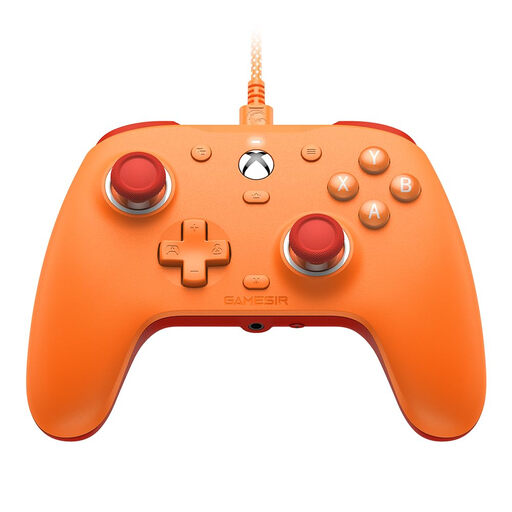
GameSir G7 SE, Orange

GameSir G7 SE, Orange

For Xbox or Windows PC if a wired connection works with where you plan to sit.

The model is listed for Xbox Series X|S, Xbox One and Windows 10/11. Hall Effect sticks are among its features; check separately whether the D-pad and buttons suit the inputs your game requires.

View at Joybuy

Nintendo Switch 2 Pro Controller

Nintendo Switch 2 Pro Controller

For a Switch 2 setup if you’d prefer a separate controller to a Joy-Con set.

Features listed include customisable GL and GR buttons, motion controls and HD Rumble 2. The model is described as a Switch 2 controller; support for other platforms isn’t confirmed here.

View at Joybuy

Frequently asked questions

Will a controller make a puzzle game easier to see in a bright room?

No. A controller changes how you interact with the game, not the reflections on your screen. First, check the light and screen position. The German Social Accident Insurance describes these measures for screen workstations, not specifically for gaming.

Can I use the Nintendo Switch Pro Controller with Switch 2?

Yes. Nintendo confirms that the Switch Pro Controller can be used wirelessly with Switch 2. You should also check whether your specific game supports the controls you want to use.

Does Bluetooth work with the 8BitDo Ultimate 2C Wireless on Windows PC?

For this specific Wireless version, 8BitDo lists Bluetooth for Android and a 2.4 GHz or USB connection for Windows. Don’t confuse it with the differently configured Ultimate 2C Bluetooth version.

What return and fault rights should I know about when shopping online in Germany?

When you buy from a retailer at a distance, you generally have 14 days from delivery to withdraw from the purchase; exceptions and possible return costs apply. New goods bought from a retailer are covered by a statutory warranty against faults for at least two years. The information from “Your Europe” relates to EU consumer rights; a voluntary manufacturer’s guarantee is separate.

What should I bear in mind with wireless controllers and disposal later on?

The Federal Network Agency lists CE marking, manufacturer details and a declaration of conformity among the points it checks during market surveillance; this doesn’t confirm that any individual controller complies. According to the Federal Environment Agency, old controllers shouldn’t go in household waste, and removable batteries should be disposed of separately.