Players who already own a console
If you already use a Switch, Switch 2, PS5 or Xbox, choose a controller made for that specific console. Also check whether the game you want to play supports the controls you need.


First, choose a controller supported by your gaming device and the specific puzzle game you want to play. Then decide whether you’d rather play from a fixed spot with a wired connection or use wireless connectivity that works with your device. For relaxed puzzle games, easy-to-reach directional and action buttons often matter more than extra features. Consider screen glare separately from your choice of controller.
If you already use a Switch, Switch 2, PS5 or Xbox, choose a controller made for that specific console. Also check whether the game you want to play supports the controls you need.
At a desk, you can choose between a wired and a wireless controller. Look for easy-to-reach buttons, and check that both the connection and controller are supported by the puzzle game you want to play.
If you like to change your distance from the screen while reading or solving puzzles, a cable shouldn’t tie you to one spot. Make sure the wireless connection is compatible with your device.
First check that your device and game support the controller. Then consider which connection suits where you play, followed by the button layout and any extra features.
| What matters | What to check before buying | Who should pay particular attention? |
|---|---|---|
| Compatibility | Check the console generation and full model name, and confirm that the game you want to play supports the controller. | If I want to make sure a controller works with a puzzle game on my console or PC, I check both sets of compatibility details. Around 36% of consumers put compatibility first. |
| Where you play and how you connect | Check the cable length or wireless connection type. If the controller uses a receiver, make sure you have the required USB port. | If I like to change where I sit while reading or solving puzzles, a compatible wireless connection matters. Around 29% of consumers prioritise where they play and how they connect. |
| Comfort and ease of use | Compare the layout and reach of the directional pad and action buttons on the specific model. | If I use the directional and confirmation buttons frequently, I check how they feel in my hands. Around 21% of consumers put comfort and ease of use first. |
| Power and extras | Check what’s included and how the controller is powered. Treat advertised battery life as an estimate that may vary. | If I’m weighing up the hassle of charging or replacing batteries, I also check whether my game uses any extra features. Around 14% of consumers prioritise power and extras they’ll actually use. |
For the 8BitDo Ultimate 2C Wireless, 8BitDo specifies 2.4 GHz wireless or a wired connection for Windows, while Bluetooth is listed for Android.
Check the connection table for the exact model variant and your gaming device.
For wireless use with a Windows PC, you may need a free USB port for the receiver.
Nintendo describes the Switch 2 Pro Controller as being exclusively for Switch 2. A controller for the wrong console generation may not work with your device.
Before buying, check the full controller name against your console generation.
Buying the wrong one could mean you need to buy another controller.
On PC, Sony says DualSense haptic feedback requires a supported game and a USB connection. If a game doesn’t support it, you shouldn’t expect to benefit from the feature.
Only factor in extra features if your specific game supports them and you want to use them.
Controller features such as buttons, connectivity and feedback don’t tell you how easy the screen will be to read in a bright room.
Consider screen glare separately from your choice of controller.
The Xbox Wireless Controller is worth considering if you’re looking for a controller listed as compatible with Xbox, Windows or mobile devices.
The DualSense is an option for PS5 and selected PC games when they support its special features.
The Switch and Switch 2 Pro Controllers are separate options. The key factor is which console generation you own.
The Ultimate 2C Wireless could be an option for Windows and Android, provided its connection type is compatible with your device.
The G7 SE is designed for players who specifically want a wired connection to an Xbox or Windows PC.
The products below include Joy-Con 2 for Switch 2, wired controllers for Xbox and PC, and wireless models for PS4, PC and mobile devices. Before buying, check the compatibility details for your specific game and device.
 No image available
For wireless play on a Nintendo Switch 2, with one left and one right controller.
The set includes two Joy-Con 2 controllers and is listed for Nintendo Switch 2.
 No image available
For compatible Xbox or PC games when you want to play with a wired controller from a fixed spot.
Features listed include four rear buttons, six mappable buttons and a detachable 3-m USB-C cable. It uses a wired connection, so you’ll need to stay within reach of the cable.
 No image available
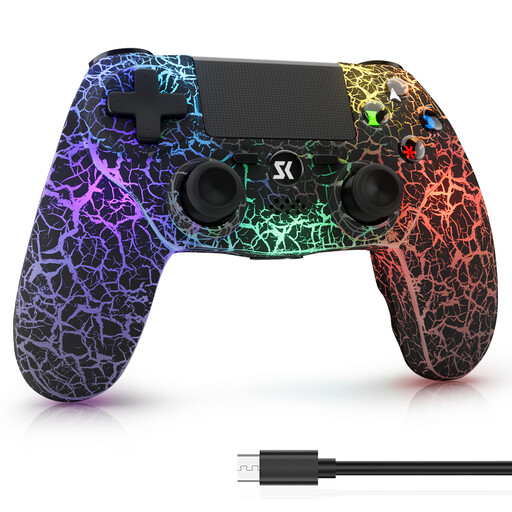
A possible choice if you’re looking for a wireless controller for a compatible PS4 or PC game.
Features listed include a touchpad, 6-axis gyroscope and two vibration motors.
 No image available
For a compatible PS4 or Windows PC game when you want to play wirelessly.
Features listed include Bluetooth, a 1000 mAh battery, dual vibration and 6-axis motion control. Battery capacity alone doesn’t tell you how long it will last.
 No image available
For compatible games on PC, iOS or Android, if you want the choice of a listed wireless or wired connection.
Features listed include Bluetooth 5.0 and wired use via USB-C. Other listed features include Hall Effect sticks and four programmable rear buttons.
No. Being able to connect a controller to your PC doesn’t necessarily mean the game supports it. Check the controller details for the specific game; Steam, for example, offers filters for supported controller types.
Sony PlayStation Support lists USB-C or Bluetooth for supported Windows systems. To use haptic feedback on PC, you’ll also need a supported game and a USB connection.
For this model, 8BitDo specifies 2.4 GHz wireless with a receiver or a wired connection on Windows, and Bluetooth on Android. Check the connection details for your specific platform before choosing this model.
When you buy from a business seller, you’re generally covered by statutory consumer rights. The Verbraucherzentrale states that the period is two years from the date you receive the goods. This is separate from the 14-day right to cancel that generally applies to online purchases, although exceptions may apply. An additional manufacturer’s warranty doesn’t replace your statutory rights.
In Germany, used batteries and rechargeable batteries must not go in household waste. The Umweltbundesamt says they can be returned to retailers free of charge.