What should you look for when buying?
Start by checking your system, the specific game and how many players need controls. Then consider the connection, ease of use and visibility of the screen.
| Priority |
What to check before buying |
Who is this especially important for? |
| System and game compatibility |
Check the operating system or console, exact controller model, connection type and input support in the specific game. |
If I want to be sure my system and co-op game actually support the controller, compatibility is the first thing I check. Around 33 % of consumers put this first. |
| Controls for everyone playing |
Check the player count and permitted controller setup in the game; connect any devices you already own before buying. |
If you want to add controls for another player, don’t assume that the number of connectable controllers is the same as the number of players the game supports. Around 27 % of consumers focus on adding extra players. |
| Connection from your seat |
Consider the supported connection type, whether you need a USB receiver and how to route any cables safely. |
If I want to play from a seat further away on the sofa without running a cable through the seating area, the right connection matters most. Around 20 % of consumers put freedom of movement from their seat first. |
| Ease of use and power |
Try the grip and buttons for yourself if possible, and check what’s included as well as the battery or charging requirements for the exact model. |
If you want easy-to-reach controls and clarity on batteries or charging accessories, weigh up extra features according to what you actually need. Around 13 % of consumers prioritise ease of use and the associated effort. |
| Visibility of puzzle clues |
Check the display you already have from your usual seating positions in typical daylight. |
If I struggle to see clues in daylight, I need to check the display, its position and the light before assuming a gamepad will solve the problem. Around 7 % of consumers put readable clues first. |
Controllers at Joybuy
This selection of Joybuy products includes controllers for PC, Switch and mobile devices, as well as a DualSense for PS5 and PC. Also check that the specific game supports the controller and its input type.
 No image available
BIGBIG WON Fight Master Leverless Controller
For Switch 2, Switch, PC, iOS or Android, it’s suitable only if the game supports the all-button hitbox layout and the relevant connection type.
Described as an all-button hitbox controller; Bluetooth, 2.4 GHz and wired connections; hot-swappable fast-trigger switches.
View at Joybuy
 No image available
EasySMX D10 Gamepad
This gamepad is an option for PC, Switch, Android or iOS, provided the game supports controller input.
Bluetooth; TMR joystick, dual-mode triggers and mechanical buttons.
View at Joybuy
 No image available
BIGBIG WON GALE HALL Wireless Controller
It’s an option for PC, iOS or Android if the game supports controller input.
Described as a wireless controller; motion aiming, Hall-effect triggers and four programmable buttons.
View at Joybuy
 No image available
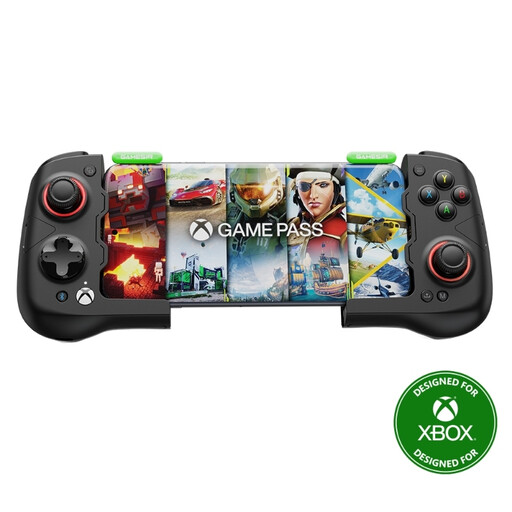
GameSir X4 AILERON Wireless Android Mobile Game Controller
It’s suitable for Android mobile games if the specific game supports controller input.
Wireless Android mobile controller with Hall-effect sticks and programmable buttons.
View at Joybuy
 No image available
PlayStation DualSense Wireless Controller Midnight Black, including USB cable
It’s an option for PS5 or PC if the game supports the controller.
Bluetooth and USB-C; a USB cable is included. Haptic feedback, adaptive triggers and touchpad; some features depend on the game.
View at Joybuy
Frequently asked questions
Are two Joy-Con I already own enough for two players?
They may be, if the specific game supports single Joy-Con controls for two players. Nintendo counts left and right Joy-Con connected separately and wirelessly as two controllers; also check the game’s input requirements.
How do I connect an extra controller?
The connection depends on the model and system. Sony lists USB-C or Bluetooth for DualSense on PC; for the Ultimate 2C Wireless on Windows, 8BitDo specifies a 2.4 GHz USB receiver. Connect the devices you plan to use before you start playing, and check that the game recognises them.
What should I know about power and charging?
Check the battery type, charging method and what’s included with the exact model. Microsoft specifies standard AA batteries for one Xbox version. Older Switch Joy-Con can’t be attached to or charged on Switch 2; Nintendo says you’ll need an older Switch or suitable accessories to charge them.
Will a different controller help with glare in daylight?
No. A controller won’t change glare on the screen. Check the display and how the light falls on it from your intended seat in typical daylight, separately from your choice of controller.
What should I check to make sure a wireless controller complies with regulations?
For products it monitors, the Federal Network Agency lists requirements including CE marking, product identification, manufacturer details, instructions in German and declarations of conformity. By applying the CE mark, the manufacturer declares that the product complies with the regulations that apply to it. It is not an independent endorsement that a controller is suitable for a particular game.


