Start by choosing a controller that works with your console or PC, then check whether the specific puzzle game supports controller input. In a shared bedroom, a headphone connection that actually works and the option to limit vibration are important considerations. There’s no evidence to classify any of the models mentioned as quiet, so if button noise matters, test them in your own room.
Who this decision matters most to
Considerate gamers
If someone else is resting in the room, you’ll want to limit game audio and vibration. Nintendo says the Nintendo Switch has a setting to turn off controller vibration. Whether a headphone socket works depends on the model and connection.
Players who switch platforms
If you want to play narrative puzzle games on a PC and another device, check the connection for each device separately. For example, 8BitDo lists different connection options for Windows and Android with the Ultimate 2C Wireless.
Headphone users
If you want to listen to game audio through a headset, check that the connection works with your platform and chosen connection type. Sony requires a wired connection to use the DualSense headphone socket on PC.
What to look for when buying
First check that your specific game and platform are supported. Then compare audio connections, vibration settings and the connection type that suits your gaming space.
| Buying criterion |
What to check before buying |
Who is it important to? |
| Being considerate of someone who’s asleep |
Check your platform’s audio output and vibration settings. Nintendo says the Nintendo Switch has a system setting to turn off controller vibration; you’ll need to judge button noise for yourself in your room. |
If someone is resting beside you, you’ll want to keep game audio and vibration to a minimum. Around 33 % of consumers put consideration for others in the room first. |
| Compatibility with your platform and game |
Check that the console or operating system, connection type and controller support all match your specific game. Sony says the DualSense can be used with compatible games and applications; Nintendo describes the Switch 2 Pro Controller as designed for Switch 2. |
If you switch between devices, you’ll want to use the same controller only where it’s supported by both the platform and puzzle game. For around 27 % of consumers, compatibility is the top priority. |
| Listening to game audio through headphones |
Check the headset type, connection and supported audio options. Sony requires a wired connection to use the DualSense headphone socket on PC; Microsoft lists a 3.5 mm headset socket on the Xbox Wireless Controller. |
If you want to hear game audio without disturbing someone who’s resting in the room, you’ll need a connection that works with your platform and connection type. Around 20 % of consumers prioritise using headphones. |
| Connection and power |
Check the available USB port, space for a wireless receiver, cable routing and power supply. 8BitDo lists 2.4 GHz or wired connections for the Ultimate 2C Wireless on Windows, and Bluetooth on Android; according to the manufacturer, the GameSir G7 SE connects using a detachable 3 m USB-C cable. |
If you’ll use the controller by your bed or at your desk, its connection should suit the space and its power supply should be practical. Around 20 % of consumers give these practical considerations top priority. |
Common misconceptions when buying a controller
-
‘Wireless’ doesn’t automatically mean wireless audio through the controller socket
Sony says you need a wired connection to use the DualSense headphone socket on PC.
Before relying on the socket, check that audio works with your specific platform and connection type.
Depending on your setup, you may need a suitable cable or a different audio connection.
-
Bluetooth doesn’t mean the same connection works on PC and smartphone
8BitDo lists Bluetooth for Android with the Ultimate 2C Wireless, but 2.4 GHz or a wired connection for Windows.
Check the model description to see which connection is intended for each device.
A spare USB port may be needed for a wireless receiver.
-
Hall-effect sticks and a high polling rate don’t tell you anything about button noise
8BitDo describes the Ultimate 2C Wireless controls as ‘clicky’. This doesn’t establish a specific noise level.
If quiet buttons matter to you, test the noise in your own room.
-
Don’t confuse vibration features with quiet operation
Adjustable or switchable vibration doesn’t automatically affect button noise.
Check vibration and button noise separately, and make sure you know which settings your platform actually offers.
Relevant brands and their controllers
Sony PlayStation
The DualSense is primarily designed for PS5 and can also be used with compatible games on other devices listed by Sony.
- Sony describes haptic feedback and adaptive triggers as DualSense features.
- On PC, haptic feedback requires USB and game support. According to PlayStation Support, the headphone socket only works with a wired connection.
Microsoft Xbox
The Xbox Wireless Controller is an option for Xbox and Windows PC if Bluetooth and a headset socket are important to you.
- Xbox Germany lists Xbox, Windows, iOS and Android as supported devices; Microsoft lists a 3.5 mm headset socket.
- Check audio functionality and power requirements for your specific setup. The socket alone doesn’t guarantee audio output over every PC connection.
Nintendo
The Nintendo Switch 2 Pro Controller is worth considering if you play on Switch 2, particularly if you want a socket on the controller.
- Nintendo Germany lists a 3.5 mm headphone socket and assignable GL and GR buttons.
- Nintendo lists this model for Switch 2. The stated battery life is an estimate and may vary depending on use; vibration can be turned off in the console settings.
8BitDo
According to 8BitDo, the Ultimate 2C Wireless has one connection option for Windows and another for Android.
- 8BitDo lists a 2.4 GHz receiver for Windows and Bluetooth for Android.
- The manufacturer describes the controls as ‘clicky’, but this doesn’t indicate a measured noise level. 8BitDo doesn’t list a Bluetooth connection for this model on Windows.
GameSir
The G7 SE is a wired option for Xbox and Windows if a cable works for your gaming setup.
- GameSir lists a detachable 3 m USB-C cable and a 3.5 mm socket for the G7 SE.
- The information provided doesn’t confirm wireless operation or quieter buttons.
Joybuy controllers for compatible devices
This selection includes controllers whose product titles mention use with PC, Switch, Android, iOS or PS4. Before buying, check that your specific puzzle game and intended connection are supported.
 No image available
EasySMX D10 wireless controller
The product title lists PC, Switch, Android and iOS as intended platforms; check that your specific game is supported.
Bluetooth; mechanical buttons; TMR joystick; 1000 Hz polling rate.
Joybuy
 No image available
NAXSIR wireless controller with smartphone holder
The smartphone holder mentioned in the product title may be useful for mobile gaming; check that your game and device are supported.
Bluetooth 5.2 and 2.4 GHz wireless; dual vibration; the product title mentions PC, Switch, PS3, Smart TV and mobile devices, among others.
Joybuy
 No image available
VIELLAN wireless gaming controller for PC
The product title lists PC as the intended platform. Before buying, check that your specific puzzle game supports the controller.
Hall-effect joysticks; 255-level Hall triggers; programmable rear buttons; 1000 mAh battery; USB-C; PS5 button layout.
Joybuy
 No image available
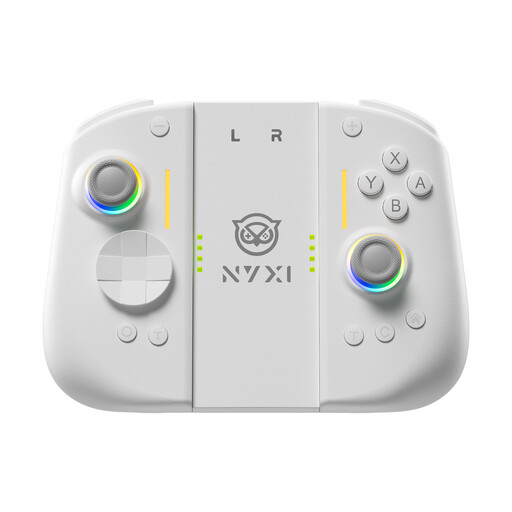
NYXI Hyperion 3 wireless controller for Switch 2, white
The product title lists Switch 2 as the intended platform. It also lists adjustable vibration intensity; check that the setting you want works with your game.
9-axis gyroscope; Hall-effect joysticks; mechanical buttons; two rear buttons.
Joybuy
 No image available
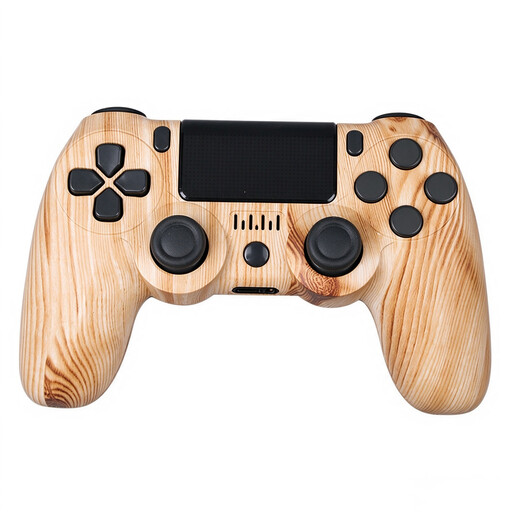
VIELLAN wireless controller for PS4, wood-effect finish
The product title lists PS4 as the intended platform. Check whether your specific puzzle game supports controller input.
Bluetooth; dual vibration; 600 mAh battery; micro-USB charging cable.
Joybuy
Frequently asked questions
Will a controller automatically work with every narrative puzzle game?
No. Check which input devices are supported by the specific game. Sony explicitly says that a connected DualSense can be used with compatible games and applications.
Can I plug headphones into a DualSense connected wirelessly to my PC?
Sony requires a wired controller connection to use the headphone socket on PC. Alternatively, you could use a separate audio connection that’s compatible with your PC.
How can I limit vibration on a Nintendo Switch?
Nintendo describes an on/off setting under ‘System Settings > Controllers and Sensors > Controller Vibration’. When you first switch it on, the controller currently in use vibrates briefly.
What rights do I have if a controller bought from a business seller is faulty?
According to information from the European Union, you have a statutory right to a minimum two-year guarantee from the seller, starting from the date you receive the goods. This is separate from any additional manufacturer’s warranty; the rule doesn’t apply to purchases from private individuals.


