First, check whether the specific puzzle game supports the controller you want to use on your device: simply connecting it to your PC isn’t enough. If you’ll be using directional inputs repeatedly, the D-pad could be an important factor in your choice. When deciding between a cable, Bluetooth and a wireless receiver, focus on the connections available at your desk and how the particular model is powered.
Choosing the right controller for you
PC puzzle gamers
If you want to play a particular puzzle game at your desk with a gamepad, first check the controller details for that specific game. The Steam listings for Pixel Puzzles Ultimate and Piczle World of Puzzles name Xbox controllers as supported input devices; that doesn’t mean every puzzle game supports them.
Gamers with limited desk space
If space is tight, consider whether you can route a cable neatly or whether a wireless connection would work better. Check the connection required and how the specific controller is powered; a wireless receiver, for example, may need a spare USB port.
Gamers using multiple platforms
If you want to use a controller you already own with another device, check its connection options and game support separately. Sony describes Bluetooth or USB connections for the DualSense on PC; Nintendo confirms that the Nintendo Switch Pro Controller can be used wirelessly with Switch 2.
What to look for when buying
| What matters when buying |
What to check |
Who it matters most to |
| Game and platform compatibility |
Check the controller details for the specific game, as well as the operating system and connection requirements for the complete model. |
If you want to play a particular puzzle game on your device, you’ll want to know first whether the game recognises your controller. Around 36% of consumers put support for the specific game first. |
| D-pad and buttons |
Check which inputs the game requires and whether the D-pad and button layout are suitable. |
If you’ll be using directional inputs repeatedly, you’ll want the D-pad to be easy to reach and to avoid features you don’t need. Around 29% of consumers prioritise the directional controls and button layout. |
| Connections at your desk |
Check the cable route, available USB ports and the wireless connection types explicitly supported. |
If a cable gets in the way or USB ports are in short supply, the connection needs to suit your existing setup. Around 21% of consumers prioritise the connection and space required. |
| Power supply |
Check the battery type, charging method and included accessories for the exact version. |
If you want to plan for or avoid battery changes and charging breaks, the power supply of the specific model matters. Around 14% of consumers prioritise this. |
Common misconceptions
-
‘Wireless’ doesn’t automatically mean Bluetooth on PC
For the 8BitDo Ultimate 2C Wireless, the manufacturer lists a 2.4 GHz receiver or cable connection for Windows; Bluetooth is specified for Android.
Check the connection types for the exact model version and make sure your device has the port it needs.
-
A controller that connects won’t necessarily work in every game
Games can support different controllers and inputs. So, connecting a controller to your device doesn’t prove that the puzzle game you want to play will recognise its inputs.
Before buying, check the details for the specific game to see which controller support is listed.
-
Extra features aren’t essential for every puzzle game
Assignable extra buttons or special feedback are only useful if the game and the way you play actually make use of them. For DualSense on PC, Sony says haptic feedback requires a supported game and a USB connection.
Prioritise the D-pad, the buttons you need and the connection over features you don’t have a specific use for.
Brands to consider
Microsoft Xbox
The Xbox Wireless Controller is an option for Windows and Xbox, provided the game and connection type are compatible.
- Microsoft lists a hybrid D-pad, Bluetooth and PC compatibility.
- These details don’t show that it’s the preferred choice for puzzle games or that every game supports it. The Joybuy version considered here is listed as taking two AA batteries; check what’s included with your version.
8BitDo
The Ultimate 2C Wireless can be used with Windows via the supplied 2.4 GHz receiver or a cable.
- 8BitDo lists a redesigned D-pad and a rechargeable battery.
- For this model, the manufacturer specifies Bluetooth for Android, not as a wireless connection for Windows. The quoted battery life is based on idealised laboratory data.
Logitech G
The F310 is worth considering for a wired PC setup if XInput or DirectInput is important to you.
- Logitech lists both input modes for the F310.
- The cable limits your freedom of movement, and support for these modes doesn’t guarantee that every game will work.
PowerA
The Enhanced Wired Controller for Xbox Series X|S is a wired option for Windows and Xbox.
- PowerA lists a detachable 3-m USB cable and assignable extra buttons for this model.
- Extra buttons aren’t automatically useful for simple puzzle games. Claims about comfort and performance are the manufacturer’s descriptions.
Sony PlayStation
The DualSense may be worth considering if you already own one and want to play compatible PC games.
- Sony describes Bluetooth and USB connections for PC.
- According to Sony, haptic feedback on PC requires a supported game and a USB connection; not every feature is available on every device.
Nintendo
The Switch Pro Controller is a platform-specific option for puzzle games on Nintendo Switch.
- Nintendo describes a full D-pad and confirms that this controller can be used wirelessly with Switch 2.
- The Switch 2 information doesn’t guarantee compatibility with PC games. The Switch Pro Controller and Switch 2 Pro Controller are different product versions.
Related products at Joybuy
The models below include PC controllers with listed wireless and USB connections, as well as a controller specifically described as being for Nintendo Switch 2. Before buying, check that the specific game and your device support the version you’re considering.
 No image available
The G-Lab K-PAD-HELIUM-WL Wireless Gaming Controller
For PC gaming if you want to use a wireless connection via the USB receiver.
The title lists 2.4 GHz wireless and PC compatibility; the description lists Windows 10/11, XInput and DirectInput, plus a rechargeable battery. The USB receiver is required for the wireless connection.
View at Joybuy
 No image available
EasySMX D10 PC Controller
For PC gaming if you want to use the connection specified for your device.
The title lists Bluetooth and names PC, Switch, Android and iOS. The product description also lists a USB connection and PC compatibility; check support for your specific game and device.
View at Joybuy
 No image available
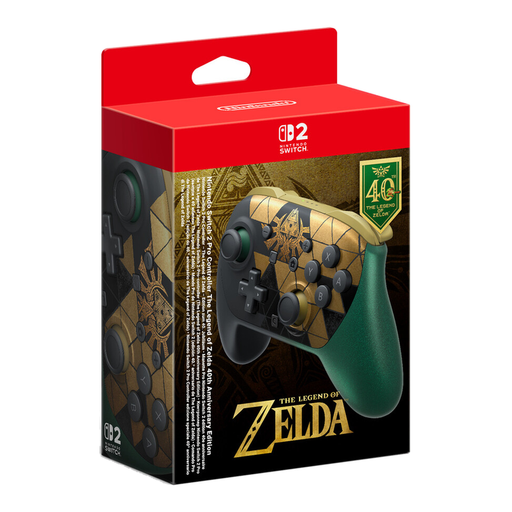
Nintendo Switch 2 Pro Controller The Legend of Zelda 40th Anniversary Edition
For playing puzzle games on Nintendo Switch 2, provided the specific game supports the controller.
The title lists Nintendo Switch 2 and HD Rumble 2. The description lists Bluetooth and a USB-C charging port.
View at Joybuy
 No image available
VIELLAN Wireless Gaming Controller with Hall Effect Joysticks
For PC gaming if you’re considering a controller with the extra buttons listed in the title.
The title lists Hall effect joysticks, 255-level Hall effect triggers, programmable back buttons, RGB lighting, a 1,000-mAh battery and USB-C. The PS5 button layout describes the layout and, by itself, doesn’t prove compatibility with a PS5.
View at Joybuy
 No image available
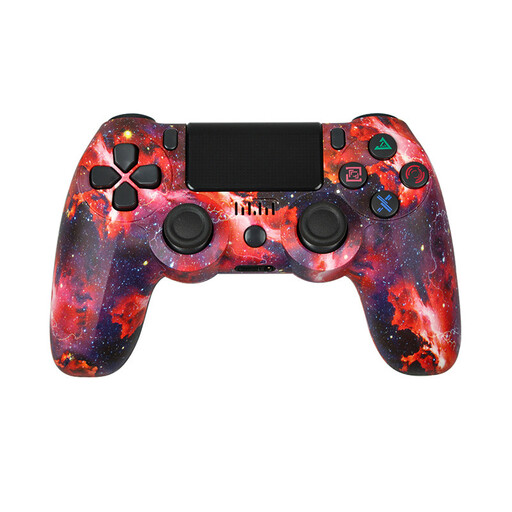
VIELLAN Wireless Controller for PS4 and PC
For PC or PS4 gaming, provided the game supports the controller.
The product description lists PC and PS4, a wireless connection, vibration, a 600-mAh battery and a Micro-USB charging cable.
View at Joybuy
Frequently asked questions
Is ‘PC-compatible’ enough to make my puzzle game work?
No. Also check the details for the specific game: the Steam listings for Pixel Puzzles Ultimate and Piczle World of Puzzles name Xbox controllers, but they don’t say anything about every other puzzle game.
How do I connect the 8BitDo Ultimate 2C Wireless to a Windows PC?
For this model, 8BitDo describes a 2.4 GHz connection for Windows: set the mode switch accordingly, connect the USB receiver and turn on the controller. The manual lists Windows 10 version 1903 or later; Bluetooth is specified for Android with this model.
Does DualSense haptic feedback work on PC over Bluetooth too?
For haptic feedback on PC, Sony specifies a supported game and a USB connection. Being able to connect the controller via Bluetooth doesn’t, on its own, tell you whether this feature will be available.
What should I check about power and returns?
Check whether batteries, a rechargeable battery, receiver and cables are included with the exact version. In Germany, consumers generally have a right to cancel a distance purchase of consumer goods; the period is usually 14 days and, for goods, generally starts when they are received. Statutory exceptions and the circumstances of the specific purchase should be taken into account.
Can I use the Nintendo Switch Pro Controller with a Switch 2 as well?
Yes. Nintendo confirms that the Nintendo Switch Pro Controller can be used wirelessly with Switch 2. This applies to this controller and isn’t a general guarantee for other models or every game.


