Who this guide is for

Developers who run tests frequently

If you run tests repeatedly while coding, assess the CPU and RAM in light of how many processes and other applications you use at the same time. Microsoft outlines the requirements for Visual Studio Code, while the pytest documentation covers testing projects of different sizes.

People who write a lot and work across multiple windows

If you keep code, test output and documentation open side by side, pay particular attention to the keyboard, display and ports. Notebookcheck lists tested office laptop configurations, while the pytest-xdist documentation explains how to run test processes in parallel.

People who code on the move

If you work in different places, weigh up portability, usable screen space, power supply and compatibility with your tools together. The configurations and specifications cited by Notebookcheck, Dell and Apple show why it’s important to check the exact model.

What to consider when buying

Windows laptop with an Intel or AMD processor

A good fit if: Your development tools require Windows or you want to set up a specific Windows environment.

Trade-off: Specifications and included items can vary even within the same model range, so check the exact configuration.

MacBook with an Apple chip

A good fit if: Your project tools run on macOS and a compact device suits your working day.

Trade-off: Check the packages, testing tools and, where relevant, container images for the specific platform. Apple’s battery-life figures for video playback and wireless browsing aren’t measurements of automated testing.

Windows laptop with a Snapdragon processor

A good fit if: The specific device suits your mobility needs and your development tools and dependencies are compatible with it.

Trade-off: Its processor uses a different platform from the Intel and AMD devices in the Notebookcheck list cited here. The name ‘Windows laptop’ doesn’t automatically guarantee support for every application.

What matters when buying What to check Who it matters most to
Test runs and parallel processing Compare the CPU and RAM in the exact configuration with the way you actually run tests. If you use pytest-xdist, bear in mind that it can distribute tests across multiple processes; the pytest-xdist project describes this feature. If I run tests repeatedly or processes in parallel, I want to take my workflow into account when choosing a laptop. Around 28 % of consumers put test performance first.
Keyboard and workspace Check the keyboard layout, screen size, resolution and finish, as well as the monitor connections you need on the exact model. If I write a lot of code and keep test output or documentation open, I need a comfortable keyboard and a usable display. Around 22 % of consumers prioritise typing and reading comfort.
Tool compatibility Check that the operating system and processor platform work with your editor, programming language, testing tools and required packages. Check container requirements only if you plan to use containers. If my project tools or dependencies require a particular platform, I want to confirm they’re supported before buying. Around 22 % of consumers put compatibility first.
Portability and power supply Compare the weight and display size of the complete configuration, and check whether a power adapter is included and suits your charging needs. If I often take my laptop with me, I want to weigh up portability, workspace and charging options together. Around 17 % of consumers prioritise portability.
Upfront and ongoing costs Compare configurations only when they’re clearly identified. Check what’s included and any software costs, if you intend to use the relevant applications. If I need to consider the cost of the device alongside how I plan to use it, I want to be able to distinguish clearly between configurations and what’s included. Around 11 % of consumers put total cost first.

Avoiding buying pitfalls

  • Comparing only the name of a model range

    The processor, RAM, SSD and included items can vary between configurations in the same range. So specifications listed for one model in a ranking don’t automatically apply to every version.

    Check the full model name and the configuration actually on offer before applying test results or specifications to it.

  • Assuming the editor’s minimum requirements cover the whole project

    Visual Studio Code’s requirements relate to the editor; running tests in parallel and having other applications open add to the workload.

    Choose a laptop based on the tools you use at the same time, rather than using a single minimum requirement to estimate what your entire project needs.

  • Assuming a USB-C port means a power adapter is included

    The European Commission gives 28 April 2026 as the start date for common charging requirements for laptops. It also describes the option to buy a device without a new charger. Dell notes that a power adapter isn’t included with the relevant Pro 14 Plus configurations.

    Check the specific offer to see whether a power adapter is included and whether one you already own is suitable for the device.

Brands at a glance

Lenovo

Notebookcheck includes tested ThinkPad L14 and E14 configurations as examples of compact work laptops in its German office laptop rankings.

  • For the tested ThinkPad L14 G5 21L50014GE, Notebookcheck lists 16 GB RAM, a 512-GB SSD and a matt 14-inch display.
  • These specifications don’t automatically apply to other ThinkPads or versions with the same name.

ASUS

Notebookcheck’s German office laptop rankings include a 14-inch ExpertBook PM3406 and a larger Vivobook S16 S3607QA.

  • The models listed offer different sizes and platform options.
  • Notebookcheck lists the ExpertBook as an AMD device and the Vivobook as a Snapdragon device. Display, processor and tool specifications aren’t interchangeable between them.

Dell

Dell Germany describes the Dell Pro 14 Plus PB14250 as a configurable Windows business laptop.

  • Dell lists different processor and storage configurations on the model page.
  • Dell doesn’t list a power adapter as included with the configurations shown there. Check the version and what’s included in the specific offer.

HP

The HP EliteBook 8 G1a 16 is an option if you’d like a larger built-in workspace.

  • For version AD3F3ET#ABD, HP lists 16 GB RAM, a 512-GB SSD and a 16-inch display with a resolution of 1920 × 1200 pixels.
  • HP’s stated battery-life and productivity figures aren’t measurements taken using a puzzle generator or automated tests.

Apple

The 13-inch MacBook Air with M5 is a macOS option if your project tools are compatible with the platform.

  • Apple lists a version with 16 GB of unified memory, a 512-GB SSD and two Thunderbolt 4/USB-C ports.
  • Apple’s battery-life figures are for video playback or wireless browsing, not automated test runs.

Joybuy products

The following Joybuy offers are Windows laptops for development tools and automated testing. Check that your tools are compatible and review the specifications of each configuration.

Microsoft Surface Laptop 7 Snapdragon X Plus, 16 GB, 512 GB, Black

Microsoft Surface Laptop 7 Snapdragon X Plus, 16 GB, 512 GB, Black

A Windows option if your development tools are compatible with the Snapdragon platform.

This configuration is listed with Windows 11 Professional, Snapdragon X Plus X1P-64-100, 16 GB RAM and a 512-GB SSD.

Check that the tools and dependencies you need are supported on this processor platform.

View at Joybuy
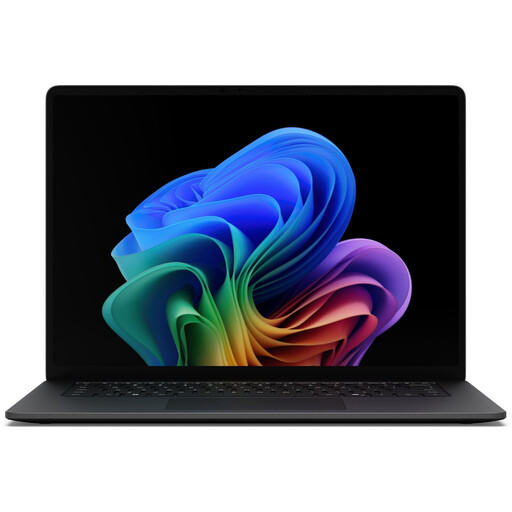
Microsoft Surface Laptop 8 Core Ultra 7, 16 GB, 512 GB, Black

Microsoft Surface Laptop 8 Core Ultra 7, 16 GB, 512 GB, Black

A Windows configuration for code and project files, if the listed platform is compatible with your tools.

This configuration is listed with an Intel Core Ultra 7, 16 GB RAM and a 512-GB SSD.

The 15-inch touchscreen and stated weight of 1.67 kg make screen space and portability important factors to weigh up.

View at Joybuy

Samsung Galaxy Book6 Enterprise Edition 16-inch touchscreen laptop, Intel Core Ultra 7 355, 16 GB, 512 GB, Windows 11 Pro

Samsung Galaxy Book6 Enterprise Edition 16" Touchscreen Laptop

A Windows option with a larger display, if these specifications suit your workspace.

This configuration is listed with an Intel Core Ultra 7 355, 16 GB LPDDR5X RAM, a 512-GB NVMe SSD and Windows 11 Pro.

The 16-inch WUXGA display and stated weight of 1.74 kg make workspace and portability important factors to consider.

View at Joybuy

Ninkear YBook15 2-in-1 with 360° rotating display, 15.6 inches, FHD IPS, 8 GB DDR4, 512 GB SSD

Ninkear YBook15 2-in-1, 15.6 inches, FHD IPS, 8 GB DDR4, 512 GB SSD

A Windows 2-in-1 option if you’d like to make a touchscreen and rotating display part of your workflow.

Listed specifications include a 15.6-inch FHD IPS touchscreen, 8 GB DDR4, a 512-GB SSD and Windows 11.

Check whether 8 GB RAM is enough for the tools you use at the same time and the scale of your testing.

View at Joybuy

Ninkear A15 Pro, 15.6-inch FHD IPS, 16 GB DDR4, 512 GB SSD, Windows 11

Ninkear A15 Pro, 15.6-inch FHD IPS, 16 GB DDR4, 512 GB SSD

A Windows configuration with 16 GB RAM for development tools and project files, if the specifications suit the scale of your testing.

Listed specifications include 16 GB DDR4, a 512-GB SSD, a 15.6-inch FHD IPS display and Windows 11.

The stated weight is 1.6 kg.

View at Joybuy

Frequently asked questions

Do I need a particularly powerful laptop for automated testing?

Not just because your tests are automated. What matters is whether you run small tests locally or start lots of processes in parallel; pytest-xdist can distribute tests across multiple CPU processes. Choose a laptop based on the demands of the tests you actually run.

How do I set up a separate test environment for a Python puzzle generator?

If your project uses Python, you can create a project-specific virtual environment with python -m venv and install the packages you need there. The Python documentation describes virtual environments as separate locations for package installations; you can use pytest to run your tests.

Do I need to buy Docker Desktop to run tests?

No, Docker Desktop isn’t required for simple local tests. If you want to use containers, check the terms for your specific use: Docker distinguishes between free and paid use based on how the software is used and the size of the organisation.

What are my rights if I buy a faulty laptop or buy one online in Germany?

For goods bought from a business seller, you’re generally entitled to a statutory guarantee of at least two years from the date you receive them; this is separate from any voluntary warranty. Online purchases generally come with a 14-day right to cancel, although statutory exceptions may apply. The right to cancel covers returning an item without giving a reason related to a fault, and doesn’t replace your rights if the goods are faulty. The EU’s information on guarantees and consumer rights explains the difference.

Does the EU’s common charging port rule mean a power adapter has to be included?

No, a power adapter doesn’t have to be included with the offer. The European Commission gives 28 April 2026 as the start date for common charging requirements for laptops and explicitly describes the option to buy a device without a new charger. So check the specific offer to see whether a power adapter is included and whether one you already own is suitable.