First, choose a device that can run the specific software required for your course. Then compare battery life measured under the same conditions. A long-lasting Windows on Arm laptop may suit basic Python exercises, but if you need specific apps or drivers, compatibility matters more than extra battery life.
Who should weigh up these options?
Learners without reliable access to a socket
If you spend long study sessions on the go, in a library or at different locations, battery-life tests you can compare are more useful than a manufacturer’s estimate alone. COMPUTER BILD compared various tested laptop models at maximum screen brightness.
Learners with required course software
If you need specific development tools, packages or devices as well as Python, check the operating system and processor architecture before buying. Microsoft and the Python Software Foundation list different installation options for Python and development tools.
Budget-conscious Python beginners
You don’t need to choose a laptop solely for a particularly powerful processor or extra features when getting started with local exercises. Match your choice to the requirements of your software. Microsoft describes VS Code as relatively lightweight, but you’ll also need to factor in the requirements of your other learning software.
What to look for when buying
| What matters |
What to check before buying |
Who it matters most to |
| Battery life on the go |
Compare results from tests using the same methods and brightness settings; check the full model variant. |
If I’m planning longer Python sessions without access to a socket, battery life tested under clear, consistent conditions matters to me. Around 36% of consumers put battery life first. |
| Course software compatibility |
Check that the operating system and processor architecture meet the course requirements and support the necessary packages and, where applicable, drivers. |
If my exercises require specific tools or devices, I want to make sure they’re compatible before buying. Around 29% of consumers prioritise making sure Python and their course software will run. |
| Typing comfort and portability |
Check the screen size, keyboard and weight of the specific model; try the keyboard yourself if possible. |
If I spend a lot of time reading and typing code in different places, the screen and keyboard need to suit my workspace. Around 21% of consumers prioritise comfort while working. |
| Unnecessary extras |
Match the features to the software you’ll actually use, and check whether a suitable power adapter is included. |
If I’m just starting out with Python exercises, I don’t want to pay for features my software doesn’t need. Around 14% of consumers focus mainly on avoiding unnecessary purchases and accessories. |
Common buying mistakes
-
Assuming battery-life results apply to every model variant
The ASUS Zenbook A14 UX3407 range includes different processor and memory configurations. COMPUTER BILD’s independent battery-life test covers the model they tested under specific conditions.
Compare the full model name and test conditions with how long you expect to use the laptop.
Without a socket nearby, an unexpected charging break could interrupt your study session.
-
Assuming Windows on Arm is compatible with all course software
Python is available for Windows ARM64, but dependencies, extensions or native drivers may need extra checks. Microsoft points out that these components can present compatibility challenges.
Before buying, check the specific packages and devices your course requires. Having a Python installer available doesn’t guarantee that your entire course setup will work.
If a required package or driver doesn’t work, you may need to choose alternative software or equipment.
-
Assuming USB-C guarantees a suitable charger
A USB-C port alone doesn’t tell you whether your existing power adapter supplies the required charging power or is included with the laptop.
Check the power specifications and what’s included with the specific offer.
Depending on what’s included, you may need to buy a suitable power adapter separately.
Laptop brands to consider
ASUS
The Zenbook A14 UX3407 is a Windows on Arm option, while the Zenbook S14 UX5406 is an Intel alternative for mobile use.
- For the models tested at maximum brightness, COMPUTER BILD reports 17:08 hours for the Zenbook A14 UX3407 and 15:48 hours for the Zenbook S14 UX5406.
- The ranges include different processor and memory configurations. These results don’t automatically apply to every configuration or to your own programming routine.
Acer
The Aspire 14 AI is a compact Intel laptop range; COMPUTER BILD’s battery-life test included the A14-52 model.
- For the Acer Aspire 14 AI A14-52 they tested, COMPUTER BILD reports 15:06 hours at maximum screen brightness.
- Specifications listed for a range don’t automatically apply to every configuration on sale.
Samsung
The Galaxy Book5 Pro 360 is for buyers looking for a 16-inch convertible as well as a laptop for Python.
- For the device they tested at maximum brightness, COMPUTER BILD reports 15:27 hours of battery life.
- You don’t necessarily need a convertible for Python exercises alone. Memory configuration and model number can vary between offers.
Dell
The Inspiron 14 7441 is another Windows on Arm option included in the battery-life comparison.
- For the device they tested at maximum screen brightness, COMPUTER BILD reports 12:38 hours.
- If you need specific course software, additional apps or drivers, check that they’re compatible with Arm processors.
Apple
The MacBook Air with M5 is a macOS alternative if your Python course allows macOS.
- Apple quotes up to 18 hours of battery life for the MacBook Air with M5.
- This is a manufacturer’s figure, not a test result directly comparable with COMPUTER BILD’s measurements. Check your course’s software requirements first.
Joybuy laptops for Python practice
The Joybuy laptops below are designed for mobile study and work. Check that the operating system, course software and features of each configuration suit your Python exercises.
 No image available
HP OmniBook Ultra 14-kd0072ngx
For local Python exercises, check that your course software runs on this specific Windows configuration.
14-inch 3K display, Intel Core Ultra 7 356H, 16 GB RAM, 1 TB SSD and Windows 11 Home.
View at Joybuy
 No image available
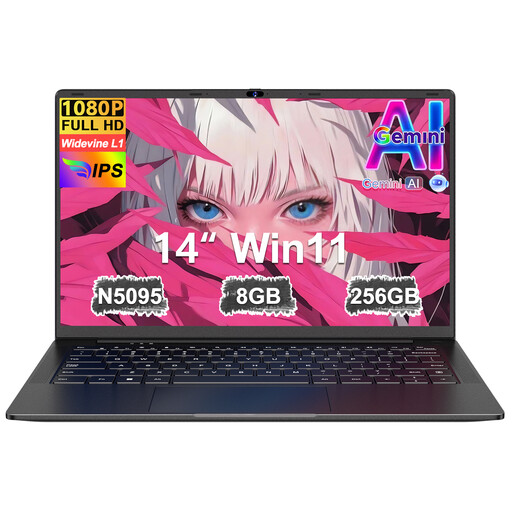
Ruzava 14-inch laptop
Its compact design could suit study spaces with limited room. Before buying, check which operating system and software this specific model supports.
FHD display, N5095 processor up to 2.9 GHz, 8 GB RAM and 256 GB SSD; listed as expandable up to 1 TB in the product name.
View at Joybuy
 No image available
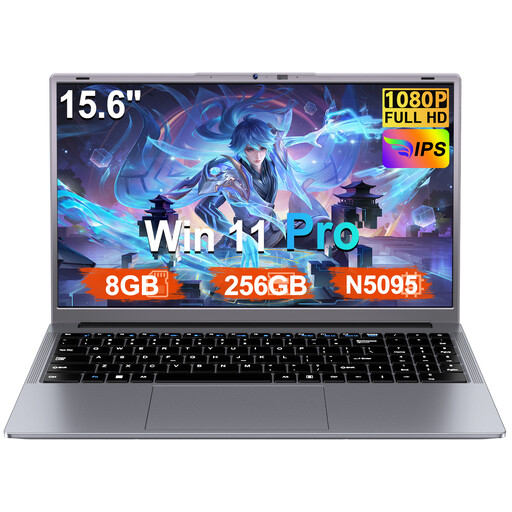
Ruzava 15.6-inch laptop
Windows 11 Pro is listed for local exercises, but check that your course software and packages work with this specific configuration.
FHD display, N5095 processor up to 2.9 GHz, 8 GB RAM, 256 GB SSD and Windows 11 Pro; listed as expandable up to 1 TB in the product name. The product listing quotes up to 6 hours of continuous use.
View at Joybuy
 No image available
16-inch laptop with FHD display
If you prefer a larger screen for code and course materials, also consider whether the laptop is suitable for the different places you study.
Intel Core i5-8210Y with 2 cores and 4 threads, up to 3.6 GHz, 16 GB RAM, 512 GB SSD, Windows 11 Pro and RJ45 port.
View at Joybuy
 No image available
Ninkear A15 pro
If you’re planning longer study sessions without access to a socket, don’t confuse the stated battery capacity with a battery-life estimate. Check the battery life of the specific model.
15.6-inch FHD IPS display, 16 GB DDR4 RAM, 512 GB SSD, 55,4 Wh battery capacity and Windows 11. The stated weight is 1,6 kg.
View at Joybuy
Frequently asked questions
Do I need a particularly powerful laptop for Python?
Not just for the editor: Microsoft recommends 1 GB RAM for VS Code. Also check the requirements of your Python packages and course exercises, as the editor’s recommendation doesn’t cover your entire learning setup.
How do I set up Python in VS Code?
Install a Python interpreter and the Python extension separately. Then select the interpreter for your project in VS Code. You can use separate environments for different projects.
Will all course software run on Windows on Arm?
You can’t assume that all programmes will work. Python is available for Windows ARM64, but dependencies, extensions and native drivers may need extra compatibility checks. Before buying, check the specific course software and devices you need.
Will any USB-C power adapter I already own charge the laptop?
No. The connector shape alone doesn’t confirm that the charging power is suitable. Compare the laptop’s power requirements with your adapter and check whether a suitable charger is included.
Does the EU rule on a common USB-C charging port apply to laptops too?
Yes. The European Commission gives 28 April 2026 as the date when the rules begin to apply to laptops. This doesn’t mean that every USB-C power adapter you already own will provide the power required by a particular device.


